 1
1CRYPTOTRACKER
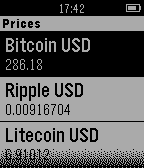
DailyShows a list of cryptocurrencys and their associated prices in USD.
 1
1Charm
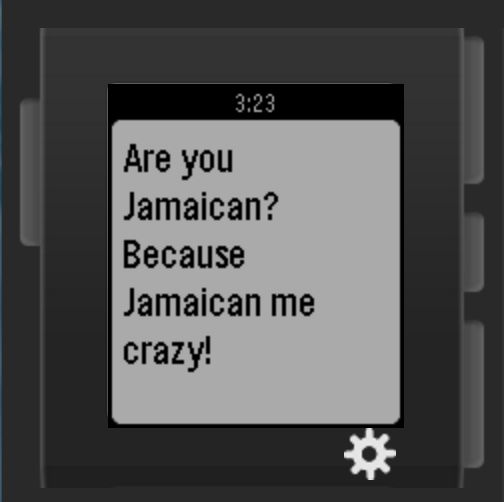
Tools & UtilitiesCharm helps you get out of those sticky situations through generating pick-up lines for you to use! With Charm, you'll never be lost for words ever again! Developed at HackTheNorth held in the University of Waterloo, Ontario, Canada by Patrick Sheldon Wee (patrickwee.co) and Joshua Paul Chan(thebattery.co).
 1
1TransLoc
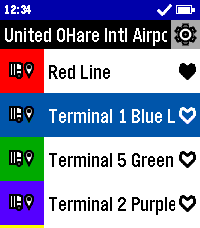
DailyCatch the bus in style with TransLoc for Pebble! With support for over one hundred transit agencies, this app can get you where you need to go. Don't second guess when your bus will arrive, find out now from the comfort of your wrist! This app is designed to be used in conjunction with either the official TransLoc mobile app, or a live tracker website based on TransLoc services. This app is meant to provide at-a-glance information, but is not meant for viewing a route on a map. Features Include: - At-a-Glance, Up-to-Date Route Information - Support for over 100+ Transit Agencies - Live Bus Distance Tracking* - Live Bus Capacity Tracking* - Location-Based Nearest Stop Information - Favorite Routes Potential Planned Features: - Add Original and Round Watch Support - Filter Running Routes from All Routes - Add Alerts Feature from Transit Agencies *For Buses with Tracking Support This project is open source! Check out the code yourself on GitHub! DISCLAIMER: THIS PROJECT IS NOT AFFILIATED WITH TRANSDEV, TRANSLOC, NOR ANY AGENCIES AVAILABLE WITHIN THE APP.
 1
1WeightTracker
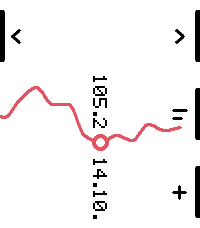
Tools & Utilities**WeightTracker – Simple weight tracking on your wrist.** Track your weight directly on your Pebble Time 2 with a clean, minimalist interface and a smooth, interactive chart. Whether you want to lose weight, gain weight, or simply monitor your progress, WeightTracker makes it easy to keep an eye on your measurements. **Features** - Add, edit, and delete weight measurements directly on your watch - Interactive chart with smooth scrolling through your entire measurement history - Adjustable chart zoom with 4–30 measurement intervals - Choose between measurement-based and calendar-based charts - Display weight, date, or BMI above and below the selected point - Support for kilograms, pounds, and stones - Intuitive touch-based weight entry - Store up to 100 measurements on your watch No accounts, no subscriptions, no unnecessary complications. Just your weight history, right on your wrist. **Designed for Pebble Time 2.** Based on the original WeightTracker by Viktor Csala. Adapted and redesigned for Pebble Time 2 by marukitano. **WeightTracker – Dein Gewicht immer im Blick.** Erfasse dein Gewicht direkt auf deiner Pebble Time 2 und verfolge deine Entwicklung in einem übersichtlichen, interaktiven Diagramm. Egal ob du abnehmen, zunehmen oder einfach dein Gewicht beobachten möchtest – WeightTracker macht es dir leicht. **Funktionen** - Messwerte direkt auf der Uhr hinzufügen, bearbeiten und löschen - Interaktives Diagramm mit Navigation durch den gesamten Messverlauf - Einstellbare Skalierung mit 4–30 Messintervallen - Diagrammdarstellung nach Messungen oder Kalendertagen - Datum, Gewicht oder BMI individuell oberhalb und unterhalb des Messpunkts anzeigen - Unterstützung für Kilogramm, Pfund und Stone - Intuitive Gewichtseingabe über den Touchscreen - Speicherung von bis zu 100 Messwerten Keine Benutzerkonten, keine Abonnements, kein unnötiger Schnickschnack. Einfach dein Gewichtsverlauf direkt am Handgelenk. **Entwickelt für die Pebble Time 2.** Basierend auf dem ursprünglichen WeightTracker von Viktor Csala. Für die Pebble Time 2 angepasst und neu gestaltet von marukitano.
 1
1Squire Plus
Tools & UtilitiesSquire Plus puts your own AI agent on your Pebble. Press SELECT, ask a question out loud, and your agent's answer appears on your watch. It connects to an agent you already run, such as Hermes or OpenClaw, through that agent's Telegram bot. Your phone talks to Telegram directly. There is no Squire Plus server in between. - Ask by voice, read the reply on your wrist. - Pick up your last conversation where you left off. - Recent and sample prompts one press away. - Optional location, so your agent can answer "what's nearby?". Off until you allow it. - Build targets: basalt, chalk, diorite, emery and gabbro. Android use is user-tested; iOS is unverified. **What you need** - Your own Telegram account. You sign in on the watch or in the app's settings. - An AI agent bot you've set up yourself in Hermes or OpenClaw. Squire Plus doesn't include an agent; it connects you to yours. - A Pebble phone app with full PebbleKit JS support. Cobble isn't supported. You don't need Telegram developer credentials to use this app. **Privacy** Your prompts, your agent's replies and (only if you allow it) your location travel through Telegram to the agent bot you choose, and are kept in that Telegram chat and by your agent's backend. Your Telegram sign-in stays on your phone. Squire Plus has no maintainer-operated relay or analytics server. Your selected bot and phone dictation service process data according to their own policies. **About** Squire Plus is an independently maintained fork of Squire by Justin Sunseri, which is based on Bobby by Katharine Berry. It is maintained by Andreas Varotsis and is not supported by the original authors. Unofficial; not affiliated with or endorsed by Telegram. Open source under Apache 2.0: https://github.com/AndreasThinks/pebble-squire Known limitation: Telegram and Squire Plus may both notify for replies. iOS has not been verified.
 1
1METAR
Tools & UtilitiesMETAR on your wrist
 1
1windsurf
Health & FitnessGet a webcam snapshot, current conditions and a 24 hour forecast of your favourite surfspot on your wrist
 1
1PTZ Remote
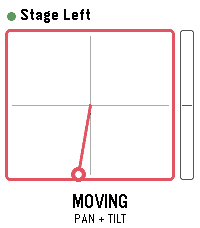
Tools & UtilitiesDrive Panasonic PTZ cameras from your wrist - with the buttons or by tilting the watch. PTZ Remote controls Panasonic AW-series cameras through their HTTP interface. Your phone does the talking, so the camera only has to be reachable on the same network. No extra software, no computer in between. Two ways to drive: - Buttons: up and down work the selected axis, a short press on select switches between TILT, PAN, ZOOM and FOCUS. - Motion: hold select as a dead-man switch and tilt your wrist. Zero is the posture you start from, so any comfortable arm position works - even with your elbow bent, in the dark next to the desk. Let go and the camera stops. Also included: presets with a confirmation before overwriting, up to 8 cameras to switch between, adjustable speed and tilt sensitivity, and an optional still image from the camera. That preview is not a live feed - the link to the watch carries about 1.6 KB per second, so one frame takes one to three seconds. Enough to check the framing, not to judge it. Nothing keeps moving unattended: the dead-man switch, a short arming delay so a tap does nothing, a watchdog on the phone that stops the camera if the watch goes quiet mid-move, and a stop when the app closes. Beta: camera control is tested against real hardware. The preview is not verified on a camera yet and is switched off by default; it needs JPEG transmission enabled in the camera's web menu. Runs on Pebble Time 2, Pebble Time and Pebble 2. Cameras are set up in the app settings on your phone. Vibe coded from start to store. That is the only reason it exists alongside a full time job. The app is free and has no ads. If you enjoy it, a coffee is much appreciated: https://buymeacoffee.com/SIDEffects
 1
1Entur Departures
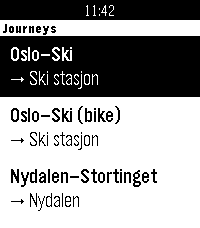
DailyGlance at your wrist, see your next train, and see which way it's going. Entur Departures shows live public transport departures for up to four journeys you set up on your phone, such as Oslo S – Ski. You don't choose a direction: the app checks which end of the journey you're nearer and shows departures from there. Near Oslo S you get trains to Ski, and near Ski you get trains back. Each departure shows: • The realtime departure time and a countdown in minutes • The line (R21, RE20, bus 31, ...) • The boarding track and the arrival track ("Spor 12 > 1"), so you can choose between two trains leaving at nearly the same time Per-journey options: • Big text: the countdown is huge and the track is bold, so you can read it at a glance while walking or cycling • Bike-friendly trains: a bike symbol on departures with step-free doors and room for a bike. You choose which lines or train numbers count, and it defaults to the Type 75 lines on Oslo – Ski. Works for trains, metro, trams, buses and ferries anywhere in Norway. In settings, type a stop name like "Nydalen" or "Bergen stasjon", or paste an NSR:StopPlace id. Boards are fetched in the background as soon as the app opens, so they're usually ready before you pick a journey. Privacy: your location is only used on your phone to decide the direction. It's never sent anywhere. Entur only receives the stops you set up. Unofficial app, not made or endorsed by Entur. Departure data comes from Entur's open APIs (NLOD licence). Built for Pebble Time 2.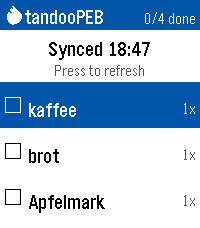 1
1tandooPEB
Tools & UtilitiesAnother shopping list for the Pebble Time 2. This one syncs with your Tandoor Recipie Manager (https://github.com/TandoorRecipes/recipes). Only one basic shopping list without catagories is supported. Note that the app was built with opencode using various models; code is AI-generated and should be reviewed before trusting it with data. Usage: - Enter your URL and API token in the settings page on your phone - View open shopping-list items on watch (name + amount) - SELECT an item to check it off; SELECT on "Sync now" row to sync - Long-press DOWN to dictate a new item (stored locally until next sync) - Long-press SELECT to undo the last toggle
 1
1HELO Remote
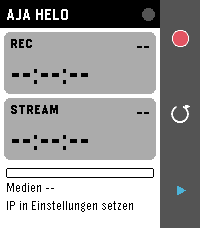
Tools & UtilitiesHELO Remote turns your Pebble into a remote control for the AJA HELO H.264 streaming and recording encoder. The Pebble app on your phone talks to the HELO over Wi-Fi through its REST API, so the watch shows the live status and sends commands with a single press. Features - Start and stop recording and streaming - Live status: recording and streaming state, run time, free media in percent, device temperature - Device name and connection dot in the header (green OK, red unreachable, yellow wrong password) - Stopping needs a second press within 4 seconds, so nothing stops by accident - Short vibration on start, double on stop, long on an error state (can be switched off) - Settings in the Pebble phone app: HELO address, HTTP port, password (only if user authentication is enabled on the HELO), polling interval 1 to 15 s - Seven languages (EN, DE, FR, ES, IT, PT, NL), following the watch language automatically - Optional timeline pin per recording and stream, with duration once stopped Controls - UP: start recording; while recording, press twice to stop - SELECT: refresh now (also cancels a pending stop) - DOWN: start or stop streaming (same confirmation) - BACK: exit Requirements: the phone must reach the HELO over HTTP, i.e. same network, no HTTPS. Works with HELO and HELO Plus. Runs on Pebble Time 2, Pebble Time and Pebble 2. Vibe coded from start to store. That is the only reason it exists alongside a full time job. The app is free and has no ads. If you enjoy it, a coffee is much appreciated: https://buymeacoffee.com/SIDEffects
 1
1Interval treadmill
Health & FitnessInterval on treadmill
 1
1Golf Stroke Counter
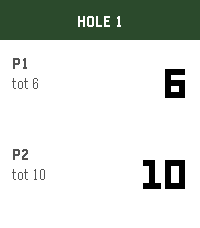
Tools & UtilitiesKeep score for two players on the course. Up adds a stroke for P1, Down for P2. Select goes to the next hole. Hold a button to undo. Scores save through all 18 holes.
 1
1RFD Hot Deals
NotificationsCanadian deals forum comes to your wrist! The Hot deals feed of Redflagdeals.com (No affiliation) vibe coded into a feed with comments intact you can check from your pebble watch. Built for the time 2 and very much a WIP still.
 1
1unWatch
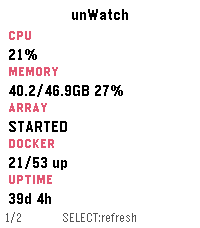
Tools & UtilitiesMonitor your unRAID server directly - nobody else sees your data! A Pebble Time 2 watchapp that shows live stats from an unRAID server on your local network, spread across several pages you can enable/disable in settings. Press SELECT to refresh, swipe or press UP/DOWN to change pages. Everything happens over your LAN. Your phone talks to the watch over Bluetooth, and the phone talks to Unraid's GraphQL API directly over Wi-Fi. Nothing goes over the internet. You can connect remotely using a service like Tailscale or other VPN. Pages Stats - CPU/memory %, array state, Docker running/total, uptime. Temperatures - CPU temp and the 3 hottest disks. Array - capacity (used/free/total in TB) and parity check status. Virtual machines - running/total count and up to 3 running VM names. UPS - status, battery %, load %, estimated runtime. Alerts - unread warning/alert/total counts from Unraid's notification center. Pages can be disabled as desired.