 10
10NewYorkTimes Whatchapp
DailyWith this awesome app you can scroll through the headlines and short descriptions of those headlines of The new york times.
 10
10Multiply
GamesA game similar to Cookie Clicker, but more simple. Race your friends to the highest score of cookies, buying multipliers on the way (Still In Beta).
 10
10Horario 5to TIC
Tools & Utilitieshola
 10
10Burh
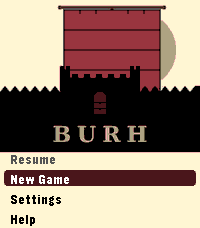
GamesLate ninth-century England. Norse fleets work your coasts every year. You have a small kingdom, a war band, and difficult choices to make before winter closes in. Most turns take thirty seconds. A campaign plays in short sessions across real days - the game waits when you are not watching. Your kingdom is a four-by-four grid of territories, roughly half settled when the campaign begins. Fortifications take years to build. The same people who farm your land fill your fyrd. Monasteries draw Norse attention. Ruins wait to be reclaimed. The Norse learn your settlements over time. A fleet that has raided your coast for two years knows things about your defences that a newly arrived one does not. A shattered war band cannot be quickly rebuilt. Battle outcomes are costly even when you win. Fyrd go home after a fight. Housecarl casualties stay lost until you recruit again. Procedurally generated maps. Four difficulty levels: Learn, Sheltered, Standard, Brutal. Campaign chronicle. For Pebble Time 2. *Burh* is Old English for a fortified town; pronounced "burr." *Note: Claude Code was used in the generation of this app.*
 10
10Pebble Buy
DailyBESCHREIBUNG DEUTSCH ---------------------------------------------------------------- Pebble Buy – die Einkaufsliste am Handgelenk. Leg dir eine Liste je Laden an – Aldi, Edeka, Baumarkt, Drogerie – und ruf im Laden einfach die passende auf. Abhaken geht mit einem Druck oder Tipp; der nächste Artikel rutscht direkt unter die Markierung. Erledigtes wandert durchgestrichen nach unten. Neue Artikel auf der Uhr: • Diktieren: „Milch, Eier und zwei Kilo Äpfel“ wird zu drei Artikeln – mit Menge • Anfangsbuchstaben wählen, dann aus Vorschlägen tippen (rund 300 Begriffe + deine eigenen) • „Häufig“: deine üblichen Artikel, was bald wieder fällig ist, steht oben Kategorien werden automatisch erkannt und farbig markiert. Funktioniert auch ohne Netz im Laden – Änderungen werden nachgeschickt. Bequem am Computer pflegen: pebble.ni3d.de/buy (Web-App mit Hell/Dunkel-Modus) – drei Tage gratis testen, mit Pro unbegrenzt. Gratis: 2 Listen, Web-App 3 Tage zum Testen. Pebble Buy Pro (einmalig 2.99 USD zzgl. MwSt.): Web-App unbegrenzt, bis zu 20 Listen, Listen mit dem Haushalt teilen (live abgeglichen – wer eingeladen wird, braucht kein Pro) und Statistik mit Kaufrhythmus und „bald wieder fällig“. Freischalten direkt auf der Uhr. Datenschutz: Konto mit E-Mail, gespeichert auf ni3d.de in Deutschland. Keine Werbung, keine Weitergabe; eine anonyme Artikel-Statistik gibt es nur, wenn du sie einschaltest. BESCHREIBUNG ENGLISCH ---------------------------------------------------------------- Pebble Buy – your shopping list on your wrist. Create one list per store and open the right one when you get there. Tick items off with one press or tap; the next item slides right under the cursor. Done items move to the bottom. Add items on the watch: • Dictate: "milk, eggs and two kilos of apples" becomes three items – with quantities • Pick the first letters, then choose from suggestions (built-in + your own items) • "Frequent": your usual items, the ones due soon on top Categories are detected automatically and color-coded. Works offline in the store – changes sync when you're back online. Edit on your computer at pebble.ni3d.de/buy (web app with light/dark mode) – free for three days, unlimited with Pro. Note: the built-in word list and dictation splitting are German-first. Free: 2 lists, web app for 3 days. Pebble Buy Pro (one-time 2.99 USD + VAT): unlimited web app, up to 20 lists, share lists with your household (live sync – invited people don't need Pro) and statistics with buying rhythm and "due soon". Unlock right on the watch. Privacy: account with e-mail, stored at ni3d.de in Germany. No ads, no data sharing; anonymous item statistics only if you opt in.
 10
10Durr2
Tools & UtilitiesVibrates every set interval. A direct clone of Durr watch from Skrekkøgle.
 10
10Find My iPhone
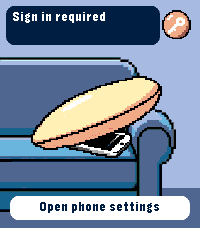
RemotesRing your iPhone directly from Pebble Time 2. Open the watch app, select an iPhone with the Up and Down buttons, then hold Select for 650 ms to send the sound command. The app runs through Pebble Core on your iPhone and talks directly to Apple over HTTPS. No separate companion app or intermediary server is required. Setup supports trusted-device two-factor authentication, multiple iPhones, automatic system language selection and clear states for offline devices, expired sessions and rate limits. Your password and two-factor code are used only during sign-in and are not stored. Apple session tokens remain in Pebble Core local storage on the paired iPhone. You can remove the saved session from the settings page at any time. Important: this is an independent, unofficial utility based on an undocumented Apple service. It is not affiliated with or endorsed by Apple. Apple may change the service without notice, which can temporarily or permanently stop sign-in or sound requests from working. Requires Pebble Time 2 (emery), Pebble Core on iPhone, an internet connection and an Apple Account with Find My enabled.
 10
10ChronoKit
Tools & UtilitiesStopwatch and Timer in one app
 10
10EyeRef
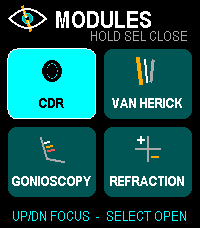
Health & FitnessOffline ophthalmology reference and refraction calculator for Pebble Time 2. Browse cup-to-disc ratio, Van Herick grading, gonioscopy landmarks and Shaffer grades, plus refraction tools for transposition, spherical equivalent, optical cross, retinoscopy working-distance correction, and vertex conversion. Designed for fast button and touch navigation and stores no patient data. Educational reference only; not a diagnostic or treatment system.
 10
10Wrist Glow
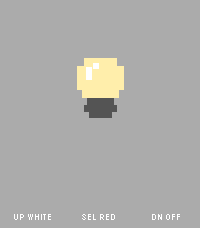
Tools & UtilitiesWrist Glow turns your Pebble Time 2 into a simple screen light when you need a tiny bit of glow in the dark. Choose from three modes for each of the physical buttons: - White for a bright neutral screen, keeps on backlight - Red for a less intrusive red screen, keeps on backlight - Off for a black screen with normal automatic backlight behavior The app is intentionally watch-only and has no phone companion, networking, animations, or background activity. A small bulb and button guide remain visible so the app never feels like an unexplained blank screen. The red mode uses red display pixels illuminated by the normal backlight. It does not change the physical backlight color. Pebble does not expose a documented brightness control to apps, so White and Red use the watch's normal backlight level.
 10
105/10/15
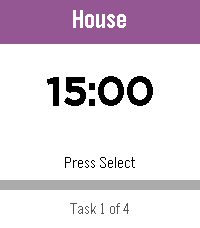
Daily5/10/15 is a highly configurable interval timer for Pebble. Starts with four ready-made lists — Work Loop, Long Loop, Quick Loop, and Morning Routine. Full add, delete, and edit support means build your own! The watch counts down and vibrates when it’s time to switch. Loop lists restart automatically; one-shot lists announce when you’re done. State persists across app exits, so you can check your watchface without losing your place. • Select — play/pause • Up/Down — skip tasks • Long Select — reset current task • Long Down — back to the List of Lists Named in tribute to the classic iPhone app 30/30.
 10
10Egg Timer
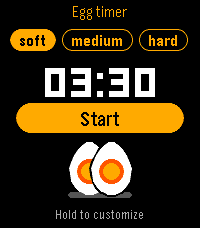
Tools & UtilitiesGet the perfect breakfast egg - soft, medium or hard - right from your wrist. - Pick soft, medium or hard with Up/Down, press Select to start, pause or resume. - Hold Select to adjust a cooking time (+/-10 s), or set them in the app settings. - Leave the app: the timer keeps running and the watch wakes up when your eggs are ready. - Vibrations when it's done, and a hen cackles on watches with a speaker (Pebble Time 2). Can be turned off, silent during Quiet Time. - The yolk on screen matches your cooking: runny, creamy or firm. - Available in English, French, German, Spanish, Italian, Portuguese, Dutch, Swedish, Danish, Norwegian and Finnish. Free and open source. If you enjoy it, you can support development from the settings page. Hen sound: 'Chickens demanding food' by alys (public domain).
 10
10Pocket Bowling
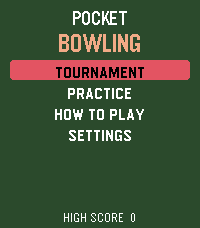
GamesPocket Bowling brings a complete ten-pin bowling experience to your wrist. Aim your shot, time the accuracy and power meters, and send the ball down the lane with realistic pin-to-pin action. Play a quick Practice game across five difficulty levels or enter a five-match Tournament against CPU opponents. Follow every frame with live score tables, including strikes, spares, bonuses, and running totals. Climb the tournament ranks and build your ball collection. Every tournament victory unlocks a new ball color. Can you defeat the final opponent to claim the prestigious Golden Ball? Features: • Complete ten-frame bowling scoring • Practice mode with five difficulty levels • Five-match Tournament mode • Live player and opponent scorecards • Random accuracy and power sweet spots • Gutter balls and interactive pin collisions • Unlockable and selectable ball colors • Win the tournament to claim the Golden Ball • Haptic feedback and built-in instructions • Support for every modern Pebble platform One complete Practice game is included free. Unlock the full game for $1.99 with a one-time KiezelPay purchase. No subscription is required. Gameplay works offline. An internet connection through your paired phone is only needed for purchasing, restoring, or periodically verifying the full-game license.
 10
10Toothbrush Timer
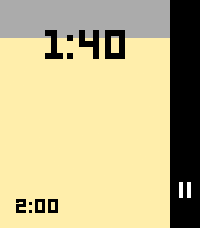
Tools & UtilitiesA simple timer for brushing your teeth, built for the Pebble watch. The app runs two back-to-back timers: a 2-minute timer for brushing your teeth, and a 30-minute timer before you eat. During the 2-minute timer, the watch vibrates every 30 seconds to prompt you to switch quadrants, then auto-advances to the 30-minute timer when finished.
 10
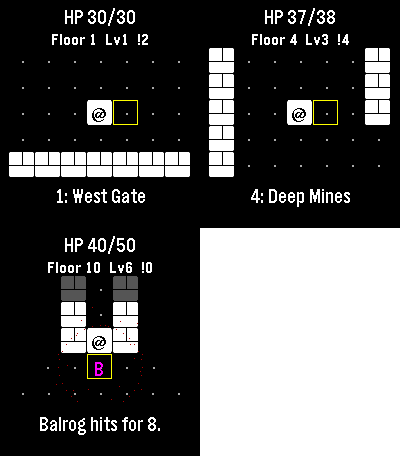
10Micro Moria
GamesI lost countless hours as a kid to a text Rogue derivative also themed after Moria, and I’m already zoned into playing it on the watch. Descend ten floors through Moria, collect treasure and equipment, and face the Balrog at the Bridge of Khazad-dum. Goblins pursue you, orc archers prepare ranged attacks, and cave trolls strike hard. Bump an enemy to fight. Play a few turns and come back later: the watch automatically saves your floor, position, enemies, health and gear. Gold and purchased equipment survive death or a return to camp. Spend gold between expeditions on blades, mail and lembas packs. Defeat the Balrog and take the final exit to unlock New Game+, up to five harder tiers. Up and Down turn; Select steps. Back opens healing, waiting and camp. Step onto stairs to choose whether to descend. Touch also moves you. No timer, account or connection required. For Pebble Time 2 and Round 2. Touch requires firmware 4.33.2; button controls remain available. By Luke Steuber.