 14
14Shot & Recoil Counter
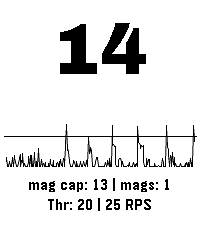
Tools & UtilitiesThis app uses the accelerometer to measure recoil (as spikes in acceleration) in order to count the number of shots taken in sports shooting. Settings: - Color Theme (default: Dark Mono) - Recoil threshold, set this to adjust for different calibers or other physical activities - Maximum rate of fire, set this to suppresses events happening after an initial detection to avoid false positives. (default: 3 Rounds Per Second) - Show Mags, toggle to display how many magazines have been spent (default: on) - Debug Energy Overlay, enable this to show the spikes relative to the current threshold setting, for easy adjusting. Usage instructions: - Short press up or down to change the threshold setting - Long press up or down to change magazine capacity - Short press select to reset count - Long press select to cycle through the color themes NOT A SAFETY DEVICE THE SOFTWARE IS PROVIDED FOR ENTERTAINMENT, TRAINING, AND/OR DATA RECORDING PURPOSES ONLY. IT DOES NOT DETECT OR CONFIRM ANY FIREARM SAFETY CONDITION AND DOES NOT PROVIDE ANY SAFETY GUARANTEE. THE SOFTWARE’S OUTPUT IS NOT A RELIABLE INDICATOR OF WHETHER A FIREARM IS LOADED, UNLOADED, OR SAFE TO HANDLE. THE SOFTWARE MAY BE INACCURATE OR MAY FAIL TO COUNT PROPERLY DUE TO SENSOR LIMITATIONS, CALIBRATION, USER HANDLING, WEAR OR ORIENTATION OF THE DEVICE, ENVIRONMENTAL CONDITIONS, OR OTHER FACTORS. USERS MUST NOT RELY ON THE SOFTWARE’S OUTPUT TO MAKE DECISIONS REGARDING LOADING, UNLOADING, FIRING, OR SAFE HANDLING PRACTICES. IN NO EVENT SHALL THE COPYRIGHT HOLDER OR CONTRIBUTORS BE LIABLE FOR ANY PERSONAL INJURY, BODILY INJURY, DEATH, OR PROPERTY DAMAGE ARISING OUT OF OR RELATING TO THE USE OF OR RELIANCE ON THE SOFTWARE OR ITS OUTPUT, EVEN IF ADVISED OF THE POSSIBILITY OF SUCH DAMAGES, AND EVEN IN CASES ALLEGING NEGLIGENCE, STRICT LIABILITY, OR OTHER TORT OR LEGAL THEORIES TO THE MAXIMUM EXTENT PERMITTED BY LAW.
 14
14Departures
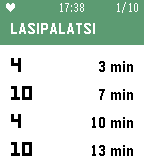
Tools & UtilitiesThis Pebble app answers the question: when does my tram or bus leave? Departures displays the next four tram and bus departures for up to 10 stops. It works in all of Finland and Estonia, including Helsinki, Tampere, Turku, and Tallinn. By default, Departures will show the ten nearest stops based on your location. Add stops to your Favorites list to always display them at the top of the list. See the stop code (e.g. H1234, visible in the HSL/HRT route planner and on tram and bus stop signs) to make sure you're adding the right stop. Favorite stops are saved in the Pebble app on your phone, so your favorites will always be syncronized no matter which Pebble you decide to wear. On color Pebble watches, bus stops are colored blue, and tram stops are colored green. On Pebble Classic and Pebble Steel watches, route numbers (e.g. "1T" and "21N") are simplified to just numbers, due to font limitations on those watches.
 14
14SG Traffic Cameras
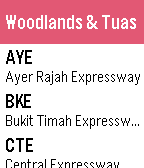
DailySG Cameras allows you to view the latest traffic conditions along expressways and key locations in Singapore. Features - Provides 78 cameras of all major expressways in Singapore - Realtime information - Optimized camera images for better viewing in Pebble Time Traffic information are provided by https://www.mytransport.sg/content/mytransport/home/dataMall.html
 14
14PebbleBeans
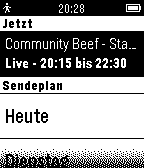
DailyInoffizielle RockBeansTV Sendeplan App Danke an die Community und an die Rocket Beans www.rocketbeans.tv
 14
142 Player Pong
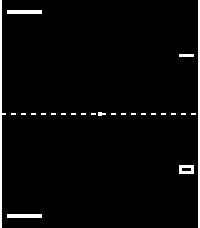
GamesTwo-player Pong on your wrist. Hold you wrist out and go head-to-head whether your right handed or left handed. Player 1 on the down button, Player 2 on the up button. Paddles naturally fall down while holding your button makes it go up. Press select to serve. Two play styles: Relaxed keeps the ball at a steady pace, Classic speeds it up with every hit just like the original. Switch between right handed and left handed orientations from the phone settings. Scores reset each launch. Stuck waiting for something with a friend? Launch into a game anytime anywhere! Hope you guys enjoy!
 14
14Wrist Dungeon
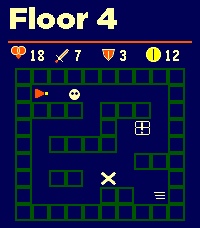
GamesWrist Dungeon is a top-down dungeon crawler and roguelite RPG built for Pebble. Explore changing room complexes, collect treasure, evade patrolling enemies and fight your way through 30 increasingly dangerous floors. Monsters use line-of-sight detection and will pursue you—if they catch you, they attack first. Combat combines your Attack or Defence stat with a dice roll. Every clash displays both calculations and the final totals. Attack, survive the counterattack or flee and risk taking one last hit. Discover weapons, armor and potions as you descend. Compare new equipment with your current gear, equip it immediately, carry it in your six-slot inventory or leave it behind. Drop unwanted items and visit merchants to buy and sell gear using gold. Every run makes you stronger. Earn Shards and Legacy progress, purchase permanent upgrades, unlock new heroes and preserve an heirloom for your next descent. Features: • 30 progressively harder dungeon floors • 20 enemy types, including skeletons, bats, mimics, trolls and drakes • Major bosses on Floors 10, 20 and 30 • Elite encounters and varied room types • Patrolling enemies with line-of-sight detection and pursuit • Dice-based combat with visible Attack and Defence totals • Weapons, armor, healing and stat-boosting potions • Equipment comparisons and six-slot inventory • Gold, treasure chests and merchants • Permanent Shard upgrades and Legacy progression • Three unlockable heroes with different strengths • Heirlooms carried into future runs • Unlockable Depth II for a greater challenge • Optional hit, miss, victory and defeat sounds • Optional haptic feedback • Support for rectangular, round, color and monochrome Pebble watches Floors 1–5 are free to play. A one-time KiezelPay purchase unlocks all 30 floors, every boss, advanced heroes, heirlooms and Depth II. No subscription. More to come...
 14
14Rock Timer
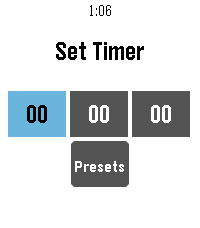
Tools & Utilities• Fork of the official Pebble timer app • Full touchscreen support — inertial drag-to-scroll, long-press / double-tap to select • Configurable timer presets, edited from your phone • Choose your touch activation: long-press, double-tap, or both • Configurable snooze length and alarm vibration • Voice-named timers • Delete confirmation • Developer: snrkl-labs • Built 100% with AI.
 14
14Meu Ponto
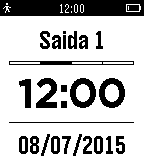
Tools & UtilitiesMeu Ponto é um aplicativo para controlar os seus horários de entrada e saída do trabalho e saldo total de horas. Meu Ponto para o Pebble permite que você registre os horários na sua conta do Meu Ponto, em tempo real, diretamente do seu Pebble. Você poderá editar e ajustar tudo através do Meu Ponto em seu browser caso necessário. Antes de usar o Meu Ponto para o Pebble, você precisa: - Registrar-se no Meu Ponto em: http://meu-ponto.appspot.com/ - Acessar o menu "Configurações" no website - Selecionar a opção "Integração" e confirmar - Copiar as informações fornecidas (User e Token) - Abrir "Settings" do Meu Ponto no Aplicativo Pebble do seu telefone - Inserir as informações copiadas e salvar Controles: Botão UP - clique curto: muda o tipo de registro - clique longo: envia um registro usando os dados da tela Botão SELECT - clique curto: volta 1 minuto - clique longo: muda para a hora/minuto atual Botão DOWN - clique curto: volta 1 dia - clique longo: muda para a data atual
 14
14HIT-TrainingHelper
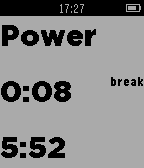
Health & FitnessThis app helps you while jogging or cycling. You can determine how long the power phases and the normal phase should be . You decide whether it should vibrate only at the beginning and end of the power phase or during the whole power phase ever . This App dosn't need the Phone
 14
14JokesTime
Dailytest
 14
14AI Assistant
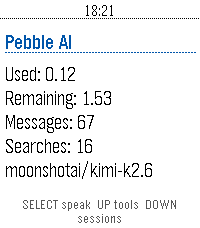
Tools & Utilities**THIS IS A VIBE CODED PROJECT, THERE IS BUGS AND ROUGH EDGES.** **THIS HAS ONLY BEEN TESTED ON THE Pebble Time 2, AND HAS BEEN OPENED ON THE Pebble Time.** # Info I would probably recommend you to just use Bobby or Wrist AI. Unless you have tried them and don't vibe with them. Also the code for this is on GitHub, if you want to modify or critique my (GPT-5.6-sol's) code. You are also free to contact me on either GitHub though and issue or by pressing the `CONTACT DEVELOPER` button at the bottom of this page. I may be a bit slow when it comes to answering, sorry in advance. If you want to know everything about the app and what tools it has, where data is send, stuff like that, head over to the GitHub (`SOURCE LINK` at the bottom of the page) and check out the README.md. # Controls ## Home Screen - SELECT: Start voice dictation. - UP: Open tool settings. - DOWN: Open saved sessions. - BACK: Exit the app. - Hold SELECT: Clear the current conversation. - Hold UP: Open tool settings from any screen except a choice prompt. - Hold DOWN: Open saved sessions from any screen except a choice prompt. ## Conversation Screen - UP / DOWN: Scroll through the conversation. - SELECT: Dictate another prompt. - BACK: Cancel an active request. If no request is active, return to the home screen. - Hold SELECT: Clear the conversation and start a new session. ## Tool Settings - UP / DOWN: Move between tools. - SELECT: Enable or disable the selected tool. - BACK: Return to the previous screen. ## Saved Sessions - UP / DOWN: Scroll through saved conversations. - SELECT: Start a new dictated prompt. - BACK: Return to the previous screen. ## Choice Prompts - UP / DOWN: Move between choices. - SELECT: Confirm the highlighted choice. - Select Say your own: Dictate a custom answer. - BACK: Cancel the choice prompt. ## Touchscreen Models - Swipe vertically: Scroll through the current screen. # Vibrations ## Short Pulse - When the first text of an assistant response arrives. - When you clear the current conversation. - When a tool setting is successfully toggled on or off. ## Double Pulse - When an assistant response finishes. - When the phone reports an error. - When a prompt, choice answer, cancellation, or other AppMessage fails to send. - When an incoming message is dropped during an active request. ## Normal (if things go well) 1. A short pulse when the answer begins arriving. (You can now begin reading) 2. A double pulse when the complete answer has arrived.
 14
14Chuck Norris Jokes
GamesA watchapp that loads random Chuck Norris jokes from chucknorris.io.
 14
14DateFact
DailyDateFact shows a fact about an historical event that occurred on the current day in history. Look forward to learning about something new every day!
 14
14Slice It!
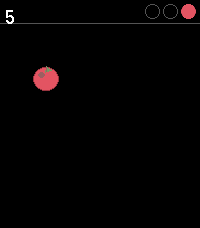
GamesSlice It! is a fast-paced fruit-slicing game for Pebble Time 2. Swipe across the screen to slice flying fruits and rack up your score. But watch out - black bombs are mixed in, and slicing one costs you a life. Miss three fruits and it's game over. The longer you survive, the faster and trickier things get: fruits spawn more frequently, waves of two or three appear at once, and bombs become more common. Controls Swipe to slice · SELECT to restart after game over Requires touch input (Pebble Time 2). As I do not own a Pebble Time 2 (yet), please test it and report if it is working. :) It's like a revival of Fruit Ninja. :)
 14
14Vertrektijden
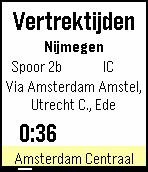
DailyVertrektijden Dutch: Een app gebruikt om de vertrektijden van alle Nederlandse stations te kunnen zien vanaf je pols! Up: Bekijk de volgende trein Select: Refresh (gebeurt ook automatisch elke 15 seconde) Down: Bekijk vorige trein Select lang ingedrukt: Selecteer station Voor vragen, suggesties, bugs of opmerkingen kunt u mij een email sturen op [email protected] ! Deze app word mogelijk gemaakt door de API van rijdendetreinen.nl English: An app used to easily view the departure times of dutch trains, right on your wrist! Up: View next train Select: Refresh (also auto-refreshes every 15 seconds) Down: View previous train Long-press select: Select station If you have any questions, suggestions, bugs, or comments, please send me an email at [email protected] ! This app is powered by the rijdendetreinen.nl API!