 333
333Loc8Pkmn
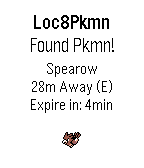
NotificationsPokemon Go, Pokemon finder, locate Pokemon close to you without the Pokemon Go app. 31/7/16 - Servers Down, Working on Fix! Have a feature request, please contact me! Love my app? Please donate: http://bit.ly/2awtWST How does it work? Simply leave the Pebble application running and when you are within 35 meters (or notification distance set in settings) of a Pokemon your Pebble will vibrate and display the nearby Pokemon information. If no Pokemon are within the notification distance a list of Pokemon nearby will be displayed. Q. Searching... is displayed with no nearby Pokemon? A. Servers could be overloaded, or you are in an area with no nearby Pokemon. Q. Do I need to run the Pokemon Go application on my phone at the same time? A. No, the Pebble application works independently of the Pokemon Go application on your phone. == TODO/IMPROVEMENTS == 1. Additional language programming for full multi language capability. Not affiliated with Niantic or Nintendo. All trademarks property of their respective owners.
 332
332You Cannot Go Back!
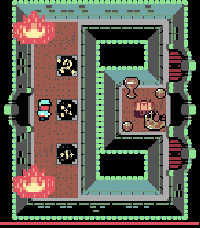
GamesA fiendish challenge awaits you, an adventure of puzzle solving, memory and skill. Just remember dungeoneer - the only way is onwards; you cannot go back! Version 2 is now out for Time 2, Round 2 and (coming for the first time) to B&W Pebbles (exc. Classic) with twice the number of dungeon chambers than the original! Asset credits: http://opengameart.org/users/buch Michele "Buch" Bucelli (tile set sponsored by Abram Connelly) Promotional Art: Frank Martinez Jr. http://opengameart.org/users/clint-bellanger http://opengameart.org/content/blocky-animated-classic-hero-edit
 331
331Shows
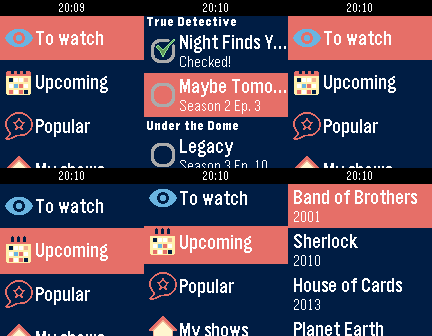
DailyKeep track of your TV shows on your Pebble! With this watchapp you can view what episodes you have to watch and what's coming out in the next days. On your timeline, too! The watchapp needs to access your Trakt.tv account. Don't worry, you can create one within the configuration page. Twitter: @youtux
 328
328Pomodoro
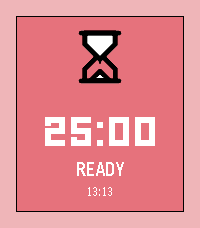
Tools & UtilitiesStay focused, one tomato at a time! Pomodoro turns your Pebble into a tiny productivity coach. Work for 25 minutes (or set the time you prefer), earn your break, and repeat until you've crushed your to-do list. A satisfying progress ring fills up as you go, gentle vibes every 4 minutes keep you on track, and the whole thing runs right on your wrist with zero phone needed. Adjust your session length, pause when life interrupts, and always know what time it is. Works on every Pebble ever made. Now stop scrolling and go focus!
 327
327PCal
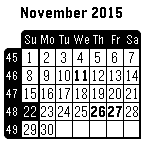
Tools & UtilitiesUniversal Calendar, configuration screen available from the Phone Pebble App, allowing to set language, display of week numbers, first day of week and public holidays for some countries. Available languages : Dutch, English, French, German, Italian, Spanish or Swedish.
 326
326Pebble Communicator
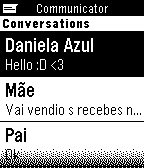
Tools & UtilitiesPebble Communicator is an app built so you can read and send SMS without taking out your phone. Isn't that the reason we all have a smartwatch? (Well, that and because it looks really cool.) With Pebble Communicator you can even type your own SMS using Tertiary Text, an input method by vgmoose which allows you to write using only Pebble's three buttons.
 324
324Buienalarm
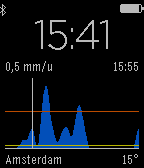
DailyBuienalarm for Pebble! A fully functioning version of Buienalarm for your wrist. See rain showers before you get wet. Works in the Netherlands, Germany and Belgium only. Compatible with Android and iOS.
 323
323Grill Timer
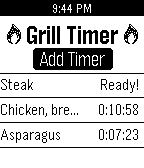
Tools & UtilitiesWith over 100 pre-programmed foods, Grill Timer helps you track your food on the grill. Know how long to cook, at what temperature, when to flip, and when it's ready! Grill perfect every time!
 323
323Tea's Ready
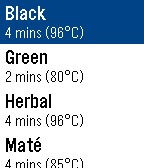
Tools & UtilitiesEver forgot to take the tea bag out of your cup? Wondered what temperature the water should be at for green tea? What is the recommended steeping time for rooibos tea? Well this is your day, I have the perfect solution for you. And now thanks to Tea's Ready (beta) feature and Newton's law of cooling, you can even be reminded to drink the tea once it cooled down to the temperature you like! Features: * Animated tea cup * Tea's Ready (beta) * Possibility to choose your preferred steeping time * Large selection of tea with possibility to hide unused options * Recommended water temperature * Timer continues in the background
 320
320AeroTracker
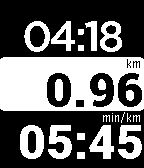
Health & FitnessAeroTracker is a flexible and independent tracker that shows run time, distance, current and average speed/pace, splits, and elevation, no matter what tracking app you are using on your phone. For heart rate monitor support, look for AeroTrackerPro. AeroTrackerPro syncs with RunKeeper, Strava and Dailymile. Visit website below for user guide.
 318
318Find My Pebble
Tools & UtilitiesYou're in Bluetooth range, but you just. can't. find. your Pebble? Use "Find My Pebble"! Simply keep the app in your Locker, then load it by tapping on the settings gear icon whenever you need to find your watch. The watch will vibrate and blink on and off for up to one minute while you look for it. (In order to preserve battery, the blinking and vibrations stop after one minute.)
 317
317Feed the Timeline
DailyThis App allows you to subscribe to various RSS Feeds, the headlines from these feeds will populate your timeline, so you can catch up on today headlines.
 312
312My Calendar
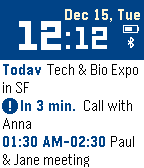
DailyDisplays 3 nearest events from your Google calendar - just login to your Google calendar in the app settings and you are ready to go. No companion app required. Works with iOS and Android. All features: - shows 3 calendars event - indication of upcoming event (in less than 10 minutes) - digital clock - current date - battery charge and bluetooth indication Controls: SELECT button - fetch events immediately.
 311
311LGRemote
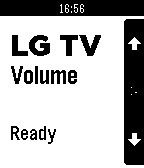
RemotesControl your LG TV from your wrist with this remote-control app. Select button switches between Channel / Volume / Smart Mouse modes. Long-select for power on/off. Feel free to donate: - PayPal: http://www.paypal.com/cgi-bin/webscr?cmd=_donations&business=erik%40csw%2enl&lc
 311
311Readebble
DailyA multiple source RSS reader for Pebble that allows you to read the headlines of your favorite feeds and a summarized story for each headline. *NEW: Pocket support. Add items to your Pocket by simply holding the select button. Add any kind of RSS feeds such as news, reddit, emergency feeds, GitHub news feed, Pebble blog, etc. Thanks to John La Motta for the idea and graphics!