 5
5Next NASCAR Race
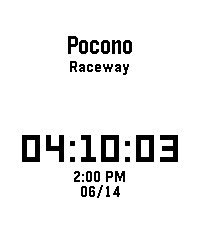
Tools & UtilitiesThis app shows you when and where the next NASCAR Cup Series race is in your local time. In addition, it also features a dd:hh:mm countdown until the next race. I made this app for myself because I wanted a super basic app that just shows the place, time, and date of the next NASCAR Cup Series race. Note: Race times and dates may change. Delays and schedule changes will not appear in the app.
 3
3Når går bussen
DailyFor eget bruk. Viser avganger fra et stopp i Bergen
 10
10FastWasp
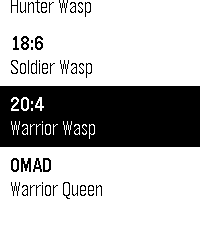
Health & FitnessFastWasp is a free, native intermittent-fasting tracker for the new Pebble devices from Core Devices. Everything runs on the watch - no companion app, no phone, no accounts, no internet. 6 fasting programs built in: - 12:12 - Worker Wasp - 14:10 - Scouting Wasp - 16:8 - Hunter Wasp - 18:6 - Soldier Wasp - 20:4 - Warrior Wasp - OMAD - Warrior Queen Glance-first UI. The main screen always shows a circular progress ring filling toward your target, a large HH:MM:SS countdown, and - once you pass the target - an OVERTIME badge with an upward counter. No hunting through menus to see where you are. Eating window tracking. After you stop a fast, FastWasp immediately starts counting down your eating window. A wrist alert fires when it closes. OMAD mode. Tracks elapsed time since your last meal with a thin progress bar toward the 23-hour target. Wrist alerts. A wakeup is scheduled at your target time so the watch vibrates and shows a banner even if you close the app. Long pulse for fast complete, double pulse for eating window closed. Stats. Total fasts completed, average fast length, longest fast, and total overtime accumulated - all on one scrollable screen. Press Up to open from any state. 100% offline. All data lives in watch persistent storage. Nothing leaves your wrist. Supports Core 2 Duo (diorite, 144x168 B&W) and Pebble Time 2 (emery, 200x228 colour).
 10
10Garden Buddy
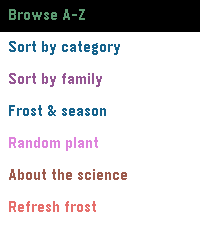
Tools & UtilitiesAn app that can tell you everything you need to know about as many plants as possible. This will tell you plant locations, do's and don't, watering and sunlight information in a nice compact way for a large arrangement of plants. It allows for editing and adding of your own as well as easy sorting methods to find the right plant.
 70
70PebbleTalk
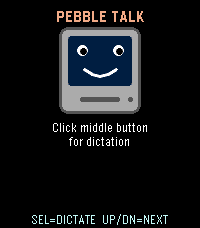
Tools & UtilitiesA tiny retro speech synthesizer that talks through the Pebble Time 2 speaker. Fully algorithmic MacinTalk-style formant synthesis: no samples, no internet, just math. Press Select to hear the classic greeting, or use dictation to make it say anything you want in a charming 1984 robot voice.
 10
10GymClock
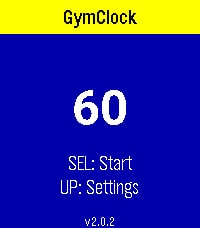
Health & FitnessGymClock — your interval & HIIT timer on the wrist. Build a circuit from your own named exercises, set the work time, rest time and number of rounds, then start training without ever touching your phone. GymClock counts every interval down for you and uses the watch's vibration to keep your eyes off the screen — so you can focus on the workout. Features - Background run & resume - Independent on the phone - Custom routines: name each exercise and set work, rest and round count - Large, glanceable display — current exercise, big countdown, round progress (e.g. "2/5 Lap 3") and a preview of what's next - Color-coded phases: work and rest are instantly distinguishable (high-contrast on black-and-white watches too) - Vibration cues: a buzz on the final seconds, the half-way mark, and the end of every interval — plus a long buzz when the workout is done - Set rest to 0 for non-stop circuits - Live heart rate (BPM) on watches with a heart-rate sensor - Skip forward, skip back, pause and reset, all from the buttons - Settings stay on the watch — once configured, it works fully offline Controls Select: start / pause Hold Select: stop & reset Hold Up: previous exercise Hold Down: next exercise
 42
42F1 Calendar
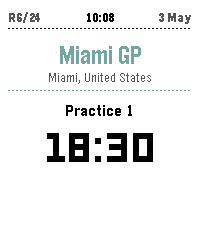
Tools & UtilitiesBecause checking your phone during a race is basically a time penalty. F1 Calendar shows the full season on your wrist — upcoming sessions with countdown times, live positions and gaps when the lights go out, and podium results the moment the chequered flag drops. Cancelled races get the CNCL badge of shame. No login. No API key. No excuses for missing the start. Up/Down to scroll races. Select for details. Long-press Select to refresh.
![ChatFace Chinese [Peek]](https://assets.repebble.com/screenshots/242f8997b08b453e881e9d89/emery/a522d136-2fb0-4af8-9d00-99308e3c9fb6.png) 5
5ChatFace Chinese [Peek]
DailyThe companion to ChatFace Chinese. Open it to reveal the pinyin pronunciation and English translation of the current phrase: Right on your wrist. Long phrases are automatically chunked into readable sections. Press Select to step through them, Up/Down to switch between the three most recent messages. Pinyin with correct tone marks Full English translation Automatic chunking for long phrases Smooth slide-in animation By Malte Makes
 14
14QR Viewer
DailyA lightweight Pebble app that displays a static QR code directly on your watch screen. Ideal for quick access to payment codes, attendance check-ins, digital IDs, or any custom information. Simply configure the QR content once and keep it available on your wrist at all times, with support for customizable data up to the maximum character limit.
 2
2Run Tracker
Health & Fitnesstest app
 13
13PebbleSky Detail
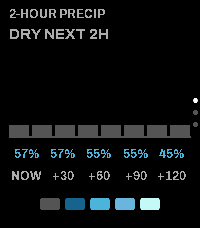
Tools & UtilitiesCompanion app for the PebbleSky watchface. Three screens, cycled with the Up and Down buttons: - 2-hour precipitation: bar timeline, rain countdown, and precipitation probability - 5-day forecast: condition icon with daily high and low - Now: location, temperature, feels-like, wind, and humidity Opens from the watchface via Quick Launch. Configurable: - Weather source: Open-Meteo (no API key) or Tomorrow.io (API key) - Temperature units (°F / °C) - Accent and warning colors
 21
21Mindful Practices
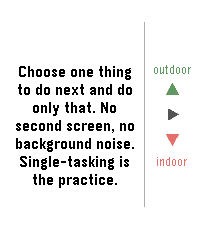
DailyAn app to remind you to slow down and smell the flowers. This app comes will many prompts that can help you be a little more mindful each day and even set reminders if you'd like to get in the habit of enjoying this odd life we're in.
 15
15Conversation Deck
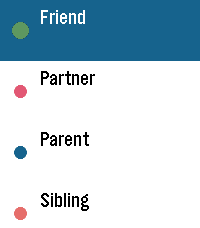
DailyThis app gives creative conversation starts based on who you're talking to. It allows for more vague or specific topics and has enough randomness that it should be difficult to see the same conversation twice.
 19
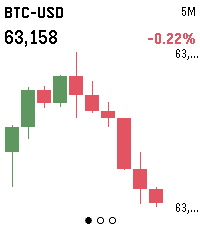
19Price Charts
DailyLive candlestick charts for stocks, futures, crypto and FX, right on your wrist. Three screens — 5-minute, 1-hour and 1-day intervals — each showing the last 10 candles, auto-scaled to fit the display. Build a watchlist of any Yahoo Finance symbols (AAPL, ES=F, BTC-USD, EURUSD=X) in Settings, then press SELECT to flip between them and UP/DOWN to change the timeframe. Hold SELECT to refresh. Crypto data comes from Binance; stocks, futures and FX from Yahoo Finance. No account or API key required.
 62
62Wristcord
Tools & UtilitiesDiscord on your wrist! Browse your servers, follow chats, and send a reply with your voice, right from Pebble Time 2. Selfbotting is against Discord ToS, by using Wristcord you accept all responsibility.