 13
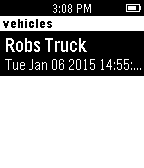
13Mojio spot
Tools & UtilitiesFind the distance, walking directions, fuel level, to your moj.io enabled vehicle all from your watch!
 112
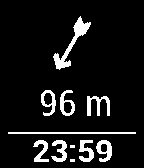
112Navigation / Geocaching for Pebble
Tools & UtilitiesThis app shows you distance and direction to the navigation point or geocache on your pebble! You must also install Android app on your phone, then you can use C:Geo / Geocaching / Locus app to select the location or geocache you want! It supports Pebble compass!
 15
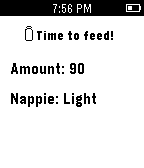
15Milktime
Tools & UtilitiesMilktime is good for mum and dad who have a newborn or an infant. This app alert you the next time your baby has milk, the amount and the potential of soiled nappie base on previous entries. Milktime runs everything on pebble watch so there is no need for phone app. Note: This app was built in a couple of hours when my baby boy asleep so It probably has a whole bunch of bugs unfortunately.
 13
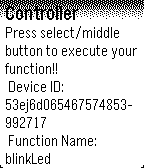
13Spark Core Control
RemotesThis app lets you easily control a Spark Core device with your Pebble Smartwatch. Go into the app settings and enter your Core ID, Token and function name.
 74
74pTerm
Tools & UtilitiesThe first Pebble Command-Line Interface! Updated with new commands! Show of your tech skills with the first pebble CLI. Current commands: clr pwd date bt pwr whoami light [on/off] vibe [long/short] theme [light/dark] font [a/b/c/d/e] Now with Blinking Prompt! Feature Requests Temporarily Suspended (Work and School) Sorry :( Send Bug Reports to my Email and I will address them ASAP
 3
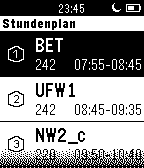
3PebbleUntis
Dailya mini version of WebUntis for Pebble
 35
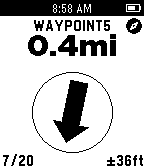
35Skink GPS
Tools & UtilitiesSkink GPS turns your Pebble into a simple but useful GPSr. Featuring a GPS satellite display, tracking screen, waypoint navigation and a trip computer. A full-featured companion app allows you to export recorded tracks as KML or GPX files, import waypoints and geocaches in GPX or LOC formats and export waypoints in GPX format. It also works with geocaching apps which support the “radar” intent.
 101
101COUNTER
Tools & UtilitiesA simple counter to keep track of things. 30 likes for a watchface.
 390
390SimonRemote
RemotesSimonRemote allows a Pebble to control iTunes, Spotify, PowerPoint, and Keynote, and the keyboard on a user's Mac computer. It even allows multiple Pebbles to control the same computer...great for parties! NOTE: Must install Mac application. Find directions on website linked below.
 100
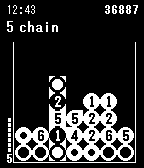
100Orbtime
GamesOrbtime is a Drop7 / Chainfactor clone for the Pebble with a twist: time orbs. Make chains while time orbs representing the current time change their numbers in real time.
 37
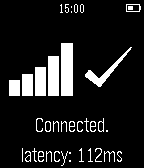
37Pingly
Tools & UtilitiesInstantly check if you're connected to the Internet from your Pebble! Pingly pings Google and tells you if you're connected to or disconnected from the Internet. It provides latency data to tell you if you have a strong or weak connection.
 11
11AccView
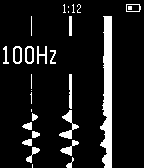
Tools & UtilitiesShows continuous vertical graphs for each of the 3 accelerometer axes. Use up/down to adjust sampling rate, press select to magnify the amplitude.
 1.6K
1.6KMulti Timer
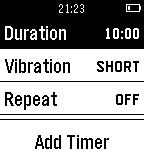
Tools & UtilitiesMulti Timer is simply the best timer and stopwatch app for Pebble. You can create as many independent timers and stopwatches as you need. With the release of 3.0, timers will now launch the app when they finish, meaning you can quit Multi Timer while timers are running and still be notified.
 16
16Caffeine Counter
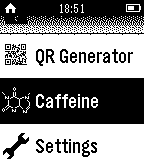
Tools & Utilities+++ Now supports German +++ English: Measure your daily caffeine consumption and calculate how much caffeine is in your blood. How-to: Increase/decrease caffeine intake with the up and down buttons. Press long to increase/decrease by 100. Long press select to reset. The caffeine amount is calculated automatically. FAQ Q: Do I have to keep the app open all the time? A: No, your caffeine count is saved in your Pebble's storage. Q: Does it work 100% correct? A: No, it's impossible to calculate it 100% correct, but this Watchapp is there to give you an idea of how much's in your blood. Don't use it for medical purposes. Q: Will this app help me to reduce my caffeine intake A: It should, but it can't. Deutsch: Überwache deinen alltäglichen Koffeinkonsum und berechne die in deinem Blut befindliche Dosis. How-to: Mit Hoch/Runter die eingenommene Menge Koffein erhöhen bzw. verringern. Länger gedrückt halten um gleich um 100mg zu erhöhen/verringern. Select lange gedrückt halten zum Zurücksetzen. Die Koffeinmenge wird automatisch berechnet. FAQ Q: Muss ich die App geöffnet lassen? A: Nein, die Koffeinmenge und Zeit wird in deiner Uhr gespeichert und beim erneuten Öffnen der App aktualisiert. Q: Funktioniert es 100% genau A: Nein, das ist unmöglich zu berechnen. Die App soll nur einen Eindruck vermitteln, wieviel Koffein sich ungefähr in deinem Körper befindet. Q: Hilft diese App dabei, den Koffeinkonsum zu verringern? A: Sollte sie, kann sie aber nicht.
 22
22Weath3r
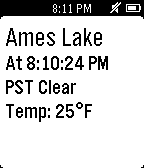
DailyWeath3r is a location aware app that tells you the current weather conditions and temperature in your area at a glance. Simplicity.