 27
27Patris
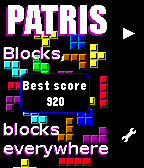
GamesPatris is a game inspired by the famous classic falling blocks. The game is automatically saved when you exit the app and you can change level in the menu. This app was developed using formal proof with SPARK2014, see more at http://blog.adacore.com/make-with-ada-formal-proof-on-my-wrist The sources are available on GitHub. Controls: - Up to go left - Down to go right - Select (short press) to rotate - Select (long press) to make the piece go faster
 54
54Abfahrt!
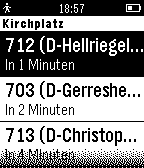
Daily"Abfahrt!" findet schnell die Haltestellen in deiner Nähe und listet diese übersichtlich auf. Zu jeder Haltestelle können die kommenden Abfahrten angezeigt werden. Ein weiterer Knopfdruck zeigt dir weitere Details zur Abfahrt. So findest du immer deinen Weg! Hinweis: Aktuell ist die Anzeige von lokalen Nahverbindungslinien nur für den VRR (Verkehrsverbund Rhein-Ruhr) implementiert. Weitere Verkehrsverbünde folgen!
 93
938 Ball by Dalpek
GamesPredict the future or amaze your friends with the photorealistic Magic 8 Ball. Just shake your pebble and enjoy timeless mystical powers on your wrist.
 8
8Heel Hook
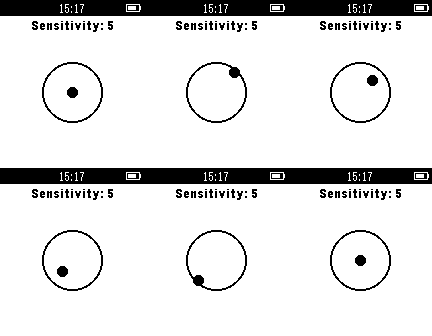
Health & FitnessHeel Hook is an app that helps promote static, fluid climbing through your pebble smart-watch. This app allows for adjustment of sensitivity threshold to make it easier or harder to climb statically. Just start the app before you boulder your route and test your static climbing ability to see if the Heel Hook app buzzes.
 6
6Busal
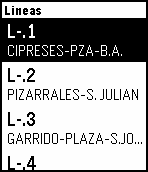
DailyBusal es una aplicación para consultar el horario de los autobuses en Salamanca. Puedes saber el tiempo que tardará en llegar el autobus en una parada en concreto.
 19
19Xur's Items
DailyIs Xur at the Tower? Here is the app to tell you what weapons and armor he is selling as soon as he arrives! #destiny
 60
60Destiny Tracker
DailyDestiny tracker for up to date information on your characters, including: Power Level, Grimoire Score, Vanguard/Crucible/Cryptarch and Faction levels and progression, Primary and Secondary stats. Please note: this app is written in Pebble.JS and therefore may have small delays in loading information.
 54
54Bose SoundTouch Remote
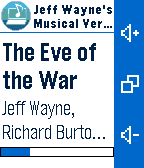
RemotesSo you got Bose SoundTouch enabled system? What can be simpler than using your watch to control it? * Select Channel * Play / Pause * Turn System Off * Volume control * Next / Previous (when applicable) * Track, Album and duration display
 7
7ChileSismos
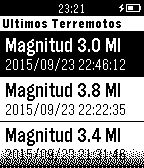
Tools & UtilitiesUna aplicación que muestra en tu Pebble los últimos 10 sismos ocurridos en Chile Continental, utilizando datos del Centro Sismológico Nacional (sismologia.cl). Los datos son actualizados en intervalos de 5 minutos, aunque podrían existir desfases entre lo mostrado por la app y lo mostrado por el sitio web del CSN. En este app podrás ver: -Magnitud del evento -Fecha y hora -Ubicación (latitud y longitud, referencia geofráfica) -Distancia entre tú y el sismo -Profundidad
 1.2K
1.2KJavaPay
DailyJavaPay allows quick access to your Starbucks card. Just enter your card number on the watch and scan it at the till to pay. ——— Disclaimer: JavaPay is not affiliated with or maintained by Starbucks Coffee. By providing your card number in the app, you agree not to hold the developer or anyone else responsible for actual or alleged misuse of your personal information.
 57
57Marine
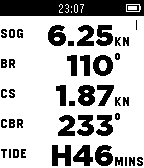
Health & FitnessPebble Marine provides useful instrumentation while sailing, windsurfing, kayaking, paddle boarding, or boating. Your Pebble watch displays speed (knots), bearing (degrees), current speed (knots), current bearing (degrees), and tides (minutes to change). Pebble Marine fetches up-to-date current and tidal data from the nearest NOAA weather stations.
 2
2Big Blue Bus (unofficial beta)
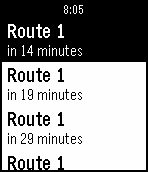
Tools & UtilitiesSimple app to find the nearest bus stops and upcoming arrivals for the Big Blue Bus (transit system in Santa Monica, California).
 21
21Koishi - 小石
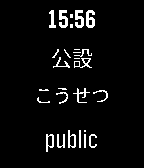
Tools & UtilitiesKoishi - 小石 is a Pebble Watchapp for the japanese learning service called WaniKani, which teaches Japanese to tens of thousands of users by utilizing a well known learning mechanism called Spaced-Learning-Repetition (SRS). Combining this learning system with the watchapp, one can more immerse themselves in this target language. You will need a japanese language pack for your Pebble to correctly display japanese characters on the screen. I recommend this free package http://wh.to/pebble/wiki.php but consider donating to the author. With this watchapp you will be able to choose between showing the recent unlocks words or the critical items. Show a different word each minute with the 'automode' or manually, first the japanese word and later the pronunciation and meaning on the click of a button. You could configure the watchapp to use the darktheme, if it suits better with your pebble style than the light theme. If you have suggestions or encounter any problem, contact me and I'll help you. If you find this watchapp usefull, please consider making a donation : 12WqEENZgRGCLpRYiuutuAT3WsmCFS2BBQ
 12
12Maan On My Wrist app
GamesMaan On My Wrist is a fun watchface that combines the head of one creature with the body of another. Every thirty minutes one half will change. Hundreds of combinations are possible! :-) Graphics by Manuel van der Graaf. Currently in b/w only until someone donates two Pebble Times :-)
 12
12MEPRS - Mine Sweepers
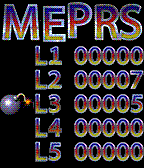
GamesMEPRS is a variation of the classic Mine Sweeper game. It has colorful graphics and a persistent high-score table and five different levels with increasing difficulty. As the application only updates when buttons are pushed it should use a minimum ammount of battery while in use. The controls are simple up and down to select your direction and select to move forward.