Binary Dial
NecatDev
⚠️ This apps settings page may not work anymore
Watchface




Description
Update : New animations, optimisation, new default design.

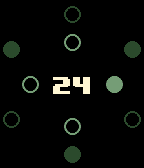
Beautiful, original and fully customisable watch face.

How to read time ? Juste start counting binarily from the top and turn clockwise. The inner circle allows you to read hours while the outer circle allows you to read minutes.

Examples :
- 10:35
- 06:03
- 10:55
- 02:42
- 12:22

Colors are fully customisable, and you can choose to display the day of the month in the center of the watchface, in the configuration page.

I hope you'll enjoy it ! Be pleased to mail me about some points that you would like to report.

The source code is fully available on my github repository.


Design & Programming by Thomas Candelaresi
- DeveloperNecatDev · Is this you? Claim your app ›
- CategoryFaces
- PlatformsTime/Time Steel, Time Round, Time 2 (scaled), Round 2 (scaled)
- Updated2016-01-18
- Version1.2