Battery Clock Color
Ankit Pyasi
⚠️ This apps settings page may not work anymore
Watchface
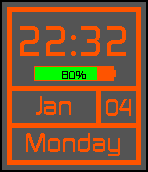
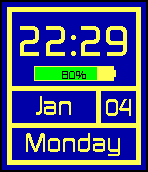
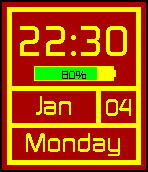
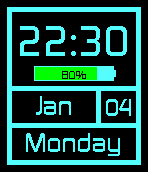
Description
Update (Jan 26, 2016) : Improved settings page, Setting for hourly vibrations, Fixed BT indicator color.

Update (Jan 9, 2016) : Now choose your own colors for text and background. Head over to "App Setting" page to make your watchface show YOUR colors.

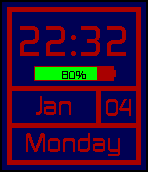
The clean and simple watch-face "Battery Clock", now with colors!!

This time includes App-Setting page to choose from 15+ themes (Themes added regularly).

Features:
Giving you all the information you need in a glance.
Shows : - Time (12h/24h depending on system setting)
* Full/Abv. Month of the year (space permitted)
* Day of the month
* Full/Abv. Day of the week (space permitted)
* Bluetooth disconnect indicator. Short pulse vibration for Bluetooth dis-connection.
And as the name suggests :
* Battery status (Shows the charge left. Also shows remaining charge percent and "Charging.." when plugged in). When battery level drops to 10% it will say "Charge me!" on the battery bar.
* Bettery bar color :
Red when less than 10%
Yellow when less than 50%
Green when greater than 50%
- DeveloperAnkit Pyasi · Is this you? Claim your app ›
- CategoryFaces
- PlatformsTime/Time Steel, Time 2 (scaled)
- Updated2016-01-26
- Version1.1