 100
100Kodi Launch
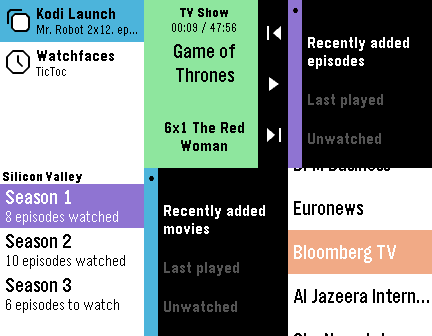
RemotesThe most complete controller and library browser for Kodi! (This watchapp is unofficial and not endorsed or supported by Team Kodi or the XBMC Foundation. Kodi and the Kodi logo are trademarks of the XBMC Foundation.) Quickly control your Kodi instance, browse your video library and PVR channels, and launch your media from your wrist! Features: - Now playing screen - Volume control - Automatic refresh - Navigation mode (see below) - TV shows browser: recently added episodes, last played, unwatched. Reports the number of episodes watched/to watch for each show & season, displays the air date and a mark for watched episodes. - Movies browser: recently added movies, last played, unwatched. Displays the rating and year of each movie. - Exits to the watchface after launching a movie or TV show episode (this is by design) - Live TV browser: display channel groups and channels - System actions: toggle fullscreen, info & codec display, update video library, party mode, suspend/reboot/shutdown the system. - Sets the app glance to the last launched media using the app. A note about navigation: The navigation mode uses the 4 buttons of your watch. Hold Back to return to your watchface. Double-click the Select button to perform a selection in Kodi, double-click the Back button to go back in Kodi. Music browsing & launching is not implemented (yet).
 59
59Yamaha AV Remote
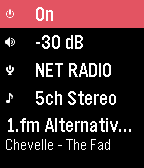
RemotesA simple control watchapp for the basic functions of your network-enabled Yamaha AV receiver. Never look for the remote again! Tested on a RX-V479 but should work on all models compatible with the official AV CONTROLLER smartphone app using the YNC/A protocol. This watchapp is unofficial and not endorsed or supported by Yamaha. Features: - Power toggle - standby/on* - Volume control & mute - 2-click preset scene launch, or manual input selection (HDMI, Spotify, Pandora, Airplay, Sirius, Net Radio, USB, Bluetooth, UPnP, Tuner...)** - DSP program selection - Basic playback control & info - previous track, next track, play/pause (if supported by the source) - Near real-time status updates, no need to refresh manually Not supported: - Multiple devices or multiple zones - Source browsing (menus) - Advanced sound & video settings * Ensure the 'Network Standby' feature is activated to be able to control/turn on the device when in standby mode. ** The available scenes & inputs are retrieved from the device configuration and may differ depending on the settings, the model and market availability.
 10
10Traffic Info Luxembourg
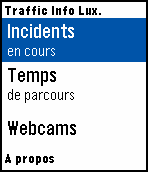
DailyTraffic information for Luxembourg motorways on your wrist! Data is fetched from http://cita.lu. This app is unofficial and NOT in any way supported or endorsed by the Administration des ponts et chaussées, Luxembourg. Features: - Incidents: Displays a list of current traffic incidents. Select an entry to view its details in a scrollable card. - Travel times: Displays a list of current travel times for a few destinations from several places. Select a starting place in the list to view the complete card. - Webcams: Choose from a variety of traffic monitoring webcams to show on the Pebble screen. Due to the limited resolution and color palette, image quality can suffer. Best results achieved during daylight hours. A few "hotspots" (busiest junctions) are promoted to the top of the menu to quickly access webcams around these areas in a sub-menu. Alternatively, the list is also sorted by motorway.