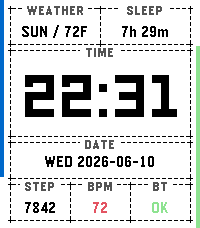
An opinionated, TUI-styled watchface. Time, date, and maybe the data you care about, framed in dashed terminal-style windows. Text over icons, contrast over decoration, utility over hand-holding.

Inspired by various terminal watchfaces. I've always liked the idea, but they always had a few shortcomings for me. Most mimic a shell calling single-value scripts or commands, which always struck me as a missed opportunity. Terminal UIs don't need to be hard to scan at a glance. They can be quite legible, dare I say aesthetically pleasing. tuiface is my attempt at the legible part; you can judge the aesthetics yourself.

FEATURES

Big, legible time with your choice of ISO-style date formats
Five complication slots: weather, steps, sleep, heart rate, active minutes, Bluetooth status, air quality (US AQI), UV index (the peak over the next 12 hours), a combined AQI/UV view, or empty
Edge progress bars: daily step goal on the left, battery on the right
High-contrast day/night themes with automatic switching, or pin either one
Color-coded values: battery, temperature, AQI, and UV shift green/yellow/red (or blue for cold)
No account, no API key. Weather comes from Open-Meteo via your phone's location, refreshed every 30 minutes
Settings are deliberately few. If a behavior isn't configurable, that's a decision, not an oversight. If your three essential complications aren't my three, the source is open; fork it and make it yours.

CREDITS
Weather, air-quality, and UV data by Open-Meteo.com (CC BY 4.0). Built with Clay (MIT) and the Pebble SDK (Apache 2.0), maintained by Core Devices and the Rebble community. Tested with Unity (MIT). Developed with assistance from AI coding agents: Google Gemini and Anthropic Claude.

Free for noncommercial use under the PolyForm Noncommercial License 1.0.0. Source: github.com/wit-0-bit/tuiface