 5
5Just Another Split Flap
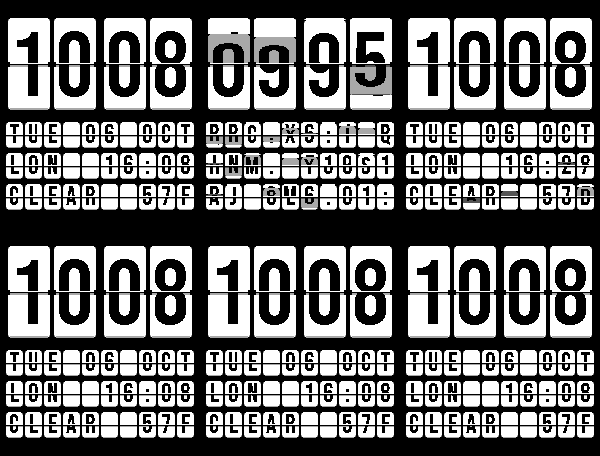
FacesA split-flap flip clock / departure board. Flick your wrist to clatter the board. - Big flip-clock time, with three configurable board rows: date, world clocks, weather, upcoming event, steps, HR, battery, etc. - Built-in themes and fully customizable colors - Calendar directly from your phone via experimental plugins or through any iCal link (Google, iCloud, Outlook) - Phone Left Behind / Low Battery board announcements Font: Bebas Neue (SIL Open Font License) Weather: Pebble app, falling back to Open-Meteo if unavailable
 138
138Flight Radar
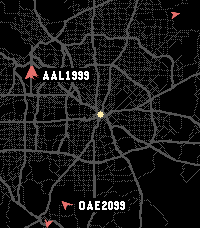
Tools & UtilitiesAware of a bug causing roads not to render. Working on a fix! Live ADS-B air traffic on your wrist. See planes around you in real time, painted over OpenStreetMap roads centered on your current GPS location. Auto-refreshes every 30 seconds. Controls: - Select: Cycle Zoom (5, 10, 20, 40 mi visible) - Up / Down: Pick next or last plane ordered by distance from you - Back: Deselect plane if selected, exit app When a plane is selected you'll see its callsign, type and tail number, altitude, and ground speed, plus its recent flight path drawn over the map. Missing fields show in orange, planes without a callsign fall back to their ICAO hex address. Roads are cached on your phone for 7 days; planes are polled at most every 30 seconds. If Overpass rate-limits, the app honors Retry-After and falls back to the cached map. Attributions: - ADS-B info provided by adsb.lol. - Road map data provided by OpenStreetMap contributors, fetched via the Overpass API. Privacy: - GPS Position is used on-device for plane and road queries. Nothing is sent anywhere except the above public APIs.
 43
43Chord Chart
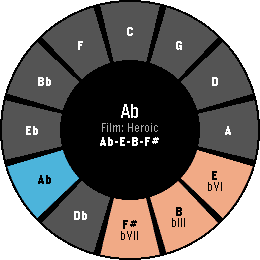
Tools & UtilitiesI'm trying to teach myself how to improvise on the piano. I often find myself needing to pull up the circle of fifths or search for progressions. Having all of this on my wrist helps me iterate through things quickly. With the upcoming shipment of the Pebble Round 2, the circle of fifths naturally fits that display. The interface is designed for the Round 2 but works on other hardware as well. The main interface is built around quick progressions and their geometry on the circle of fifths. Users can cycle through a library of common progressions and try them out in any standard key signature. The app also includes a "key finder" to help novices like myself interpret what notes fit into which key signatures. Eventually, I'd love to make this more interactive and let musicians build and store their own progressions. Controls - UP/DOWN: Transpose Key - SELECT: Flip through the current genre of pre-built progressions - Hold SELECT: Browse all genres - Hold DOWN: Open Key Finder