Check security-camera snapshots from your Pebble Time 2.

PinHole is built for fast wrist checks when you just want to know what is happening at the front door, garage, driveway, or any other configured camera. Use the hardware buttons to switch cameras, press SELECT to refresh, and keep the last good snapshot on screen while the next frame loads.

Connect to go2rtc, Frigate, UniFi Protect, or direct HTTP(S) JPEG snapshot URLs. Snapshot requests are made by your paired phone directly to the endpoint you configure; PinHole does not operate a proxy or external service. The optional UniFi cloud connector is used only when you select and configure it.

Features:
- Quick camera checks without opening your phone
- Button-first controls for easy one-handed use
- Multiple configured cameras
- Frigate account, HTTP Basic, Bearer-token, and X-API-Key authentication
- Manual refresh with SELECT
- Previous snapshot stays visible while refreshing
- Clear setup, loading, retry, and error states

Requires:
- Pebble Time 2
- A supported camera service or direct JPEG snapshot URL reachable from your paired phone
- go2rtc, Frigate, UniFi Protect, or a custom HTTP(S) endpoint
- Any account, API key, or trusted HTTPS certificate required by that endpoint

PinHole shows still snapshots only, not live video.

Credentials are stored in PinHole's local app storage on the paired phone and are never sent to the watch or a PinHole server. HTTP does not encrypt credentials or images, so authenticated HTTP should be used only on a trusted network.

Disclaimer: This app was developed with the assistance of AI.
 8
8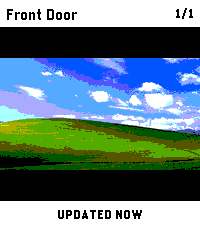 17
17