The Pebble Appstore changes based on your specific choices. Use the options below to look around!
Pebble Original
Pebble Time
Pebble Time Round
Pebble 2
Pebble 2 Duo
Pebble Time 2
Pebble Round 2
Show your QR code on your wrist in a second. 1. Install iOS app 'QRBuddy for Pebble' 2. Install Pebble Watchapp 'QRBuddy for Pebble' 3. Save your QR code to your Photo Library, or you can take a picture of it through the iOS app 4. Launch the iOS app, and the Watchapp will be launched automatically 5. Choose your QR code from "Photo Library" by clicking the button at the lower left conner 6. Wait until the QR code is transferred 7. Now you can use your Watchapp only 8. To access the 'QRBuddy for Pebble' quickly, set 'Quick Launch' by long pressing either the up or the down button and choose WeChat Buddy

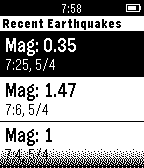
A Watchapp that shows the newest earthquake information ranging from N30 to N45, W112 to W130 (California and its surrounding areas). The data is from USGS 1. Shows the newest 6 entries 2. Updates every 5 minutes(You have to leave the app open) 3. If there is any new earthquakes, you receive a double-vibration notification 4. Shows the distance between you and the earthquake