 52
52Weather City
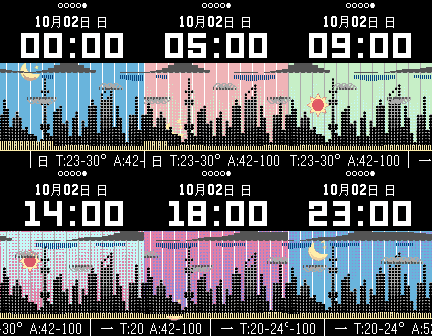
FacesThis watchface is to express weather information (including hourly data of cloud rate, precipiation, temperature and AQI) as funny figure, showing as a picture of a city. Right now it is only support the weather resource in China。 这是一个将天气预报资料图象化的表盘。 V2.0支持城市剪影自制,安卓配套程式下载: V1.1可存取版 http://pan.baidu.com/share/link?shareid=3427554331&uk=3422589443 采用了每小时预测共48小时(2天)资料。预测的资料图象化后,随着时间由右向左移动,到达现在所处的时间(以太阳或月亮的位置表示)。 时间可参考下方的时间格线,每格是两小时。 画面主题是城市的剪影(所在省份省会)。 主题画面上方有一横条细线,代表上次更新到现在的时间,参考时间格线,每格2小时。 现在时间代表的太阳或月亮会随着时间而上升与下沉。 天空随着一天的6个时段而变化颜色(每小时渐变)。 天空上端是云层厚度,云层越厚就遮蔽了天空与太阳、月亮。 云层下表现的是雨量,雨量越大,雨就会下到地面来。 中间的小云朵高度,表现了当日的高低温,并出现在当日高低温的时间点(高低温云朵略不同)。 城市下方的雾霾则象征了空气污染AQI的程度。AQI值越大,空污越严重,雾霾就越弥漫覆盖整个城市。 设定页可选择以GPS或地图点选来设定城市。 画面右上角增加GPS显示: 无图形表示地图点选; 实心图标表示使用GPS且定位成功; 空心图标表示使用GPS但定位失败(但使用上次定位成功的位置)。 V1.3以后 可以配套程式同步(目前仅)安卓手机系统日程,可以显示一个最近未到期日程,及最多2个已到期日程。以小飞机方式呈现出其时间点,并于到点时振动及标题提示。 (若新安装未进行日程同步,则系统内定一个装饰性小飞机,同步后即消除。) 配套安卓APP: WW_widget V 1.4 : http://pan.baidu.com/share/link?shareid=1789677664&uk=3422589443 (安装后请将小部件安装于桌面,必要时请重启手机,将自动同步最近日程,或按部件上时钟手动同步。) 这个表盘所想呈现的不是对气象资料精准数据的了解,而是以简单化、图象化、连续化,全观化、趣味化的方式来接受气象资料,并做为您短期(24小时)内日程的参考。 程式已设定: 震动提醒:整点、断线。 无扰时段:06-22时。 气象更新:每小时整点或按右键离开后按左键返回。更新会有天气提示。
 16
16Rain Guide China
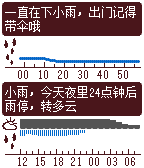
DailyONLY USE IN CHINA (need chinese font) 分钟级天气资料应用。 采用彩云天气(CaiYunAPP)的天气预测,提供未来120分钟内降水量及24小时内云量及降水量预测。 本应用的最佳用法: 1. 将应用设置为快捷键开启。 2. 搭配表盘使用,建议表盘使用Weather Wave,同样使用时间线的风格设计。 3. 在需要的情况下(特别是阴雨天气),以快捷键开启,参考所显示的未来阴雨状况的时间线显示,来决定您的意向。 4. 按右中键可进行更新,但程式中已设定每10分钟内仅向彩云天气咨询更新一次。 5. 按左键返回表盘。 本应用不收取费用,但采用的彩云API需要付费,目前额度10000次咨询,请使用者珍惜资源,不要进行不必要的频繁更新。 未来超出收费额度时,可能另采用其他收费或赞助方式,以继续使用本应用。
 305
305Weather Wave
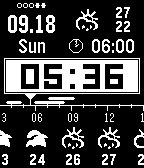
FacesShow you what weather is going on in the future. Request to update weather hourly and keep the 5 day / 3 hour forecast data. Therefore you can see the change of weather oncoming. You can set one reminder and show it as line on the timeline of weather wave. while on start or end, the watch will buzz to remind you. V1.7 above, is ready to synchronize with AndroidPhone's system calendar, and show Two Schedules as the reminder line on the weather timeline. You need to download the Companion App(widget) and sideinstall it. Load the widget and reset your phone, and then enjoy this watch face. The widget will synchronize periodly automaticly, or manually by pressing the analogclock included. The weather and max/min temperature on top screen is the forecast data for tomorrow (and the day after). Below that, is the start time of next reminder or schedule if you have. The Companion App :WW widget 1.3 : http://pan.baidu.com/share/link?shareid=3759337882&uk=3422589443
 34
34S Watch Simple
FacesONLY USE IN CHINA (need chinese font) S WATCH CHINA 的简单版本。 只有气象资料。
 5
5S Watch 1 典藏
FacesS WATCH CHINA v1.x 典藏版
 128
128S Watch China
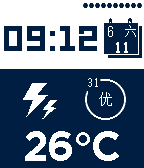
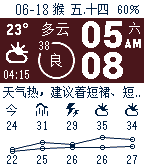
FacesONLY USE IN CHINA (need chinese font) 简易的资讯表盘。 主画面分别显示时间、天气、资讯三个栏位。 各项特点如下: 1.简洁屏保 具有屏保设计,超过1分钟未使用(转腕),自动进入简单数字时间显示,再次转腕回复主画面。 2.资讯查询 资讯栏位可经由转腕切换, 转动腕表次数可于设定页设定。 转屏资讯有: A.月历 B.天气预测 (于设定页自行设定查询的中国城市) C.中国黄历吉忌冲煞查询 (查询后将发送明日吉忌资料到时间轴)。 D.地址查询 (以GPS查询现在所在地地址) E.导航指引 (到预设目的地的第一步指引,需在设定页地图上选择目的地。) F.资料查询(快递、行程、备忘、股票等。) G.行程于到期及前1小时、10分钟会振动及自动显示提醒。 3.天气预测 天气自动每小时更新,是否及时更新可由天气图标判断,超过一小时未更新,则图标将淡化处理。 空气品质依(优、良)、(轻、中)、(重、劣)三级,分别以圆形、方形及叉形图标区别显示。 可选择防晒、穿衣、运动、洗车、晒晾等天气讯息显示。 4.活动数据 可选择显示运动数据(步数、时间、距离、热量:四选一)以取代天气更新时间。(仅PT以上版本可用) 5.时间特色 日期栏显示西历及农历日期。 时间栏位可选择:指针式、数位式或干支四柱显示。 6.整点提醒 可选择开启或关闭整点振动及蓝牙断连振动,及使用的时段(相反即为勿扰时段)。 7.色彩自定 P或PS可设定表盘反白与否。 PT或PTS可自定表盘的颜色。
 49
49Address Here China
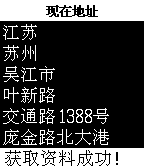
DailyOnly use in China.(need chinese font) 简单的地址查询。 根据现在的经纬度(手机必须开启GPS和网络),查询地址。 路线规划显示请于设定页设定目的地(以同城市短距离为限),并点选开启路线规划。 (部分手机可能无法于设定页显示地图) 最后一次地址查询结果会被保存。 执行后或设定页返回自动执行查询。 右中键:地图页与文字页切换 文字页: 右上键:查看上次查询结果 右下键:查询最近查询结果 地图页: 右上键:地图放大 右下键:地图缩小
 20
20Black Hole
FacesA simple analog watchface, using black hole as background. As battery's power be consumed, the Black Hole will eat the Sun. (yes, as power be zero, it will eat everything...all become dark.)
 65
65ACT monitor analog
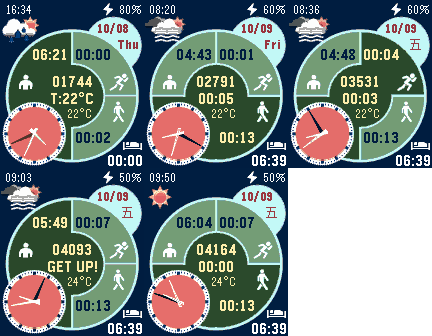
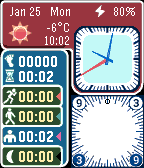
FacesThis watchface, ACT monitor, will show U the information as below: No more update! Please refer to ACT monitor. ACT monitor ,after version 1.4, go with setting page and option for analog or digit clock face, etc. 1. Date, Time, weather and battery%, weather updates every hour. 2. the total steps U taked till now today. 3. the total time of sleep, seating, walking, jogging U taked till now today. 4. the activity and the elapsed time of it U take right now. 5. buzz U every 60min for seating and 15min for jogging, no buzz for sleep and walking. 6. "till now today" means from 21:00 lastnight to now, all the data will become zero at 21:00 everyday. Some code to deal with Accelerometer Data is obtained from open source of GITHUB.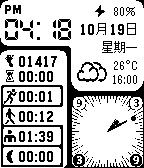 47
47ACT monitor mono
FacesNO MORE UPDATE! IF your pebble has updated to V.3.8 or above, please refer to ACT monitor. ACT monitor will support APLITE since version 1.5, and has option for analog or digit clock face choiced in the setting page.
 83
83ACT monitor
FacesCompanion Android APP : (only Chinese and English version) http://yun.baidu.com/wap/view?fsid=1052957113551207 This watchface, ACT monitor, will show U the information as below: 1. Date, Time, weather and battery %, weather updates every hour. 2. the total steps U taked till now today. 3. the total time of sleep, seating, walking, jogging U taked till now today. 4. the activity and the elapsed time of it U take right now. 5. buzz U every 60min for seating and 15min for jogging, no buzz for sleep and walking. 6. "till now today" means from 21:00 to now, all the data will become zero at 21:00 everyday. Some code to deal with Accelerometer Data is obtained from open source of GITHUB.