 40
40Variable Hands
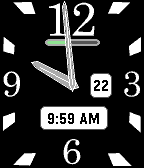
FacesIt has always bothered me that watch hands on a rectangular watchface are a varying distance from the edge of the face. This watchface grows and shrinks the hands dynamically so that they are always the same distance from the edge of the face. In the case of the minute and second hands, they reach all the way to the edge. The hour hand grows and shrinks to keep a constant 35 pixels from the edge of the screen. There are several configuration options: - Whether or not the second hand is drawn. - Start and end hours for the second hand to be drawn. - Colors for the second hand. - Whether a battery status indicator is drawn. - Whether a date window is drawn. - Whether the digital time is drawn. - Colors of the day/digital time windows. - Dark and light themes. I will also be looking at options to keep the date window from being obstructed by the minute and hour hands.
 581
581Sunset Watch
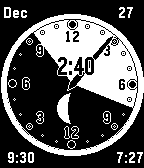
FacesThis is the Sunset Watch. On launch, the watchface will automatically ask for your location from your phone. Once it knows where you are, it will determine the local sunrise/sunset times and phase of the moon (without having to use mobile data), and display the information visually on a 24-hour face. This watch is configurable in many aspects via the Pebble phone app.