 167
167Locus
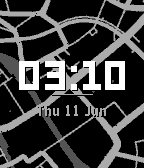
FacesLocus turns your smartwatch into a live map. Inspired by the beautiful Places watchface from the Looks collection by ustwo, this app reimagines that brilliant concept specifically for Pebble. It displays a minimalist monochrome map of your exact location with a crisp time and date overlay, and the map updates automatically as you move. You can customize everything. Recolor land, water, roads, and text to fit your style. Adjust zoom levels, location update frequency, and whether street names are shown. It is highly battery and data efficient, downloading map data only when you actually move. Locus runs smoothly across the entire Pebble watch lineup. To use Locus, you need a free Geoapify API key. Create a free account on the Geoapify website, copy your key, and paste it into the Locus settings in the Pebble app. The free tier gives you more than enough daily requests. If you value privacy, you can turn off live tracking and manually enter a fixed latitude and longitude. The watchface will only show that specific spot. Map data is provided by Geoapify, OpenMapTiles, and OpenStreetMap contributors under the MIT License.
 48
48What Time?
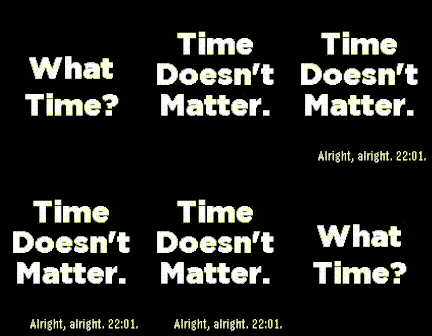
FacesWhat Time? — The Reluctant Watchface Why do you even need to know the time? This watchface is designed to ask exactly that. At first glance, it refuses to give you numbers. Instead, it greets your habitual wrist-flick with a simple, mildly sarcastic question: What Time? When you flick your wrist or press a button, it doesn't cave immediately. With a smooth animation, it reveals its true philosophy: Time Doesn't Matter. It’s an absurd, meta reminder to stop tracking every passing second and just experience the present. But since you live in the real world and actually need to know, you can force its hand. Yielding to your demand, it eventually gives in and types out the actual time alongside one of 20 randomized complaints, such as "Fine, it's 14:23." or "Do I have to? 14:23." This reluctant reveal is a comedic nod to growing up. Eventually, we all have to compromise with the giant, ticking gears of society—but we can at least do it with a final hint of stubbornness. Once its duty is done, the words quietly retreat. [ Features & Under the Hood ] Hyper Battery-Efficient: Because it refuses to tell the time unprompted, it doesn't need to wake up and redraw the screen every minute. This stubbornness translates to incredible battery life. Customizable Apathy: Dive into the settings to tailor the watchface's attitude. You can adjust the reveal delay, toggle the typewriter text animation, and customize the background and text colors.
 49
49Continuum
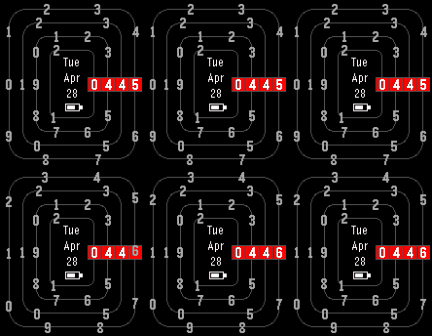
Faces"Time dissolves into single digits, each adrift on its own circling path. Only in this instant do they gather — and the present takes form." This watchface brings the concept to life through a fluid, mechanical ring interface. Every rotation smoothly snaps into the highlight frame with a natural inertial bounce. I designed it to be highly flexible. On color displays, you have full control over the color of every single element. For monochrome screens, it supports a crisp light/dark inverted theme. If you prefer a more straightforward rotation, the inertial bounce can be toggled off. You can also hide the battery icon to keep your screen entirely focused on the circling digits.
 16
16JapaneseKanjiWatchface
FacesA watch face that uses pixelated Japanese kanji to display the time and date, similar to my previous work, but with localized design.
 17
17zh-TW_Pixel
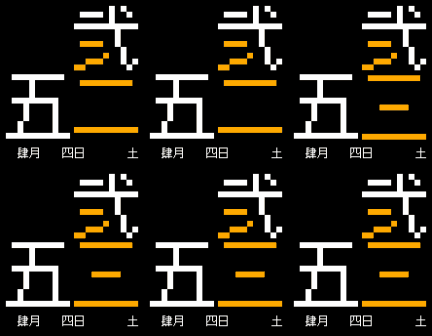
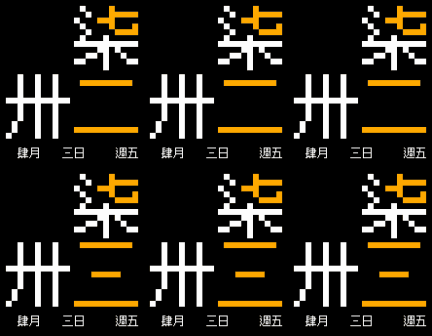
FacesA pixel-style pebble watch face with a full Chinese display, striking a balance between colloquialism and literary sense. In order to accommodate the Chinese way of reading time and the aesthetics of the interface, the logic for converting numbers to Chinese characters has been slightly adjusted. You can refer to the logic below to confirm if it meets your requirements: 小時 (Hour): Presented using Chinese uppercase numerals. The part that deviates from numerical logic is that 10 is represented by only a single character ("拾"). In the hour numerals, an accent color is applied to certain strokes; this color highlights the lowercase numerals that are, in a sense, hidden within the uppercase ones. 分鐘 (Minute): Presented using Chinese lowercase numerals. At 00 minutes, it displays as "點整" (equivalent to the usage of "O'Clock"). At 30 minutes, it displays as "點半" (half). Furthermore, in the minute block, I decided to always display two characters. Therefore, 1 minute is called "〇一", and 10 minutes is displayed as "一〇", which is a writing style common in formal documents. Integers in the tens, like 20 and 30 minutes, are represented using the more common forms like "二十" and "三十". As for minutes after 21, because they have three syllables in spoken Chinese, complex characters (ligatures) with clear documented origins like "廿(20)" and "卅(30)" are used. As for "卌(40)", because it lacks records of daily use and is easily confused with "卅", regular lowercase numerals ("四", "五") are used, omitting the "十", as an acceptable solution. 月份 (Month): Uses uppercase numeral writing. The logic is not much different from the hour block. 日期 (Day): Uses lowercase numeral writing, combining the simple logic from the hour block and the use of "廿" and "卅". 星期 (Day of the week): Uses lowercase numeral writing (yes, the day of the week in Chinese is directly represented by numbers), with the sole exception of Sunday, which uses "日" or "天", I choose "日" in this project.