 87
87Music Boss Media Browser
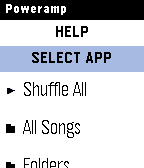
Remotes🎵🔍 Your full music library. On your wrist. PowerAmp, Podcast Addict, Spotify, Musicolet, GoneMAD, VLC and more. 🎁 Try it now - no strings attached! Activate a fully unlocked 3-day free trial of the Music Boss Deluxe companion app with all features included. No limitations. No surprises. Try it along side the Music Boss watch apps! Music Boss Media Browser is a brand new experience for Music Boss Deluxe users - bringing full library browsing directly to your Pebble for the first time. Browse playlists, explore your library, choose a track, and hit play - all without touching your phone. You can even select which media app to browse, right from your watch. ✨ What’s New • Deep integration with Music Boss Classic and Music Boss Time - launch the browser directly from the watch app and jump right back when you're done • Automatic app detection - Music Boss finds supported media apps for you • Broad compatibility - works with apps like PowerAmp, Podcast Addict, Musicolet, and Spotify (Spotify requires a quick setup) • Supports any Android app that implements media browsing 🆕 This is a brand new addition to Music Boss Deluxe If you're already a user - you're ready to go. ⌚ Watch Compatibility All Pebble models supported 📱 Companion App Compatibility • Classic Pebble App / Rebble • New Core Pebble App • microPebble 🤖 Mobile Device compatibility Android only
 83
83Face Boss - watch face builder
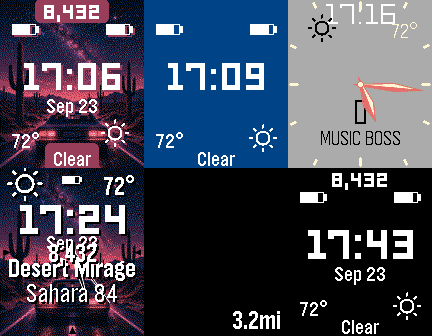
FacesBring your Pebble to life - your own photos and live music album art in a super-customizable watch face, now a complete watch-face builder with Face Boss 3.0! 🎁 Fully Unlocked 3-Day Free Trial Try every feature, nothing held back. Start it right in the Face Boss companion app. 🧱 Build Your Own Layout (New in 3.0!) A true watch-face builder - add, remove, reorder, and freely position info layers, anywhere on screen. 🎵 Now Playing & Live Album Art Show title, artist, and album, and set live album art as your background - it updates automatically as your songs change. (Great alongside Music Boss.) 🌆 Background Options Your own photos, live album art, or a solid colour. Darken any image for contrast, and set how it behaves - always, timed, or hidden. 🔤 Fonts, Text & Styling Style every layer: ALL CAPS, multi-line text, and drop shadows or background pills for readability. Pick a system font or a BIG custom clock font (Orbitron, Bebas, Doto & more). 🕒 Analog Faces & Shapes Analog clocks with 9 hand styles + hour markers, plus code-drawn shape layers - rings, arcs, outlines, and fills - to frame your info or build a whole scene. ⛅ Weather & Forecast Current temp, feels-like, humidity, wind, UV index, precipitation, and sunrise/sunset - plus today's and tomorrow's high/low, condition, and chance of rain, with day/night icons. 🔋 Battery at a Glance Phone, watch, and connected Bluetooth device (ex: headphones) battery - make a battery dashboard for all your devices! 👟 Pebble Health Steps, distance travelled, sleep, active time, and heart rate. 🔔 Notifications, Calendar & Custom Text Latest notification text and/or unread count from the apps you choose, your next calendar event, or your own custom text. 🎨 Fully Customizable • Choose what each layer shows and where it appears • Set visibility: Always, Timed Appear (reveal on wrist flick), Timed Disappear, or Never • Per-element colours, sizes, rotation, fonts, and text styling • Toggle Metric or Imperial units • Change the date format • Save and apply preset designs 🎚️ Image Quality Control Pick the colour depth that looks best on your watch - from full colour down to crisp 1-bit duotone. 🔁 Auto Rotation & 📳 Shake-to-Refresh Rotate photos on your chosen interval (sequential, random, or off), and shake your Pebble for a new image on demand. 🗺️ Multi-Language Support The watch face follows your Pebble's system language (companion app English for now). 🆓 Give it a try Enjoy the included sample images for as long as you'd like! Free layout controls - position, show/hide, reorder, ALL-CAPS, text/icon, system fonts, drop shadows, day-of-week, wrist-flick reveal, and free info (time, date, weather, health, battery). 💎 Premium Unlock Your own photos, live album art, adding/removing layers, per-element colours/sizes/rotation, custom fonts, shapes, and premium info (now-playing music, notifications, next event, custom text), choose whichever suits you: • One-time permanent unlock, or Face Boss Ongoing Support (monthly, starts with a 3-day free trial) • Music Boss Deluxe Ongoing Support — a small monthly tip jar that unlocks ALL my apps, including full Face Boss (musicboss.ca/ongoingsupport for details) • Already paid for Music Time Companion? Your license unlocks everything in Face Boss (except your own photos) • Music Boss Deluxe full license unlocks the Music Boss watch-face preset with live album art ⌚ Watch Compatibility Works with Pebble Time, Pebble Time Steel, Pebble Time Round, Pebble 2, Pebble 2 Duo, Pebble Time 2, and Pebble Round 2. 📱 Companion App Compatibility Face Boss works with the major Pebble companion apps, including: • Core Pebble App • Classic Pebble App / Rebble • microPebble • Any companion app that supports PebbleKit-Android (Classic)
 108
108Music Boss Time
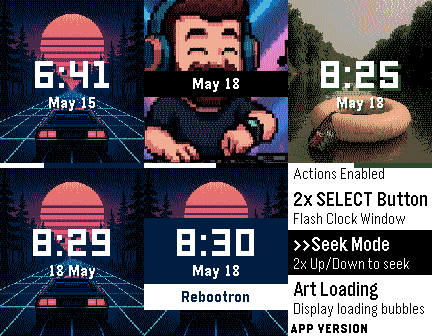
Remotes🎧 Music Boss Time is a premium media controller and media browser disguised as a watch face. Keep it on all day as you go about your daily hustle. Works with all your media/music apps*! Not a Music Boss Deluxe user yet? 🎁 Activate a fully unlocked 3-day free trial - all features included, nothing held back! • Features an album art-focused main screen with the time and date prominently displayed • Track progress ticks away to keep you informed on the current song • Customize visual elements to suit your style, and enjoy built-in media controls, volume support, and customizations for a truly personalized Pebble Music experience • Compatible with all your media apps (Spotify, Youtube, YouTube Music, Netflix, Plex, etc) 🎵 Play, pause, skip, and seek tracks from your Pebble 📺 Control apps casting audio/video to external displays or audio devices (e.g. Netflix, most music apps) ⏩ Manual Seek Mode* - jump within songs, podcasts, audiobooks, long tracks (*except OG Pebble) 🔊 Adjust volume on phone, Bluetooth devices, or while casting ⚡ Assign app-specific custom controls (e.g. Spotify DJ X) 👍 Rate songs (YouTube Music, YouTube, Spotify, more being tested) 🎨 Dynamic album art & themed UI ℹ️ View album art, title, artist, album, volume, and progress 🌈 On color Pebbles and Pebble 2/2 DUO, themes adapt to album art 📱 Watch Compatibility - Every Pebble Supported • Pebble Time, Pebble Time Steel, Pebble Time 2 • Pebble Time Round, Pebble Round 2 • Pebble 2/2HR/2 DUO Full support for album art, themes, customizations, and all features. Original Models: • Original Pebble • Pebble Steel Support album art! Manual Track Seek Mode does not function on the original models. Pebble Companion App Compatibility: • Classic Pebble App / Rebble • New Core Pebble App • microPebble Thank you for your support - whether you’ve been with Music Boss since the early days or you’re just discovering it now! *Media Browsing/Playback has been tested with: PowerAmp, Podcast Addict, Spotify, Musicolet, GoneMAD and VLC. Works with any app that supports Android Media Browsing. All assets in this listing are original and © Reboot's Ramblings 2013–2026.
 9.3K
9.3KMusic Boss
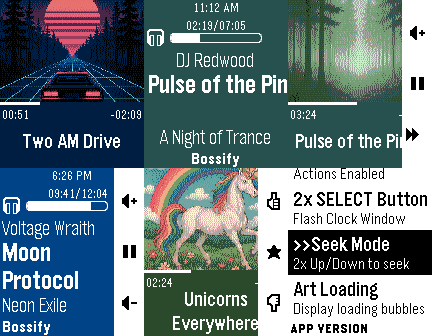
Remotes🎧 Music Boss is a powerful, customizable media controller and music library browser for your Pebble. Works with all your media/music apps*! New here? 🎁 Music Boss includes a fully-featured 3-day free trial through the Music Boss Deluxe phone app - every feature included, nothing held back! 🆕 NEW: Layout Presets - give your watch a whole new look in one tap. Choose from 20+ built-in styles - applied instantly from your phone, then fine-tune anything. Save your own looks too. (Layout Presets & the new UI are for Pebble Time 2 and Pebble Round 2. All other features are for all Pebbles!) 🎵 Play, pause, skip & seek - full media control from your wrist 🔍 Browse & play your whole library - PowerAmp, Podcast Addict, Spotify, Musicolet, GoneMAD, VLC & more 🔄 Switch and launch media apps right from the watch 🔊 Volume on phone, Bluetooth, or while casting 👍 Rate songs - Spotify, YouTube Music, YouTube (more in testing) 📺 Cast control - drive apps sending audio/video to TVs & speakers (Netflix, most music apps) ⚡ Custom per-app controls (e.g. Spotify DJ X) + full Tasker automation ℹ️ Album art, track info & live progress at a glance 🎨 Dynamic art themes that adapt to your cover (colour Pebbles & Pebble 2/2 DUO) 🖼️ Instant album art preview the moment the app opens (no more blank screen!) 🎚️ Image Quality control - Auto / 1 / 4 / 8-bit, plus a custom 1-bit colour theme ⬛ Album-art darkening for crisp text over busy covers ⚙️ Redesigned tabbed phone settings, tailored to your watch 👀 New perk - the new Music Boss watch face preset in Face Boss ✨ Pebble Time 2 & Round 2: 🆕 Brand-new Modern UI - Retro+, Classic & Time layouts in one app, full touch with seek & volume overlays, mix and match to taste 🎨 One-tap Layout Presets - 20+ styles, swap looks instantly, save your own 🎛️ Fully customizable layouts - fonts, colours, sizes, art modes, drop shadow, progress ring & optional solid text backdrops 👋 Wrist-flick gestures - flick forward/back for play, volume, rating & more (adjustable sensitivity; single, double or triple) 🕒 Big-clock display with 9 large fonts 🔒 Quick & Persistent screen lock - double-press BACK 📱 Watch Compatibility - Every Pebble Supported • Pebble Time 2 & Pebble Round 2 • Pebble Time, Pebble Time Steel • Pebble Time Round • Pebble 2 / 2HR / 2 DUO Original Models: • Original Pebble • Pebble Steel Support the Classic UI layout only (no album art). Manual Seek Mode not supported on the original models. For album art on the OG models, please check out "Music Boss Time" on the appstore. Pebble Companion App Compatibility: • Classic Pebble App / Rebble • Core Pebble App • microPebble • Any companion app that supports PebbleKit Classic Thank you for your support - whether you've been with Music Boss since the early days or you're just discovering it now! *Media Browsing/Playback has been tested with: PowerAmp, Podcast Addict, Spotify, Musicolet, GoneMAD and VLC. Works with any app that supports Android Media Browsing. All assets in this listing are original and © Reboot's Ramblings 2013–2026.
 511
511Music Time
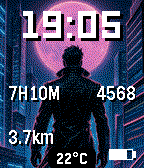
Faces🪧 Music Time is now part of Face Boss! Get started by installing the Face Boss companion app right from this listing! https://apps.repebble.com/692e04717ab5ab0009af05fe 🎁 Activate a fully unlocked 3-day free trial - all features included, nothing held back! The trial is activated in the Music Boss Deluxe Android companion app and unlocks all of my apps, including Music Time. 🖼️ Album Art Watch Face A dynamic watch face that uses your current album art as the background, with colours that shift and adapt to match whatever you're playing. 🪟 Corner Complications Assign information or icons to all 4 corners of your watch face for an at-a-glance view of what matters most to you. 🕗 8 Independent Info Slots Choose from dozens of display options and configure each of the 8 information slots completely independently. Put exactly what you want, where you want it. ⛅ Weather Data Live weather right on your wrist: current temperature, feels-like, humidity, wind, UV index, precipitation, sunrise/sunset times, and more. 🔋 Battery at a Glance Monitor your phone battery, watch battery, and connected Bluetooth device (ex: headphones) battery all from your watch face. 👟 Pebble Health Data Stay on top of your steps or set distance travelled, sleep, and active time. 🎨 Fully Customizable • Customize the Top, Middle and Bottom information sections: choose what information appears and where • Configure the large Middle block position (Top, Center, or Bottom) • Set each section's visibility behavior: Always, On Wrist Flick, or Never • Toggle between Metric and Imperial units • Change date format • Enable text shadow or background styling for improved readability 🗺️ Multi-Language Support The watch face supports the same languages as Pebble OS (I will be working on translating the companion app over time) 🌈 Dynamic Colour Theme Automatically adapts your watch face colours to match the current album art - every song brings a fresh look. ✋ Wrist Flick to Reveal Info Hidden info such as time, date, and health stats can be shown always or temporarily revealed on wrist flick. 🔄 Automatic App Detection Automatically detects which media app you're using and captures its album art. 🆓 Free Mode When first installed, Music Time sends sample album art to the watch when you change songs. All customizations are fully functional! 💎 Premium Features (Unlock Required) To display live album art from your own music and media, choose one of the unlock options: • One time permanent unlock, or • Ongoing Support in the Music Boss Deluxe app (a small monthly tip jar that unlocks all my apps) (musicboss.ca/ongoingsupport for details) ⌚ Watch Compatibility Works with Pebble Time, Pebble Time Steel, Pebble Time Round, Pebble 2, Pebble 2 HR, Pebble 2 Duo, Pebble Time 2, and Pebble Round 2. 📱 Companion App Compatibility Music Time works with the major Pebble companion apps, including: • Core Pebble App • Classic Pebble App / Rebble • microPebble • Any companion app that supports PebbleKit-Android (Classic)