 12
12Trigalarm
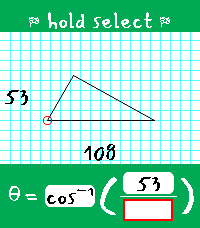
DailyTrigalarm is a habit-correcting alarm for heavy sleepers that forces you to solve for theta in right triangles. It's the perfect amount of thought to activate your brain in the morning! ## The Pitch ### Simple The alarm setter is only one page. You can only set one alarm. There is no snooze, there is no weekly schedule, and there is no way to disable the alarm (you'll always have one set - every day - like it or not). ### Persistent The alarm goes off at least twice. The first time, you must solve a triangle to silence the alarm. The second time, you must do it again, but within a strict time limit (and no constant vibration). Fail to solve it within the time limit? The alarm is scheduled for a third time. This process continues until you solve within the time limit - this is to prove you managed to stay awake between alarms before allowing it to be fully disarmed. Even if you force-quit Trigalarm, it will shortly re-open to continue nagging you. ### Adaptable Trigalarm is meant to be adapted to your needs, and you should adjust its settings as you progress on your sleep journey. For example, as your trig skills improve, you may want to lower the time limit for the disarming alarm. You can also adjust the gap between alarms to account for how quickly you find yourself getting out of bed. Perhaps the most unique, Trigalarm features optional Pavlok API integration to punish you via minor electrocution if you fall back asleep, force-quit the app, or attempt to overwrite your active alarm cycle. ## Learn the Lingo - Main alarm - The first alarm that goes off; comes with continuous vibration and does not disarm Trigalarm when solved. If Pavlok integration is enabled, this alarm can zap the user after a configurable amount of time if they do not respond. Solving this alarm will schedule an awareness alarm. - Awareness alarm - Any subsequent alarm after the main alarm has been solved; comes with only one brief vibration to indicate to the user it has opened. It has a configurable time limit it must be solved within to disarm Trigalarm. If the time limit expires, it will begin vibrations (and optionally Pavlok zaps), and once solved, it will schedule another awareness alarm. ## Tips & Tricks - When you successfully disarm the alarm, you are prompted with the options to either exit and keep the same alarm time for tomorrow, or to select a new time. If choosing the latter, whatever time you select will assume you mean tomorrow. This avoids situations where you wake up at 6 on a Friday, set an alarm intended for 9 on Saturday, and end up with your wrist buzzing in three hours! - If you are stuck waiting for an awareness alarm or there is a bug that schedules an alarm incorrectly, there is a "Reset Alarm" button in the phone-side settings that will set your alarm to 00:00.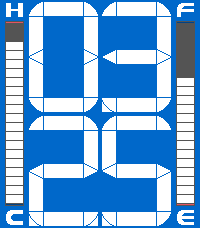 20
20Civic Segments
FacesA highly configurable clone of the beautiful 8th gen Honda Civic driver display assembly. The time font was carefully crafted to resemble the segmented display on the 8th gen Civic speedometer as closely as possible, using the full resolution of the PT2 to achieve maximum accuracy. The fuel gauge tracks your battery (including a low fuel indicator) and the temperature gauge gives you a relative idea of the temperature at your location. With a flick of your wrist, you can be reminded of the date. The face features built-in color presets for standard and Si Civics, as well as presets to match the blue/red colors of some PT2 models/bands. The dark presets take advantage of the RGB backlight for a unique effect. Want something more personal? Everything is individually configurable, including the color of everything you see, from the tiny accent lines on the side bars to the backlight LED. Beyond colors, the range of the temperature gauge is configurable as well as what battery percentage is worthy of a low fuel warning. Some optional features include the display of unlit segments behind the time, timeline peek support (minutes shrink to fit the timeline event info), shake to see the date (configurable timeout), and hour/month color shift on BT disconnect. Disabling optional features does actually improve efficiency (disabling peek support avoids loading the second font, setting date timeout to 0 unsubscribes from accelerometer events, etc.). Warning light legend: - Lit "E" and "F" icons: low fuel (battery) - Lit "C" and "H" icons: temperature fetch failure - Lit hour/month digits: BT connection lost (this feature is off by default)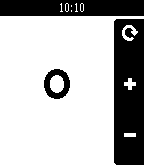 16
16REcounter
Tools & UtilitiesWhy? Because, in an era where a simple counter app would likely be left up to the AI overlords, I'd rather just fork something some guy made in 2014 and add touch support. This fork of the original adds support for all current and past Pebbles and enables touch support for incrementing the counter. This ended up being a pretty cool micro-project, as I learned about how the Pebble SDK has changed over the years. Immediately upon porting to the new SDK, there were various things that didn't quite look like they used to. This includes the lack of a status bar, the lack of margin&rounded corners on the action bar, the inability to render the previously valid menu icon, and the weird way bitmaps used to work regarding color and translucency. I addressed all of these to preserve the legacy Pebble SDK look with this app! In addition to Emery+touch support, this version of the app also supports all other Pebbles. Original app by Matthew Bauer.
 23
231 More Episode
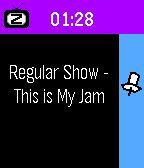
Daily"#^%$! I fell asleep and woke up watching a different season! What was the last episode I saw?!" - You, probably Well now your Pebble smartwatch can tell you! This app uses your Pebble Health data to match the time you fell asleep with your Jellyfin/Plex watch history. You can even track what you fell asleep to each night on your past timeline! Simply provide your Jellyfin/Plex (Tautulli) API key+URL in settings and let your Pebble keep track! The app changes themes automatically to match your streaming platform of choice. Due to limitations of Pebble sleep data retention, it can only show data for your most recent sleep session, and it has to be within the last day, so be sure to launch the app the day you wake up from your binge! WARNING: Jellyfin is strongly encouraged! Plex support requires installing Tautulli since the official API doesn't seem to want to return watch history (unless you have Plex Pass?).
 16
16Subnet Helper
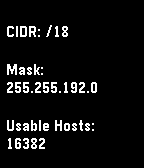
Tools & UtilitiesRemember subnets on your wrist, not in your head. Main purpose is translating between CIDR notation and traditional masks. Also shows some other useful info, especially on Chalk, Emery, and Gabbro.
 11
11Maan On My Wrist XL
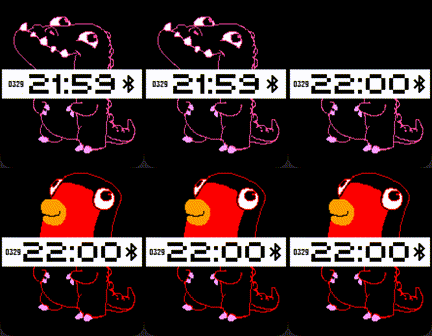
FacesThis is an unofficial and greatly expanded port of the "Maan On My Wrist" watchface to all color Pebbles, including the new Pebble Time 2/Round 2. Every half hour, one half of the creature will swap with another! Hundreds of combinations are possible. Differences From The Original: - Re-scaled to look better on the larger displays of the Pebble Time/Round 2 - Some of the extra screen space is used to display the date and Bluetooth status - Original creature part modifications - Some creature parts that resulted in broken-looking creatures were overhauled - Any creature parts that previously had cut-off details to fit on the smaller display have been extended - Some creature parts removed by the original developer (to conserve space) have been re-added - Most creature parts now have manually placed accent colors - Creature parts are now dynamically and randomly re-colored when loaded in - When swapping, creature parts now enter on the opposite side they exit from - This port is not compatible with black&white Pebbles - The original "Maan On My Wrist" is still perfectly silly on b&w screens! Credits: Original version: https://apps.rebble.io/en_US/application/557724772d93bc0eae00004c?native=false&query=maan§ion=watchfaces Art originally by Manuel van der Graaf; adapted by me