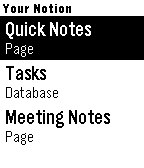
Capture notes by voice and run your Notion — right from your wrist.

Notion Notes turns your Pebble into a voice-powered remote for Notion. Speak a
thought, tick off a task, or open a page — all in a couple of button presses.

🎙 Voice capture
Press, speak, confirm. Your words are saved straight to the Notion page or
database you choose — a new note, a new task, done in seconds.

🗂 Your whole workspace, automatically
Every page and database you share with the app just shows up. No URLs to copy,
no IDs to paste — pick a target and go.

✅ Check things off
Tick to-dos, checkbox columns, and status fields (Not started → Done) directly
from your wrist. Your changes sync to Notion instantly.

🧭 Drill in
Open databases to browse their rows, step into sub-pages, and dig into a row to
see and edit the content inside it.

📝 Reads real pages
Pages that mix notes, lists, and tasks stay readable — items are grouped into
Tasks, Pages, and Notes so nothing turns into a wall of text.

🗑 Manage on the go
Long-press any item for quick actions: open it, or delete it (safely — deleted
items go to Notion's trash and can be restored).

Set up in a minute
Create a Notion integration, paste the API key into the app settings, and share
the pages you want. That's the whole setup.

Your watch. Your Notion. Hands-free.