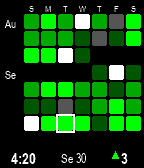
GitFaced brings your GitHub commit activity directly to your wrist on the Pebble Time 2 (Emery). Designed specifically for
 builders, developers, and open-source contributors who never want to break a streak.

🟩 Live 7×7 Contribution Heatmap

 - 49-Day Calendar Grid: Sunday–Saturday columns with calendar month markers and day-of-week headers.
 - Accurate Colors: Native Pebble 64-color palette mapped to GitHub's contribution levels.
 - Signature Visuals:
     - Red ✕ on past zero-commit days to keep you accountable.
     - Subtle hollow ghost outlines for upcoming days in the current month.
     - High-contrast outline highlighting Today.
 - Timezone-Exact: Syncs directly to your local calendar date so your commits always land on the right day.

🔋 Dynamic Battery Status Bar (New in v1.9.2!)

 - Continuous, edge-to-edge color-shifting progress bar separating the grid and status bar:
     - 🟩 80% – 100%: Dark Green
     - 🟢 50% – 79%: Lime Green
     - 🟧 30% – 49%: Orange
     - 🟥 10% – 29%: Sunset Orange
     - 🛑 < 10%: Dark Candy Apple Red
     - ⚡ Charging: Glowing Cyan

📊 Interactive Stats & Sparkline View

 - Tap the screen or flick your wrist to reveal the detailed stats overlay:
     - Current Streak (consecutive commit days)
     - 7-Day Total commits
     - Today’s Count
     - ▲ / ▼ vs. Last Month comparison
     - Multi-Week Sparkline History Chart (configurable from 1 to 7 weeks)
 - Auto-Dismiss: Configurable timer (5s, 10s, 15s) or tap/flick to dismiss.

⚡ Smart Battery Saver & Background Refresh

 - Intelligent Dynamic Refresh: Scales network calls to your watch battery level (hourly on charger, 2h above 50%, 6h above 20%,
   pauses below 20%).
 - Manual & Fixed Intervals: Select from Smart Saver, 15m, 30m, 1h, 2h, 6h, or Manual Only.
 - On-Demand Fetch: Tapping or flicking automatically pulls fresh data if older than 15 minutes.

🎨 Customization & Themes

 - Choose between Dark Theme and Light Theme.
 - Crisp, hand-hinted Pebble system typography.
 - 49-day offline persistent cache. Your data is always there even without phone connection.

 ─────

⚙️ Configuration & Settings

 Accessible via the Pebble mobile app (Locker → GitFaced → Settings):

1. GitHub Account
 - Username: Your GitHub username to fetch public contributions.
 - GitHub Token (Optional): A Personal Access Token (PAT) with read:user scope. Required if you want to include private
   contributions or avoid public API rate limits.

2. Refresh & Battery
 - Refresh Mode:
     - Smart Battery Saver (Recommended): Dynamically adjusts background fetch intervals based on watch battery level (every 1 hr
       while charging, every 2 hrs when >50%, every 6 hrs when >20%, and pauses background fetches below 20% to conserve power).
     - Fixed Intervals: Choose Every 15 Minutes, 30 Minutes, 1 Hour, 2 Hours, or 6 Hours.
     - Manual Only: Never fetches in the background; only updates on startup or when you tap/flick.
     - Tip: Tapping the grid or flicking to open stats always triggers a fresh fetch if data is older than 15 minutes.

3. Appearance
 - Light Theme Toggle:
     - Off (Default): Classic dark theme — deep black background with crisp white typography and vivid green tiles.
     - On: Clean light theme — white background with black typography and high-contrast dark gray future cell outlines.

4. Stats Screen Overlay
 - Auto-Dismiss Timeout:
     - Flick or Tap (No Timeout): Overlay stays open until you tap the screen or flick your wrist again.
     - 5, 10, or 15 Seconds: Automatically dismisses itself back to the main watchface after a quick glance.
 - Chart History:
     - Configurable duration for the bottom sparkline graph: select anywhere from 1 Week up to 7 Weeks of daily commit trends.