 18
18@MorseCode for Pebble
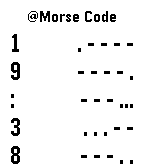
Tools & UtilitiesWere you in a situation where you need to check the time discreetly? For example, when you are on date or in a movie theater where you can't check the time because it is rude or feel uncomfortable. @Morse Code for Pebble is here to help. It will vibrate and tell the time in Morse Code. (International Morse Code) 1 = . - - - - 2 = . . - - - 3 = . . . - - 4 = . . . . - 5 = . . . . . 6 = - . . . . 7 = - - . . . 8 = - - - . . 9 = - - - - . 0 = - - - - - : = - - - . . . @Morse Code for Pebble will vibrate was soon as you launch the Watchapp and displays the time with Morse Code. Assign the @Morse Code to a Quick Launch button will be the most discreet. You can also press Up/Down/Select button to vibrate to tell time again. What's more, you can use this Watchapp as an educational Morse Code learning tool.
 184
184UPIt Pebble Pro for UP/UP24®
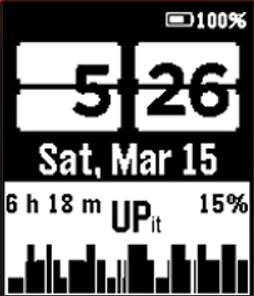
Health & FitnessAndroid Widget with Pebble smartwatch support for Jawbone® UP and UP24 Now you can have a Pebble watchface or watchapp with UP/UP24 data shown using this widget. Your Pebble acts like a mini dashboard for your UP/UP24! The widgets are plugin for Pebble Canvas. Please install Pebble Canvas. Using the Pebble Canvas, you can create new dynamic watchface or watchapp with your UP/UP24 data.
 166
166FitIt Pebble Pro for FitBit®
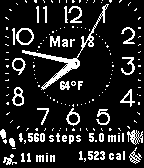
Health & FitnessAndroid Widget with Pebble smartwatch support for Fitbit® Now you can have a Pebble watchface or watchapp with Fitbit data shown using this widget. Your Pebble acts like a mini dashboard for your Fitbit wristband! The widgets are plugin for Pebble Canvas. Please install Pebble Canvas. you can create new dynamic watchface or watch app with your data & images.