The Pebble Appstore changes based on your specific choices. Use the options below to look around!
Pebble Original
Pebble Time
Pebble Time Round
Pebble 2
Pebble 2 Duo
Pebble Time 2
Pebble Round 2
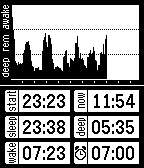
A sleep tracker which runs only on your Pebble. No companion app required. Tracks your movement over a 10 hour period and displays a graph and some statistics. Set an alarm that will vibrate when it detects movement up to 30 minutes prior to the alarm time to wake you up not during REM sleep. [HOW TO USE] Hold up to reset the data to blank. Press up after reset to start tracking Press up again to stop tracking Hold down to set alarm
Texter allows you to create a tree of messages which is then sent to your Pebble and allows you to shoot off quick replies right from your watch. Now also supports typing messages on your Pebble from scratch. Input based on Tertiary Text by VGMoose Navigation ---------------- The app uses a navigation system whereby the action in bold is performed on a single click and the action not in bold is performed on a long press of the key. The back button returns you to the previous list. How to Use ---------------- When the app is launched you are given the option to message either the last person who you had a conversation with or the first person in your favourite list. A long press on either takes you to a list of 6. You can then navigate the tree of messages which you can customise on the companion app. Anything prefixed with a + means it is a sub menu. Anything else is a message that when you click will send the relevant message to the person you selected. Text Input ----------------- While in text input mode the inputs are changes to: * Single button press take you through the letter tree * Hold up to switch to caps and symbols * Hold down to go back to previous tree level * Hold select to send the message --- This app is open source: https://github.com/tocsick/texter Tertiary Text: https://github.com/vgmoose/tertiary_text