 17
17KANJI DOKEI
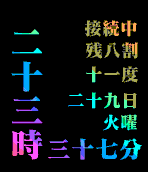
FacesJapanese Kanji character watch with colorful font <Features> - Kanji character time and informations - Selectable colorful color theme - Date and week of day - Current temperature - Connection status and Battery status - Vibe and Dialog Hourly - Vibe and dialog on disconnection - Starter Guide on Setting Page <Configurations> - Color Theme - Kanji Number font type - Disconnect phone status display - Battery level display - Temperature display - Day of month display - Day of week display - Vibe hourly (you can also setting ahead of time, start/end hour) (vibes also obey a silent mode) - Disconnect phone Vibe - Unit of Temperature - Temperature Location type
 42
42CIRCLE LINE
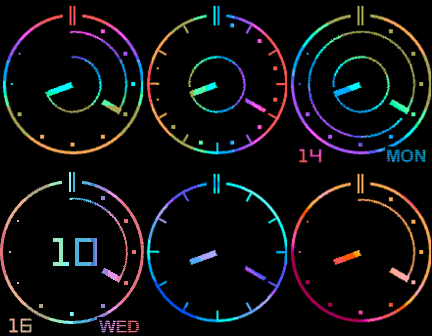
FacesSimple but Colorful Analog Watch. Features - Selectable colorful color theme - Selectable hour and minute arms - Battery status segments on 1 to 10 o'clock markers - Connection status icon on 12 o'clock mark (second screen shot is disconnected) - vibe and dialog hourly - vibe and dialog on disconnection Configurations - Color Theme - Hour markers display - Minute arm type - Hour arm type - Day of month display - Day of week display - Battery level display - Disconnect phone status display - Vibe hourly (you can also setting ahead of time, start/end hour) - Disconnect phone Vibe
 162
162COLOR DIGITS
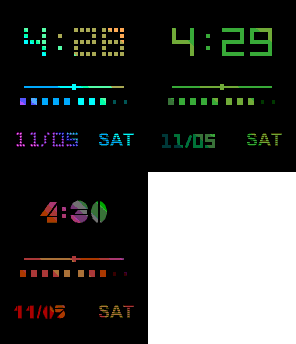
FacesSimple but Colorful Digital watch. Features - staid and colorful color theme - digital font type - phone connection status icon - battery level with 10 segments Configurations - Color Theme - Font Type - Monty/Day format - Battery Level display - Disconnect phone status display - Vibe hourly (you can also setting ahead of time, start/end hour) - Disconnect phone Vibe
 21
21FULL OF PIXELS
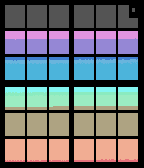
FacesMy god, It's full of Pixels! Full color watch face with simple design. 12x12 matrix pixels shows hours x minutes. Row means minutes 0 to 60 with 5min step. Column means hour 0(12) to 11. 1st image shows 7:25 2nd image shows 11:55 3rd image shows 3:05 You can also available following settings. - Color Theme - Pixel Size - Battery Level (show with upper gray rows number/ second image means 80%) - Disconnect phone status (show with bottom gray 2 rows) - Vibe hourly (you can also setting ahead of time, start/end hour) - Disconnect Vibe - Display Digit Time on Shake twice
 25
25Multi Time Viewer
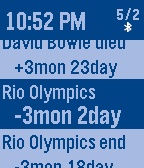
DailyMulti Time Viewer is a versatile time event viewer. This App show remaining time/day and elapsed time/day of each time event. You can use this app multi purpose like as - Daily/Weekly/Monthly routine time scheduler - Next Train time viewer - iCalender event viewer - World time clock Time type of event * Periodical Time - Daily, Weekly, Monthly, Yearly * Absolute Time * Offset Time - offset from current UTC time How to use 1. Create plain text Time List file. 2. Upload the Time List file to Web file server like as Dropbox. 3. Open SETTING Page and input Published URL of the Time List. 4. Push Save button and Pebble load the Time List. For more detail of Time List , Please look Samples on SETTING Page Key Operation * On Normal Screen - Up/Down to scroll items - Enter to open Menu (Title Menu on Title, General Menu on Item) - Long push Enter to do something which assined in menu * On Menu - Up/Down to scroll menu - Enter to select/change item - Back to quit menu Title Menu items - Load Time List from Web server - Delete Title from Pebble - NextTrain Holiday setting General Menu items - Goto Next item (may need to be sort by time) - Goto Top item - Push Timeline pin - Toggle Alarm (vibe) the item On/Off - Alarm Mode - Days format - Periodic Time treat as past or future - Sort items type - Display Second - Add Alarm item near this item - Add Alarm item near current time - Wakeup App by Alarm - Highlighting Item time Font size - Color Thema - Assign Long Push - Date format - Time Type - Disconnect Vibe
 48
48Walker
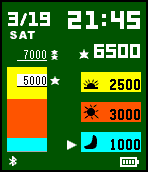
FacesWatch face for easy walkers! You can show current step count with stacked bar chart. * features of steps - display current steps - display stacked bar chart of steps of while morning(0:00-10:00), daytime(10:00-17:00), night(17:00-24:00) - you can set two target , normal level and high level - you can select average steps instead of normal level target - you can know if achieve target with STAR - you can enable vibe at achieve target * general features - you can select color theme - you can select time time 12H or 24H - you can select date format Mon/day or Day/Mon - display bluetooth connection status - you can enable vibe on disconnect - display battery level status - you can enable vibe hourly - you can select ahead of time for vibe hourly - you can select start and end hour of vibe hourly - pop up message window on vibe at hourly, disconnect, achieve target
 21
21Checklist with Web
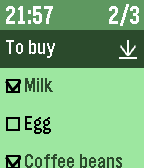
Tools & UtilitiesDo you have checklist on Wunderlist or CarbonFin outliner or dropbox ? This app import your checklist data from Wunderlist or CarbonFin outliner, or plain text list on web file server like as dropbox. * CarbonFin outliner is an iOS outliner App. * Features - import checklist from web service , Wunderlist or CarbonFin Outliner or dropbox . - can reload recent 5 checklists quickly - display current time - display checked item number and all item number * How to operate - select cursor with up/down button - at item line, check/uncheck with select button - at checklist name line, reload with select button, delete with long push select button - at bottom line of named "Delete Checked", delete all checked items with select button * How to import checklist from web - see config file of this App * Note - Please set checklist URL again after version up from ver.1.3 or lower .
 51
51MarkHand3
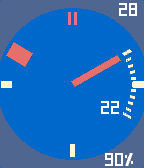
FacesMarkHand3 is a very configurable analog&digital watch. This watchface is a successor of MarkHand2. Additional features from MarkHand2 - background circle image - vibe hourly offset (0 to -10min) - vibe hourly available time - three user preset times to vibe - three user configuration settings to save and load Configurations [General Setting] - apply presets - load user settings (none/slot1/slot2/slot3) --- detail --- [FACE] - color theme (black/white/Blue/Green/Yellow/Brown/Pink...) - background circle (off/white/black/blue/red...) - hour dots number (12/6/4/1) - 10 minutes dots display (off/on) [ARM] - minute arm display (always/off/at shaked) - hour arm movement (smooth/step hour/half smooth) - hour arm layer (upper/lower) [DIGITS] - date display (off/always/at shaked) - day of week display (off/always/at shaked) - digital time display(off/always/at shaked) - second display (off/always/at shaked) - digital time type (12H/24H) [INDICATOR] - battery indication icon display (off/always/at shaked/at few level/at few or shaked) - battery indicator type (icon/percent) - Bluetooth indication icon display (off/always/at shaked/at disconnected/at disc. or shaked) [VIBES] - vibe hourly (off/on) - vibe hourly offset (0min/-1min..-10min) - vibe hourly on time from (0..23) to (0..23) - vibe at connection status changed (off/on) - vibe at time1 (0..23):(0..59) (off/on) - vibe at time2 .. - vibe at time3 .. [USER SETTINGS] - save user settings (none/slot1/slot2/slot3) - config string (for backup/restore with string)
 121
121MOYORIEKI
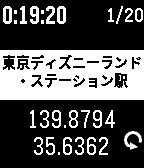
Tools & UtilitiesMOYORIEKI shows you nearest train station. This app functions only in Japan. features: - display 2 nearest station name and distance - selectable language Japanese or English - you can reload geo info with button - you can change font size of station name - you can select showing on/off of distance - you can save geo information and push to notification or timeline(PT/PTS) - you can get saved informations up to 20 on configuration page displays: (*1 : 2nd display mode when up button clicked) - 1st line -- display current time -- display elapsed time from recent time of information loaded -- saved history numbers *1 - 2nd line -- phone disconnected icon -- error status message - 3rd line -- most nearest station name - 4th line -- distance and direction to 1st station - 5th line -- 2nd nearest station name -- longitude *1 - 6th line -- distance and direction to 2nd station -- latitude *1 -- request icon button: - up button -- change display mode -- change from/to Station with long press - middle button -- change font size of station name -- toggle showing of distance with long press - down button -- reload geo information -- save current information with long press Japanese: 電車に乗っていて、ふと今どこの駅(の近く)なのか知りたくなったことはありませんか? このアプリは最寄り駅を表示するアプリです。 一番近い駅と2つ目に近い駅の名前と距離、方向を表示します。 また、現在時刻と最後に情報取得してからの経過時間を表示します。 上ボタンで画面モード切り替え、長押しで駅まで/駅から切り替え、 中ボタンで駅名の文字サイズ切り替え、長押しで距離表示有無切り替え、 下ボタンで情報の再取得、長押しで情報の保存を行えます。 情報の保存は notificationやtimelineにプッシュでき、さらに configuration page で過去最大20個の保存した情報をGoogle mymap に読み込める CSV形式やメモ形式で取り出せます。
 14
14okotoba
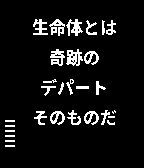
Gamesokotoba is a Japanese joke app which generate words in random. Japanese language pack is needed. how to use down button .. generate new words middle button .. change interval time of generation 10sec, 30sec, 1min, none up button .. change display time on and off Japanese 今日のお言葉、或は、哲学的時計 これは言葉遊びのアプリです。 ランダムに言葉を組み合わせ、意味ありげなお言葉を作り出します。 <操作方法> 上ボタン:時刻表示切替 on/off 中央ボタン:自動生成間隔変更 10秒/30秒/60秒/無し 下ボタン:手動生成 <日本語Language pack> このアプリの動作には日本語Language pack のインストールが必要です。 下記2種類の日本語Language pack で動作を確認しています。 日本語・中国語言語パック pblp_zhs_zht_ja_v5_bold_font_weight.pbl 日本語言語パック pbJapanese_j06.pbl 言語パックのインストール方法はネットで検索してください。
 24
24SIMON Vibes
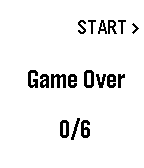
GamesSIMON Vibes is simple game of vibration. you can play without looking the screen. How to playing 1. push up button to start 2. feel vibration short 3 vibration as header short or long vibration sequence to replay short 3 vibration as trailer 3. replay vibration sequence with button middle button for short vibration down button for long vibration ex.) vibration pattern * * * ... * - - ... * * * push button middle, down, down 4. sequence will become longer, you have to replay sequence accurate.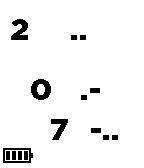 61
61Feel The Time
Tools & UtilitiesDon't look. Feel it. Feel the time with your Pebble. When you can't glance the watch like while meeting or presentation or hair cutting or dentist, feel the time vibration with this app. A step for master the feeling is following. <setup> 1. download this app. 2. register this app as QUICK LAUNCH of up(or down) button long press. (this is option) 3. use SETTINGS option for configuration (this is option) <how to use> 3. long press up (or down) button to launch this app. it feels startup vibes. 4. push up button and feel vibe to know the current hour. 5. push middle button and feel vibe to know 10 digit of the current minute. 6. push down button and feel vibe to know 1 digit of the current minute. 7. push back button to quit this app. <configuration> - vibe length : normal/short/long - vibe clock : off/every hour/every 30min - pre clock vibe :off/5min/10min <vibe pattern> vibe pattern consist of long vibe and short vibe. long vibe means 5, short vibe means 1. only 0 is special pattern. all patterns are following. 0 .- 1 . 2 .. 3 ... 4 .... 5 - 6 -. 7 -.. 8 -... 9 -.... 10 -- 11 --.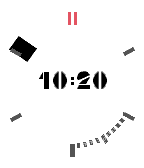 33
33MarkHand2
FacesNotice: If you have Pebble Time, try newer version MarkHand3. MarkHand 2 is a very configurable analog+digital watch. Analog watch consist of hour mark and minute arm. Dynamic 10 minutes dots appears nearby minutes arm. Its helps to know accurate minutes and keep the face simple. Most of UI parts can be hide and you can keep the watch face simple. And most of UI parts can show when you shake your arm and you can see more information at 5 seconds. features which you can config are as follows. [FACE] - color thema (black/white/Blue/Green/Yellow/Brown/Pink) - hour dots number (12/6/4/1) - 10 minutes dots display (off/on) [ARM] - minute arm display (always/off/at shaked) - hour arm movement (smooth/step hour/half smooth) - hour arm layer (upper/lower) [DIGITS] - date display (off/always/at shaked) - day of week display (off/always/at shaked) - digital time display(off/always/at shaked) - second display (off/always/at shaked) - digital time type (12H/24H) - date & time font type (7seg/SF) [INDICATOR] - battery indication icon display (off/always/at shaked) - battery indicator type (icon/percent) - Bluetooth indication icon display (off/always/at shaked) [VIBES] - vibe at every 0 minute (off/on) - vibe at connection status changed (off/on)
 172
172Big Calendar App
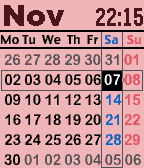
Tools & UtilitiesThis is a monthly calendar viewer with digital watch. you can select other months with up/down key. Also you can show following informations with enter key. - time with second - weather condition, temperature, wind speed - bluetooth connection status - battery remaining level - weather forecast with down key If you frequently use this app, try to register at quick launch. key operation - up : previous month - enter: toggle information display mode/ return current month - down: next month configuration - color theme - date format - week beginning with sunday/monday - time type 12H/24H - time second display on/off - gray days of prev/next month display on/off - units type of temperature and wind speed C&meter per second/F&mile per hour - weather location type gps/city name/zip code/lat&lon Note: you can't select with date format with Day of week and second display on.
 35
35Big Calendar Color
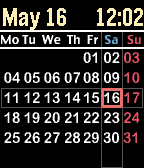
FacesBig Calendar watchface for pebble time. check it out watch app version "Big Calendar App". configurations: - color thema - date format - 12H/24H - start with sunday/monday
 22
22Big Calendar
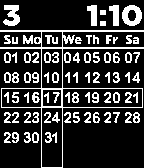
FacesThis is easy looking big font calendar watchface. customizable functions - background color - month/date format - time type - monday first/sunday first ver.1.2 - add monday first config option ver.1.1 - add date format variation ( MM/DD, DD/MM, Mon/DD ) - modify font size of date and time
 14
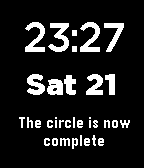
14Force Phrase Watch
FacesThis watchface is for the Star Wars fan. The phrase change per minute. May the Force be with you ! ver.1.4 - fix garbled character phrase ver.1.3 - add some of phrases ver.1.2 - fix day line feed bug ver.1.1 - change phrase selection as random - add few new phrase
 21
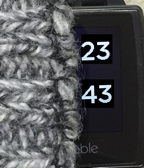
21InSleeve watch
FacesDo you wear a long sleeve clothes? Try the InSleeve watch to glance time without pull up your sleeves. you can select for right wrist or left wrist. ver.1.1 - add option of display date when shaked
 5
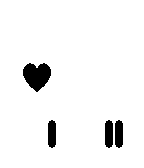
5HEART Cell Clock
FacesThis is heart version of the CELL Clock. Left column is hour, right column is minute. Upper heart means 10, middle line means 5, lower line means 1. screen shot 1st.. 10:48 2nd.. 11:02 3rd.. 22:50
 34
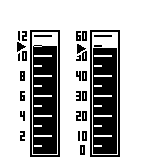
34Measuring Cylinder Watch
FacesThis is measuring cylinder faced watch. configure it as you like. ver.1.5 - add setting of display arrows ver.1.4 - add battery remain value in third cylinder selection ver.1.3 - fix the bug of forget setting option ver.1.2 - add setting of display the day of month