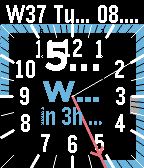
Turn your wrist into a live visual timeline - Have your Goal in Focus.

Features:
  - Live timetrack view (Dynamic 12-hour calendar timeline)
  - Support Google calendar sync (Direct integration via official API)
  - Support .ics calendar links
  - Recurring habits (Local repeating routines alongside calendar events)
  - Fully customizable layout (Configure outer and inner display slots)
  - Full Pebble color themes (Customize background, ticks, tracks, and highlights)
  - Text outline toggle (For maximum readability against any background)
  - Sun timetrack pins (Sunrise and sunset times via OpenMeteo)
  - Weather timetrack pins
  - No companion app required.
  - Circular or square watchface
  - Themes (Save your layouts and configurations)

This watchface is made for Emery and Gabbro.

Please contact me below if you find bugs or want to request a feature.