 9
9igi-anniversary
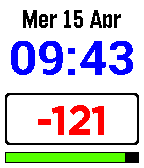
FacesA native Pebble watchface featuring a digital clock, multilingual date support, a customizable countdown, and weather integration. Features Clock and Date: Time and date display with support for 5 languages (Italian, English, French, German, Spanish). Countdown: Calculates days remaining until a specific event (Christmas, Easter, New Year, Mid-August) or a custom target date. Interactive Weather: Triggered by a wrist gesture (tap/shake). Displays temperature and weather icons (sun, clouds, rain, snow) via OpenWeatherMap. Night Mode: Automatic color inversion between 8:00 PM and 7:00 AM for better readability and eye comfort. Battery Monitoring: Dynamic colored bar (Green > 50%, Yellow > 20%, Red < 20%) with a charging indicator. Bluetooth Status: Dedicated icon that appears upon disconnection, accompanied by a short vibration pulse. Compatibility: Supports all major Pebble platforms: Aplite, Basalt, Chalk, Diorite, Emery, Flint, and Gabbro. Configuration The watchface is configurable via the Pebble app on your smartphone: Interface language selection. Predefined event selection or custom target date entry. City and OpenWeatherMap API Key input for weather services.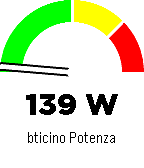 11
11igi-Assistant
RemotesA comprehensive control interface for Home Assistant on your Pebble smartwatch. Monitor sensors, control lights, manage music, and chat with your home, all from your wrist with a high-contrast, readable interface. Key Features Sensor Monitoring: Display a specific sensor (e.g., car battery, power usage) directly on the main screen with a visual gauge and large, readable fonts. Light Control: Quick menu to toggle selected lights on and off. Home Assistant Chat: Send and receive text messages to Home Assistant (requires input_text). Supports voice dictation (on microphone-enabled models) and customizable canned messages. Music Control: Control active media players (Play/Pause, Volume, Next/Prev Track). Accessible Design: High-contrast black-on-white interface with color support for modern Pebble models (Time, Time Round, P2). Home Assistant Requirements To use all features, add the following to your configuration.yaml or create the helpers via UI: Chat: Create an input_text entity named pebble_chat. input_text: pebble_chat: name: Pebble Chat initial: "" max: 255 CORS (Important for Configuration): To allow the Pebble app configuration page to fetch your lights list, you must enable CORS: http: cors_allowed_origins: - "*" App Configuration Open the app settings within the Pebble mobile app. Enter your Home Assistant URL (e.g., https://your-home.duckdns.org or local IP if on WiFi). Enter a Long-Lived Access Token (create one in your HA User Profile -> Long-Lived Access Tokens). Enter your Nickname for the chat. Select the Lights you want to control and the Sensor to display on the home screen. Note: If the configuration page fails to load your entities, ensure CORS is correctly configured in Home Assistant (see requirements above). Controls Main Screen: UP: Open Music Control. SELECT: Open Lights Menu. DOWN: Open Chat. Lights Menu: UP/DOWN: Scroll through lights. SELECT: Toggle On/Off. SHAKE (Wrist): Toggle the currently selected light. Chat: UP/DOWN: Scroll through message history. SELECT: Open dictation or canned messages menu. Music: UP/DOWN (Click): Previous / Next Track. UP/DOWN (Long Press): Volume Up / Down. SELECT: Play / Pause. 7
7igiwatch
FacesA dynamic and minimalist watchface for Pebble smartwatches that adapts to your viewing angle using the accelerometer. Features Smart Orientation: The time display rotates to remain readable whether you are holding your arm upright, tilted left, or tilted right. Interactive Control: Uses the accelerometer on-demand to save battery. Clean Design: High-contrast typography using Avenir Next. How to Use Standard View: By default, the watchface displays the time in a standard vertical orientation. Activate Rotation: Double tap the watch (or shake your wrist twice quickly) to enter calibration mode. Tilt: A small indicator dot will appear. Tilt your wrist left or right to adjust the orientation. Read: After 5 seconds, the dot disappears and the time is displayed in the new orientation.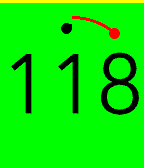 7
7igitimer-graphic-big
Tools & UtilitiesTimer with nice animations
 8
8igitimer-graphic
Tools & UtilitiesA simple and functional timer for Pebble smartwatches, featuring a high-contrast interface and quick controls. Button Functions UP Button Single Press: Adds 1 minute to the timer. Long Press: Adds 5 minutes to the timer. Note: Incrementing resets seconds to zero. SELECT Button (Center) Single Press: PAUSES or RESUMES the countdown. Long Press: RESTARTS the timer using the last set total duration. DOWN Button Single Press: Subtracts 1 minute from the timer. Long Press: Subtracts 5 minutes from the timer. Note: If the time reaches zero, the timer stops.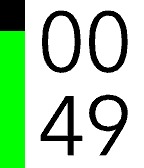 12
12igitimer
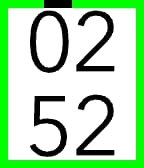
Tools & UtilitiesA simple and functional timer for Pebble smartwatches, featuring a high-contrast interface and quick controls. Button Functions UP Button Single Press: Adds 1 minute to the timer. Long Press: Adds 5 minutes to the timer. Note: Incrementing resets seconds to zero. SELECT Button (Center) Single Press: PAUSES or RESUMES the countdown. Long Press: RESTARTS the timer using the last set total duration. DOWN Button Single Press: Subtracts 1 minute from the timer. Long Press: Subtracts 5 minutes from the timer. Note: If the time reaches zero, the timer stops. User Interface Display: Minutes in the top half, Seconds in the bottom half. Progress Bar: A vertical bar on the left (green on black background) empties as time passes. Status: When paused, a pause icon appears in the center. When time expires, the watch vibrates.