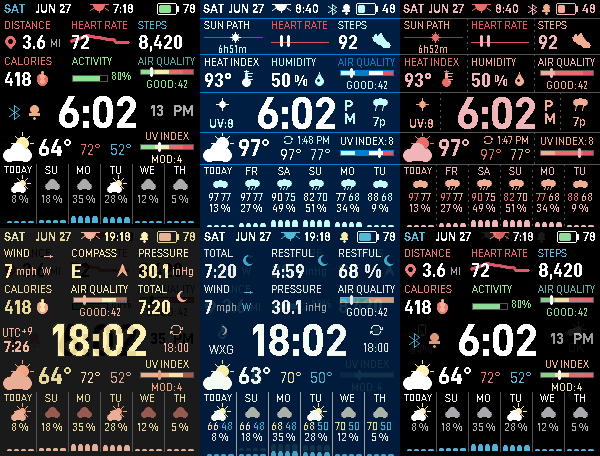
The Pebble Time 2 Watchface for Data Junkies!

DATALOAD turns your Pebble Time 2 into a fully customizable daily dashboard for health, activity, weather, air quality, precipitation forecasts, and more. Everything is organized into a dense but glanceable modular layout, with 12 distinct color themes and extensive control over what appears on screen.

The watchface and its complete feature set are free and will remain free.

HEALTH, ACTIVITY & LIVE METRICS
• Configure two metric rows with three columns each, for a total of six customizable slots. Available readings include distance, calories, calorie goal, active minutes, activity, steps, step goal, heart rate, compass, wind, barometric pressure, humidity, dew point, heat index or wind chill, air quality, PM2.5, total sleep, restful sleep, restful sleep percentage, sun path, and an alternate time zone
• Goal pace display that shows a marker for activity, steps-goal, and calorie-goal bars for where you should be by this time of day
• View live heart rate data with a sparkline of recent readings
• Display CGM data from Dexcom Share or Nightscout, including a glucose trend sparkline and customizable update interval
• Track daily activity with a progress bar based on your active-minutes goal
• Show walking distance in either miles or kilometers
• Set your usual sleep hours so watchface features adapt to your schedule

WEATHER & ENVIRONMENT
• View current conditions with a procedurally generated weather icon, current temperature, and today’s high and low
• Show either your weather location or the most recent update time above the daily high and low
• Display a UV Index gauge, plus PM2.5 and Air Quality Index gauges with color-coded risk levels
• Use WAQI monitor-based air-quality readings for more localized and frequently updated data
• Choose between an hourly precipitation chart for the next 12 hours or a six-day forecast with weather icons for each interval
• Customize the precipitation chart by displaying temperatures, hiding near-zero bars, replacing rain probability with humidity, scaling bars by humidity, or removing column dividers
• View a rotating ticker on the weather strip for important weather events expected within the next hour
• Receive severe weather alerts from the National Weather Service when available. International alert support is planned
• Show the next sunrise or sunset time in the top bar
• View the current moon phase within the nighttime procedural weather icon
• Use a live compass reading
• Track the sun’s path and remaining daylight hours

CLOCK, DATE, & STATUS
• Display scalable digital time with optional seconds and AM/PM
• Configure left-side and right-side detail slots with additional information, including:
   ◦ Temperature trend
   ◦ Air-quality trend
   ◦ Barometric pressure trend
   ◦ Next weather event
   ◦ Last weather update time
   ◦ Relative humidity
   ◦ Dew point
   ◦ Visibility
   ◦ Heat index or wind chill
   ◦ Alternate temperature, such as actual temperature when feels-like mode is enabled
   ◦ Week number
   ◦ Moon phase
   ◦ Alternate time zone
   ◦ Phone battery level
   ◦ Today’s peak UV Index
   ◦ Wind gust
   ◦ Cloud cover
   ◦ Measured precipitation in inches or millimeters
   ◦ Tomorrow's hi/lo temperatures
   ◦ Sunrise/sunset times (if you want more room in the status bar)
• Enable a 3-week calendar on the second page with the following options:
   ◦ ISO week numbers in the left gutter
   ◦ Dim past days
   ◦ Rainy-day dots from your cached forecast
   ◦ Public holidays (auto or manual country), with tint and optional outline
   ◦ Recurring marks: 1st & 15th, last of month, selected days of the month, or weekdays of the month
• View the day, date, watch battery level, Bluetooth connection, quiet-time status, and charging status
• Customize the top-bar date format with supported Pebble strftime specifiers
• Display separate mute and Bluetooth icons in the top bar
• Receive a double vibration when the Bluetooth connection is lost

WEATHER DATA & PROVIDERS
• Weather updates every 30 minutes by default using your phone’s GPS location
• Set a manual location instead when you do not want to keep location access enabled
• Weather data is cached on the watch and remains available after restarts
• Choose from the following weather providers:
   ◦ Open-Meteo, no API key required
   ◦ OpenWeather, API key required
   ◦ Weather Underground or The Weather Channel, API key required
• The US Air Quality Index is always sourced from Open-Meteo’s air-quality API

APPEARANCE & THEMES
• Choose light mode, dark mode, or automatic switching at sunrise and sunset
• Select from 12 color themes:
   ◦ Default
   ◦ Blueprint
   ◦ Night Vision
   ◦ Amber Console
   ◦ Radar
   ◦ NOAA Map
   ◦ Monochrome
   ◦ Eclipse
   ◦ Arctic
   ◦ Sunset
   ◦ Ocean
   ◦ OG Cobalt
• Assign a custom backlight color to each theme or use the watch’s system backlight color
• Add an optional second page that triggers on tap/flick and quickly cycle between additional sets of readings
• Enable Dark Room Mode during your configured sleep hours. The watchface switches to monochrome with a dim red backlight to reduce eyestrain in dark environments
• Add optional horizontal and vertical grid lines with solid, dashed, or dotted styling
• Minimal mode removes clutter and unwanted readouts to display only what you want

CUSTOMIZATION OPTIONS

Clock & Status
• 12-hour or 24-hour time
• Optional AM/PM indicator
• Three clock sizes
• Custom top-bar date format using strftime
• Larger or smaller top status bar
• Configurable left-side and right-side detail slots, including the option to leave the left side empty
• Alternate time-zone offset for clock and metric-row displays
• Optional sunrise or sunset time, mute icon, and Bluetooth icon in the top bar

Health & Activity
• Two customizable rows with three metric clusters each
• Optional second cluster page
• Custom active-minutes, step, and active-calorie goals
• Health Eco Mode
• Heart-rate sampling in automatic mode or at fixed intervals from one second to ten minutes
• Dexcom Share or Nightscout CGM configuration
• Custom CGM update interval

Weather
• GPS-based or manually entered weather location
• Display either the weather location or last update time above the daily high and low
• Optional UV Index gauge
• Configurable weather provider
• Weather update intervals from 15 minutes to four hours
• Optional feels-like or apparent temperatures
• Forecast intervals of 2, 4, 8, or 12 hours, plus a daily view
• Optional chart temperatures
• Humidity chart mode
• Option to hide empty precipitation bars
• Option to hide chart segment lines

Appearance & Controls
• Theme, light mode, dark mode, and automatic theme switching
• Theme-specific or system backlight color
• Dark Room Mode
   ◦ Auto-swaps watchface and RGB color to preserve circadian rhythm during quiet time/sleep hours
• Horizontal and vertical grid lines
• Adjustable compass redraw interval
• Deferred constant Bluetooth connection checks
• Mute vibrations during sleep hours or Quiet Time
• More responsive case-tap detection with adjustable sensitivity

Quick-Swap Profiles
• Save up to 10 custom profiles and switch between different configurations based on activity and use-case.
• Option to cycle through selected profiles with a double-tap/flick gesture

COMPATIBILITY
Pebble Time 2, Emery, only.

TROUBLESHOOTING
When the watchface becomes unresponsive, try the following:
• Uninstall DATALOAD from the watch
• Force close the Pebble app
• Clear the Pebble app’s cache
• Reopen the app and reinstall the watchface

This should resolve most unresponsive-watchface issues. Please report the problem if it continues after reinstalling.

Note: The tap/flick detection is not very reliable and is at the mercy of the firmware. Unfortunately, the SDK currently does not allow watchfaces to use touch input yet, otherwise I would have opted to use that first. If you're having issues, try turning on the "More reliable case taps/flicks" toggle in the GENERAL SETTINGS section of settings. It's still not perfect, but should be a bit more reliable until we get touch functionality on watchfaces.

FEEDBACK & SUPPORT
Please share any feature suggestions, glitches, bugs, or layout problems you encounter. I will try to add useful requests and resolve reported issues as quickly as possible.

Enjoying DATALOAD? Please tap the ❤️ above. It would be greatly appreciated.

You can also support the project here:
https://ko-fi.com/heje