The Pebble Appstore changes based on your specific choices. Use the options below to look around!
Pebble Original
Pebble Time
Pebble Time Round
Pebble 2
Pebble 2 Duo
Pebble Time 2
Pebble Round 2
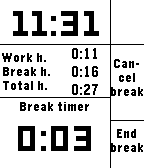
Work Tracker is an app to keep track of your hours and wages. When you start work you begin a new shift in the app. During your work you can keep track of how many hours you have worked, how many hours you spent on breaks and the total hours and wage you've earned during your shift. You can exit the app at any time during the shift and tend to other things. The app will continue with updated time values when you load it again. If you miss a shift or otherwise need to change the hours for the period, you can do so in the configure window. In the configure window you can also change other settings like the hourly pay and view the hours for the last period.
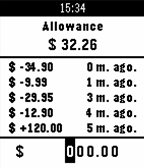
This app keeps track of your allowance. The select button cycles through the numbers in the amount you wish to enter. When you cycle past the last number the amount you entered will be subtracted from your allowance. To add funds to your allowance simply hold down the select button at any time to add the amount you entered. To enter the settings menu press and hold the up button. There you can change various settings, including the currency used. To clear the allowance amount and history press and hold the down button. You will be asked to confirm your choice.