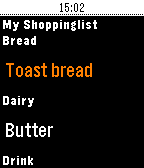
Try grocery shopping with your Pebble, it's perfect for keeping your hands free when you're shopping and speeds up the proces - and minimises the risk of dropping your phone!

Grosh is the first commercial grocery app that adds Pebble support. Grosh is like no other grocery shopping app you have seen, it comes with intelligent suggestions and orders your list according the the store layout.

How to get started:
1) Download the normal Grosh app on your phone (iOS, Android or web version) to get a FREE account that your watch app can connect to. Use the normal Grosh app to update and share your list before shopping.
2) Download Grosh for Pebble
3) Enter your Grosh account credentials by hitting the settings icon next to Grosh in your list of Pebble apps
4) Launch Grosh for Pebble. The list will be sorted, if your're in a store according to the layout.
5) Click the select button to mark items as purchased.
6) Shake the watch to check for updates to list, eg if partner added something to the list after you left home.
7) Long press select button to change list or modify quantity (set to 0 to delete item)
8) Use ""+ Add item"" to dictate a new item (requires microphone), including quantity eg. 5 milk

Grosh supports stores in 31 countries and 18 languages.

Grosh is built by a small team dedicated to bring you the best shopping app ever. We publish frequent free updates and would love your feedback. Get in touch via our homepage groshapp.com, our Facebook and Google+ pages called Groshapp or tweet us @groshapp.