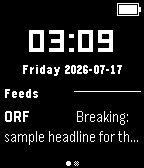
Calendar, weather, RSS/Atom feeds, and JSON — up to 4 rotating info panels on your watch face.

Infoface turns your watch face into a small live dashboard. Configure up to four independent info panels — calendar events, weather, RSS/Atom feeds, or a generic JSON source — and rotate between them with a wrist tap.

Requires the free Infoface Companion Android app (github.com/flurl/infoface-companion), which reads your calendar (and, if you enable them, weather/feeds/JSON) and serves it to the watch.
Features:

- Up to 4 configurable info panels: Calendar, Weather, RSS/Atom Feeds, generic JSON.
- Calendar panel groups events by day with day dividers, spans multi-day events, and shows up to a week ahead.
- Weather from Open-Meteo or MET Norway — no account needed for either.
- Battery, quiet-time, and Bluetooth-disconnect indicators (individually toggleable).
- Optional pagination for panels with more items than fit on one screen.
- Wrist-tap gestures (triple-tap to turn the page, quadruple-tap to rotate panels) — fully tunable from the watch's Settings screen, or turned off entirely.

A note on buttons: this listing is the standard build, which works on any Pebble running stock firmware. A separate build with quick-launch button support (rotate panels/turn pages with a button press, not just wrist taps) is available from the GitHub releases page — it requires a small firmware modification (https://github.com/flurl/PebbleOS/tree/feature/watchface-button-notify) and won't launch on stock firmware, which is why it isn't the default here.

Source code: https://github.com/flurl/infoface-watchface
Companion app: https://github.com/flurl/infoface-companion