Initially, this was designed for Pebble Steel, by placing the beautiful extra-large LCD time in the middle of Pebble Steel screen. Minor UI changes make it work for Time series too.

Functions:
•	Bluetooth disconnect vibration (Four long pulses, oh yeah)
•	Customizable text (Name your watch ^_^ Once you name it, you start getting attached to it. –Mike Wazowski, Monsters, Inc.)
•	Battery information and charging animation (Easier to read than percentage and icon)
•	Hourly weather information (Update every half hour and each load)
•	Temperature unit selection
•	Sunrise, sunset and weather location information
•	Full name of month and day, week number, day of year and time zone name.
•	Each of above information can be turn on/off individually

Please give a heart if you like it, so more chances other people can find it. Thanks.

Also thanks to these two open-source watchfaces: “Timly” and “Weather My Way”
Compiled with cloudpebble.net

Notes about weather provider:
OpenWeatherMap only has the current weather info, see the screenshot #4. A free API key is hard coded and shared for all users. Based on its spec, the limitation is max 60 calls per minute and Weather data update frequency is within 2 hours.
Highly recommend the WUnderground hourly service. It is more accurate and stable, but you need to apply your own free develop API key. Limitation is max 10 calls per minute, 500 per day, but it is good enough for yourself without sharing with other users.
https://www.wunderground.com/weather/api/
 80
80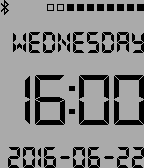 26
26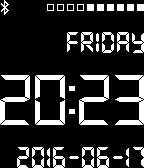 31
31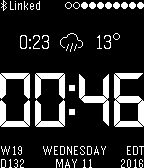 112
112