 96
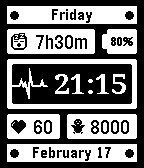
96Health v1.1
FacesHealth focused watchface, includes: - day of the week - sleep duration - battery percentage - time & date - current heart rate - current steps total - bluetooth symbol Options: - choose between 24 hours or 12 hours - choose day/month date order
 35
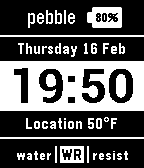
35Digital v2.0
FacesSimple digital watchface, includes: - date and time - battery percentage - current location - current temperature - bluetooth symbol Options: - 24 or 12 hours - date order - fahrenheit or celsius
 152
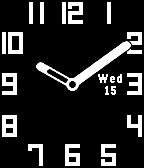
152Analogue v2.1
FacesClean and simple analogue watchface, includes: - day of the week - date of the month - battery percentage - bluetooth symbol Options: - show or hide date - show or hide battery
 123
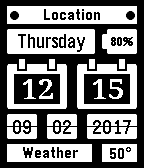
123Calendar v3.1
FacesSimple calendar style watchface, includes: - current location - day of the week - battery percentage - time and date - current weather - current temperature - bluetooth symbol Options: - choose between 24 hours or 12 hours - choose day/month date order - choose between location or pebble brand - choose between fahrenheit or celsius
 21
21Stopwatch v1.1
Tools & UtilitiesSimple and easy to use stopwatch clock. - Press select to start, pause and resume. - Hold select to reset the clock.
 34
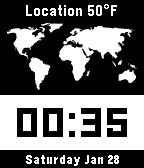
34World v2.1
FacesMap of the world watchface with location, temperature, date and time. Options: - Choose between 24 hours or 12 hours - Choose date order - Choose between fahrenheit or celsius
 22
22Football v1.1
DailyCheck the latest premier league scores.
 73
73Weather v1.2
Daily7 day weather forecast, including hourly forecast of the current day.
 18
18Timer v1.2
Tools & UtilitiesSimple and easy to use countdown timer.
 51
51News v1.2
DailyRead the latest worldwide news headlines.
 114
114Rainfall v1.2
DailyHourly precip forecast, check whether you need to take your umbrella!
 6
6AVFC v2.1
DailyCheck the Aston Villa Score!
 48
48Hue Off v1.1
RemotesControl your Philips Hue light bulbs. Initial Setup - Press select to discover bridge and begin pairing process. Controlling Light Bulbs - Press select to switch on/off - Long press select to adjust brightness levels
 43
43Mirror v1.0
Tools & UtilitiesSimply a black screen.
 97
97Torch v1.0
Tools & UtilitiesSimply a white screen with always on backlight.