 4
4Dungeon Doors
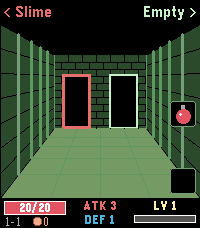
GamesLeft or right? A pocket roguelike for your wrist. Walk through three dungeons, one door at a time. Above each door you see what waits behind it: a chest, an empty room, the merchant – or a monster. Which monster? You only learn its name, not how strong it is. Remember who hurt you. FEATURES - 3 dungeons, each with its own look and 4 new enemy types, 12 pixel-art monsters in total - Automatic battles: every hit earns XP, every level gives +1 ATK and +1 DEF - Blue, green and red swords and shields - Chests with a choice of two items: potions, bombs, gold, gear – and rare finds - The merchant sells permanent upgrades and, sometimes, the Dragonslayer that destroys any boss in one blow - Bag with two slots on the middle and bottom buttons - Beat the boss to descend deeper with all your stats – beat the third one to win - Backlight stays on while you play - English and German CONTROLS Back / Up: left / right door or item Select / Down: use item in bag slot (Select also leaves the merchant) Hold Back: quit How deep can you go?
 6
6Calendar for Office 365
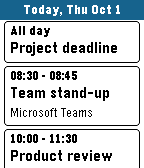
Tools & UtilitiesYour Microsoft 365 and Outlook.com calendar on your wrist. DAY VIEW See all events of a day as clear cards with time, title and location. Swipe left and right to change the day on Pebble Time 2, or long-press up/down on any Pebble. Open an event to see its details, including the description from Outlook. WORKS OFFLINE Today and tomorrow are stored on the watch, so your schedule is there even when your phone is not. DAILY BRIEFING Optional: the app opens at a time you choose, vibrates gently and shows your day. Pick the weekdays you want. MOVE EVENTS Optional: postpone your own events right from the watch – 1 hour, 1 day, 2 days, 1 week later or to next Monday. Turned off by default. MAKE IT YOURS Choose which calendars to show, accent, text and background colors, English or German, touch control, and whether past events are grayed out. The app closes itself after a few minutes without use to save battery. PRIVATE BY DESIGN No server, no tracking, no ads. Your calendar goes straight from Microsoft to your phone and your watch. The developer never sees your data or your sign-in. SIGNING IN Open the app on the watch. It shows a short code – enter it at microsoft.com/devicelogin on your phone or computer and sign in. Keep the app open until your events appear. Microsoft may show the app as "unverified"; this is normal for apps from independent developers. WHICH ACCOUNTS WORK Personal Microsoft accounts (outlook.com, hotmail.com, live.com) work. Work or school accounts usually work in small organizations. Many larger companies block third-party calendar apps or this sign-in method – then the app cannot be used with that account. Made for Pebble Time 2. Also runs on Pebble 2 Duo, Pebble Time, Pebble Time Steel and Pebble 2. Not affiliated with or endorsed by Microsoft. Microsoft 365, Office 365 and Outlook are trademarks of the Microsoft group of companies.
 9
9Wrist Rush GT
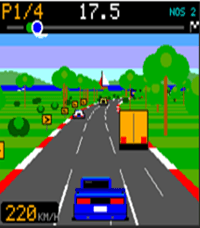
GamesWrist Rush GT brings classic OutRun-style arcade racing to your wrist – with a career inspired by Gran Turismo. Turn your watch sideways and race across three lanes all the way to the horizon. - 10 races in 7 worlds: coast, desert, city, night, snow, sunset and forest – with tunnels, bridges, grandstands and landmarks in the background - 3 AI rivals and busy traffic: cars, taxis, buses, trucks and police - Career mode: pay the entry fee, win prize money, upgrade your car - Bronze, Silver and Gold licenses with 9 tests: braking, cone slalom, gate course, overtaking and a nitro sprint - Garage with engine, gearbox, tires, body and nitro upgrades, plus 9 paint jobs - Night races where only your headlights light up the road, plus snowfall, rain and blowing sand - Real engine sound through the Pebble Time 2 speaker - Three difficulty levels, achievements and best times – best times also show up in the Pebble app on your phone - English and German, following your watch's language setting - Battery friendly: the game pauses automatically after one minute without input