Hello there,
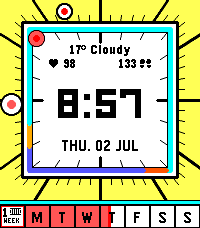
The concept here is providing an "analogue" indication of the time (full day &12-hour), while also providing a "digital" read-out, and other readings such as heartrate, steps, weather, date and exact position in the week/month/year.
I have recently added some new features such as "shake" to switch the bottom-bar between week, month, and year meters.
This watch face is very customisable.

In the middle is a simple digital time display with the LECO font, this is in the 12hr format, 24hr numbers are also an option in watchface settings.
Stats for Weather, heart rate, step-count, day and date. All optional and switchable ( now with home-made icons😊[black/white] ).

There are the two "tracks" around this:
The outer track contains two "dot" indicators displaying the time. This is functionally the same as a regular analogue clock or watch. The larger dot is the hour hand, the smaller dot is the minute hand.
The Larger hour-indicator dot can optionally show the hour-number inside of it [24-hour / 12-hour format], as well as swap between the regular "dot" and the number inside at noon (see settings).

The inner track, has a single indicator dot. This whole inner section has 24 hour-marks, they indicate the full 24 hour day in a single revolution of the indicator. Noon at the top, midnight at the bottom. You will also notice a 4-colour "gradient" in this section, showing sunrise and sunset. The colours here are also customisable.

At the bottom is the NEW bottom-bar or "B-bar".
The B-Bar currently has 3 different "bars", and you can cycle through them by flicking your wrist.
The first is the week-day progress bar; the coloured bar moves along with the time of day, and shows your position in the week.
The second bar shows your position in the month.
The third bar shows you the position in the year.
I will expand the capabilities of the B-bar at some point with additional bars.
You can choose which bars you want to see, and in which order. It will "snap-back" to bar number 1 after 30 seconds.
(The new B-bar functionality can be turned-off to restore the original week-day bar only)

Another new feature, the quick-view events are now accounted for. When one pops into frame, the clock size adapts (you can see this in the screenshots).
You can also set Sunday as the first day of the week on the Week progress bar now.

The colours you see in the screenshots are much more subtle on the watch than they appear in screenshots.

From the settings you can choose from pre-set themes or duplicate and edit them, and save your own themes.
You can also have it change between a pair themes at sunrise and sunset, or set a custom time for this.

I took some inspiration from the brilliant Halcyon by Freakified, you should check that one out too.

Thank you for the hearts 💖
Long live the pebble 🙌

--
DJ

_____
Recommended backlight colour is:
#FF912A
[ pebble phone app> settings> watch> display> scroll down and "select" backlight colour, paste the code above ]
_____
_____

The "why" for creating this watch face...
My ADHD & neurospicy brain has never really "got-on" with being able to grasp the passage of time, especially when just thinking about simple numbers. I need to see it, and see where it's going.
So this is my way to visualise the progression of time.
_____
If you happen to really like my work here, please feel free to buy me a coffee at the "WEBSITE LINK" below and I will greatly appreciate 😁