 84
84TouchyWeather - Weather WatchFace
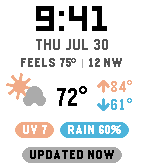
FacesTouchyWeather Face is a weather watch face that gets out of your way. The layout isn't a fixed template! You decide. Time, date, the weather, badges and the last-updated stamp are measured, stacked and centred every time it draws. Switch a row off and the rest don't just shuffle up, instead the whole face re-centers around what's left. Nothing sits out of flow, so there's no leftover chrome band making the face look top-heavy. FOUR SLOTS, YOUR CHOICE Two text lines under the date and two colored pills below the weather. Any slot takes any reading: feels like, wind, humidity, dew point, UV, air quality, rain chance, step count, or your watch's battery. Two readings on one line draw as a single group split by a hairline rule, each keeping its own accent colour. Give any badge the "only when notable" filter and it stays hidden until it's worth reading — rain over 50%, UV 6 or higher at midday, battery at 20% or charging. NUDGE FOR MORE A watch face gets no buttons and no touch, so this one listens to your wrist. Nudge the watch — a flick, or a firm tap on the glass — and the lower half deals a peek card: 6 Hours, Week Ahead, Conditions, Sun + Moon. It returns to the clock on its own after a few seconds, and the deck resumes where you left it instead of starting over. Prefer something else? Set a nudge to open one fixed view, let the pages auto-rotate on a timer, or turn the whole thing off and keep just the clock. IT WATCHES THE SKY FOR YOU Rain due within the hour flashes the hourly page up by itself, and the bottom row takes over with the countdown. After sunset, night mode drops the face to dark and swaps the sun for tonight's moon phase, then restores your daytime theme at sunrise. BUILT TO SIP BATTERY At rest it wakes once a minute and no more. Animations run only in a short window after a nudge, then settle to a static frame. Settings live on your phone, with a live preview of the face that reshapes as you change it. Works on Pebble Time, Time Round, Pebble 2, Pebble 2 Duo, Pebble Time 2 and Round 2. Weather from Open-Meteo — no account, no API key. Companion to the TouchyWeather app, if you want radar, charts and a weather app with opinions.
 514
514Touchy Weather - Weather App
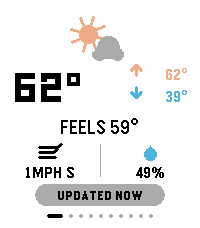
DailyTouchyWeather is a playful, card-based weather app for Pebble that mixes useful forecast data with personality for touchscreen Pebble Watches. It is the most feature complete weather application for the Pebble Platform. It’s designed around fast swipes, quick glances, and weather advice that is very practical. Keywords: weather, forecast, pebble, smartwatch, touch, swipe, current conditions, temperature, feels-like, wind, humidity, hourly forecast, 6-hour outlook, week ahead, 4-day forecast, precipitation, rain probability, UV index, air quality, AQI, sunrise, sunset, sun cycle, moon phase, night sky, golden hour, blue hour, weather radar, meteorology, climate, real-time, touch-first, wearable, glance-first, weather app, widget, interactive, customizable, weather cards, location-based, atmospheric, radial gauge, dynamic guidance. Included Features: ✓ Real-time current conditions (temperature, feels-like, high/low) ✓ Wind speed & direction display ✓ Humidity tracking ✓ 6-hour hourly forecast ✓ 4-day week-ahead view ✓ Precipitation probability charts & alerts ✓ UV index gauge with risk classification ✓ Air Quality Index (AQI) with health context ✓ Sunrise & sunset times ✓ Moon phase & illumination percentage ✓ Golden hour & blue hour timing (for photographers) ✓ Live weather radar imagery ✓ Touch-gesture controls (swipe, pull-to-refresh) ✓ Personality-driven weather advice ("Touch & Go" card) ✓ Fully customizable card layout ✓ Multi-platform support (rectangular & round displays) ✓ Location-aware weather data ✓ Celsius & Fahrenheit support ✓ Dark mode / theme options Device Compatibility: Pebble Time Round, Pebble Time 2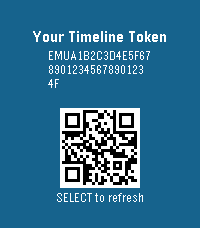 0
0Timeline Token
Tools & UtilitiesA test to generate token required to enable custom timeline pins!
 45
45Wyze Control
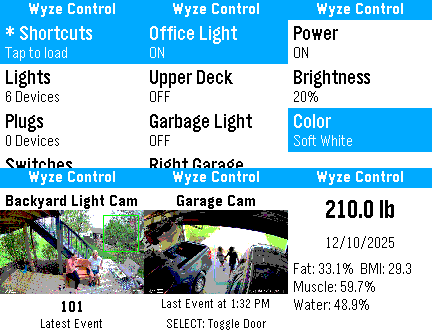
Remotes# Wyze Control for Pebble - Application Description ## A complete Wyze control center, built for Pebble **Wyze Control for Pebble** turns your smartwatch into a practical control surface for your Wyze smart home. Instead of treating the watch like a passive notification display, this app is designed for direct action: check device state, trigger automations, control lights, and view key information without pulling out your phone. It is optimized for the moments when a fast response matters. If you are leaving home and want to close the garage, in bed and notice a light is still on, or checking whether a camera recently captured motion, the app keeps the interaction short and focused. The experience is built around the Pebble philosophy of quick, glanceable, button-driven use. The app connects through the Wyze cloud via PebbleKit JS, so it can operate as a remote companion to your phone while still feeling lightweight on the watch itself. That makes it useful both for everyday convenience and for quick status checks when you are away from home. --- ## What the app is for Wyze Control for Pebble is intended for users who want the most useful parts of their Wyze setup available on their wrist. The app is focused on: - Turning devices on and off quickly. - Checking whether a device is online and what state it is in. - Triggering recurring automations and shortcuts. - Viewing important device information in a compact format. - Keeping the most common smart home actions available with minimal friction. The goal is not to mirror every phone-app function. The goal is to make the high-value actions faster and more convenient in a smartwatch-friendly workflow. --- ## Supported device categories ### Lighting Wyze lights are one of the best fits for wrist-based control, and the app gives them full attention. For compatible bulbs and light strips, you can: - Toggle power instantly. - Adjust brightness using simple preset steps. - Switch between common color or color-temperature options. This is ideal for the everyday tasks people actually do most often: dimming a room, setting a clean white light, or changing the mood of a space without navigating a larger mobile interface. ### Plugs and switches Plugs and switches are handled as straightforward on/off devices. That makes them quick to use for lamps, fans, appliances, and other simple loads where the only action that matters is whether the device should be powered or not. ### Cameras For Wyze cameras, the app goes beyond a simple name-and-status listing. It can display a thumbnail from the most recent motion event so you can get a quick visual clue about what happened at home. That makes the watch useful as a fast awareness tool. Instead of loading a full live view on your phone, you can check the most recent activity with a glance. ### Wyze Scale The Wyze Scale view is presented as a read-only summary of the latest available measurement data. Depending on what the cloud API provides, the app can show: - Weight. - Body fat percentage. - BMI. - Muscle mass. - Body water. - Measurement date and time. This turns the Pebble into a compact health dashboard for quick reference, without forcing you into a more complex mobile health app. ### Shortcuts and automations The app exposes Wyze shortcuts and rules so you can launch your existing automations from the watch. That is especially useful for recurring routines like "Goodnight," "Away," or any custom action sequence you already use in Wyze. Rather than recreating logic on the watch, the app acts as a fast trigger for the automations you already rely on. ### Garage door controller Garage control is treated as a special case because it is a high-value action where clear state matters. The app shows garage status in a way that is easy to interpret and provides large, deliberate controls for open and close actions. That makes it practical in real situations where you need to operate the garage while moving, carrying things, or simply not wanting to reach for your phone. ### Device visibility and state Even when a device is not actively being controlled, the app still tries to surface meaningful state. Device type, online status, current power state, and special flags are included so the menu itself is informative rather than decorative. The result is a watch interface that answers the most important question quickly: what is this device doing right now? --- ## How the experience is organized The interface is built to feel native to Pebble rather than like a shrunken phone app. ### Device-first navigation The app organizes devices into a list that is easy to scan and select. Once the list is loaded, you can move directly to the relevant device and then into the control screen that matches its type. This keeps the interaction model simple. You do not have to hunt through dense categories or repeatedly switch contexts just to perform one action. ### Contextual action screens Selecting a device opens a window that matches that device’s purpose. Lights expose lighting controls, cameras expose preview behavior, the scale shows health data, and garage devices expose garage actions. This matters on a watch because every extra layer of irrelevant UI adds friction. The app reduces that friction by showing only the controls that make sense for the selected device. ### A consistent title bar Every screen uses a persistent app title, "Wyze Control," so the watch always has clear context. On a small display, that kind of consistency improves readability and makes the app feel cohesive as you move between screens. ### Glanceable by design The UI emphasizes readable labels, current state, and direct actions. It is intentionally not a dense dashboard. It is a quick-answer interface for moments when you want to know something or change something immediately. --- ## Real-world use cases The app is especially effective in ordinary day-to-day moments: - You are leaving home and need to close or check the garage. - You are in bed and realize the kitchen or living room lights are still on. - You want to verify whether a camera recently detected motion. - You want to launch a home automation routine instantly. - You want to check recent scale data without opening another app. These are all small interactions, but that is exactly where a Pebble shines. The app embraces that strength by keeping each action brief and purposeful. --- ## Platform support Wyze Control for Pebble is built for the Pebble hardware targets included in the project: - Pebble Classic and Pebble 2 for high-contrast monochrome layouts. - Pebble Time and Pebble Time 2 for color-capable layouts. - Pebble Time Round for the circular display. - 2026 supported Pebble platforms defined in the project configuration! The app is designed to adapt to the strengths and constraints of each display type, rather than assuming a single screen shape or color capability. --- ## Security and data handling The app uses token-based authentication rather than depending on your raw password every time it communicates with the Wyze service. Your credentials are used to obtain a token, and the app then works from that token for subsequent access. That approach is more appropriate for a companion watch app because it reduces repeated credential handling and keeps the smartwatch side of the experience lightweight. The control flow also uses the phone as the network bridge, which is consistent with Pebble’s companion-app model and allows the watch to remain focused on display and input rather than heavy networking logic. Your password is handled only long enough to complete the login exchange, then it is immediately removed from storage and kept only in memory during that process. In other words, the password is not persisted by the app after authentication. This code is open source. You can see for yourself! --- ## Known limitations There are a few practical limitations to be aware of: - Bluetooth-only locks cannot be controlled through the cloud API path used by the app, so they may be visible but not actionable. - Some features depend on the availability and behavior of Wyze cloud endpoints. - Multi-factor authentication is not part of the initial login flow. These limitations come from the underlying Wyze ecosystem and its cloud-access model, not just from the watch app itself. --- ## Why this app exists The core idea behind Wyze Control for Pebble is simple: a smartwatch should make the most common and important actions faster. It should not force you to wait, scroll, or switch to your phone for things that can be handled in a few seconds. Wyze Control for Pebble is built around that philosophy. It gives Wyze users a compact, always-available control layer that is especially useful for quick status checks and immediate actions. --- ## Getting started 1. Install the app on your Pebble. 2. Open the configuration page on your phone. 3. Enter your Wyze credentials and the required API keys. 4. Save the settings and allow the app to sync your device list. 5. Start using your watch to control lights, plugs, cameras, scale data, shortcuts, and garage devices. *Note: Wyze Control for Pebble requires a Wyze account and the appropriate API keys. Cloud control is not available for Bluetooth-only locks.*
 137
137Aura
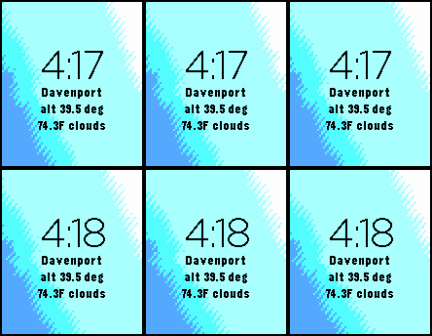
FacesAura: The Sky, Hand-Painted by Physics Why settle for a static watchface when you can wear the actual atmosphere? Aura is a real-time, mathematically driven simulation of the light above your head. From the first blush of dawn to the deep indigo of midnight, Aura uses professional-grade solar physics to paint your Pebble with the exact "vibe" of the heavens. The Science of the Glow Aura doesn’t guess. Using the SunCalc engine, it tracks the Sun’s altitude and azimuth relative to your exact GPS coordinates. It then projects a directional "light-cast" across your screen, rotating the sky’s gradient to match the sun's actual position. Because the earth is tilted, Aura is dynamic: the colors, timing, and angles of your gradients shift automatically based on your specific location and the time of year. Your winter solstice sunset will look and feel fundamentally different from a midsummer twilight. The Solar Phases Aura transitions through distinct atmospheric states based on solar altitude: Solar Noon (+20° to +55°): Brilliant, high-contrast cyans and blues with 45% contrast widening for maximum daylight visibility. Golden Hour (+2° to +10°): Warm, honey-toned peaches and oranges as the sun begins its descent. The Horizon Crossing (-2° to +2°): The "Magic Hour." A vibrant, hand-authored transition of coral, magenta, and pink. Civil Twilight (-6° to -2°): Deepening purples and violets as the world settles into dusk. Nautical Twilight (-18° to -6°): Pre-dawn or post-sunset indigos and dark violets. Astronomical Night (Below -18°): The deepest navy and midnight blues, optimized for low-light legibility. The Technical "Nerd" Stuff Vector Projection: The gradient isn't just a vertical flip; it’s projected against a unit direction vector based on solar azimuth. Hand-Authored Atmosphere: Six unique "Anchor Bands" ensure that color interpolation remains natural and smooth. Optimized Rasterization: High-efficiency 2x2 and 4x4 block-drawing logic keeps your battery happy while maximizing the Basalt, Chalk, Emery, and Gabbro color displays. Smart Weather: Integrated Open-Meteo data (temperature and conditions) provides vital info without breaking the celestial aesthetic. Aura: Because your watch should know exactly what time it is—and exactly what the sky looks like.
 72
72Pebble Points
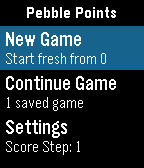
GamesPebble Points Pebble Points is a fast, button-first scorekeeping app for Pebble smartwatches. It is designed for in-the-moment tabletop, card, party, and casual competitive games where you need quick score changes without leaving gameplay. What Pebble Points Does Pebble Points lets you: Track scores for 2 to 4 players with Customize player count and player names from phone settings Switch the active player instantly Increment or decrement scores with one click Use negative scores when your game rules allow it Keep up to 3 saved games and continue later Replay a saved game using checkpoint playback Toggle haptic feedback from phone settings Set score step from watch settings (1, 5, or 10 points per click) Reset only the active player to 0 with a long Select press Core Features (Detailed) 1) Flexible Player Support Supports 2, 3, or 4 players. Layout adapts automatically: 2 players: vertical split 3 players: top full-width + two bottom panels 4 players: 2x2 grid Active player is visually highlighted. 2) Fast, One-Handed Scoring Up: add points to active player Down: subtract points from active player Select: rotate to next player Long Select (~700ms): reset active player score to 0 3) Count-By Methods (Scoring Step) Pebble Points supports multiple “count by” methods via score step: Count by 1: +1 / -1 Count by 5: +5 / -5 Count by 10: +10 / -10 Set this from the app’s on-watch Settings menu. 4) Save and Continue Sessions Keeps the 3 most recent games. Stores creation and last-played timestamps. Promotes a continued game to the newest slot automatically. Preserves player names, scores, active player, and settings-backed behavior. 5) Phone Settings (Clay) From companion settings you can configure: Player count (2/3/4) Player names (up to 15 chars each) Haptic feedback on/off 6) Responsive Visual/Haptic Feedback Haptic pulses for key scoring and selection actions (when enabled). Score-delta indicator for recent change context. Built-in animation scaffolding for pop/slash/confetti style effects. How Pebble Points Differs from Typical Pebble Score Apps Pebble Points focuses on speed + persistence + replay context rather than only raw counters: Session-centric design instead of a single volatile scoreboard You can keep multiple recent games and return later. Replay-aware storage Each saved game has a checkpoint track for playback. Immediate replay-to-live handoff You can watch a replay, then continue directly into live scoring. Watch-first interaction model Most core flow (new game, continue, step changes, scoring) works directly on watch. Practical count-by control Native score-step selection (1/5/10) enables faster game-specific scoring patterns. Replay Feature: Big Overview Replay in Pebble Points is a checkpoint replay system, not a full event-by-event log. Replay Flow Open Continue Game. Pick a saved game. Choose Replay (when checkpoints exist). Watch checkpoint playback. At end, press Select to continue directly into live game. What Replay Can Do Reconstruct score snapshots over time for a saved game. Show progression of scores and active player across checkpoints. Play checkpoints automatically on a timer (~300ms step). Skip to replay end with Select while playback is running. Restart replay after completion with Up. Continue directly from replay end into active gameplay. What Replay Cannot Do (Current Limits) It is not a full tap-by-tap action history. It does not store unlimited history (bounded checkpoint ring). It does not allow editing while in replay mode (read-only replay view). It does not branch/fork from arbitrary mid-replay checkpoints. Replay availability depends on checkpoint data existing for that save. Replay Data Model (Practical Constraints) Up to 8 checkpoints per saved game. Checkpoints are recorded from key moments (start, player switch, interval-based taps, larger deltas). Data is bounded to stay lightweight on Pebble hardware.