 19
19Aubade
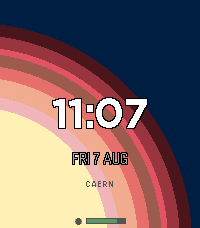
FacesAubade (noun): a song or poem greeting the dawn - traditionally sung by parting lovers at daybreak. This watch face explores this concept using the compass to orient a bloom of light spilling in from whichever edge of the screen faces the sun (or moon), so the glow always points at the sky. A soft radial glow bleeds in from the edge of the screen in the direction of the sun (or, at night, the moon). Turn your wrist and the glow tracks with you - it's a compass as much as a watchface. This is not the most battery-friendly watch face; when the watch is roughly horizontal, the compass is engaged, updating the the location of the light bloom. When not oriented for ideal viewing, the compass is disabled and the bloom remains stationary. Note: Claude Code was used in the generation of this watch face.
 10
10Burh
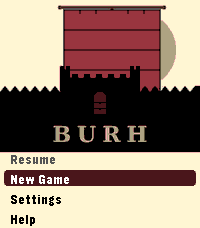
GamesLate ninth-century England. Norse fleets work your coasts every year. You have a small kingdom, a war band, and difficult choices to make before winter closes in. Most turns take thirty seconds. A campaign plays in short sessions across real days - the game waits when you are not watching. Your kingdom is a four-by-four grid of territories, roughly half settled when the campaign begins. Fortifications take years to build. The same people who farm your land fill your fyrd. Monasteries draw Norse attention. Ruins wait to be reclaimed. The Norse learn your settlements over time. A fleet that has raided your coast for two years knows things about your defences that a newly arrived one does not. A shattered war band cannot be quickly rebuilt. Battle outcomes are costly even when you win. Fyrd go home after a fight. Housecarl casualties stay lost until you recruit again. Procedurally generated maps. Four difficulty levels: Learn, Sheltered, Standard, Brutal. Campaign chronicle. For Pebble Time 2. *Burh* is Old English for a fortified town; pronounced "burr." *Note: Claude Code was used in the generation of this app.*
 37
37Limen
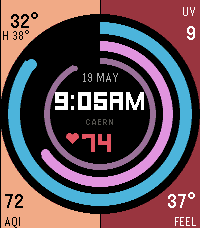
FacesLimen shows your health rhythms and the world outside in a single glance. Three concentric arcs track steps, active minutes, and last night's sleep against your personal baseline. The four corners carry the environment: current temperature and today's high, and your choice of UV index, air quality, precipitation chance, feels-like, wind gusts, humidity, or pollen - each colour-coded by severity at a glance. Goals self-calibrate from a 7-day rolling average of your own Pebble Health history. No setup needed; 100% always means "you matched your usual day." Fixed targets are available in Settings if you prefer them. Weather data from Open-Meteo — no account or API key required. For Pebble Time 2. *Note: Claude Code was used in the generation of this app.* --- ## Data sources Weather and air quality data provided by [Open-Meteo](https://open-meteo.com/) under the [Creative Commons CC BY 4.0 licence](https://creativecommons.org/licenses/by/4.0/).
 9
9GoatWatch
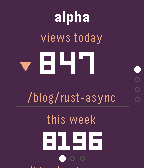
Tools & UtilitiesYour sites, at a glance. GoatWatch connects to GoatCounter and surfaces the numbers that matter right on your Pebble: unique visitors today with a trend versus yesterday, total pageviews for the past week, and the top page drawing traffic right now. Flip between up to eight sites with the up and down buttons. Dive deeper with a tap of Select: a seven-day pageview bar chart shows the shape of your week, followed by top pages for the week and for today - so you can see not just how many people came, but what they were reading. The watch polls automatically every five minutes and retries quietly if your connection is slow. Set it up once from the Pebble app on your phone - paste in your GoatCounter API token and a comma-separated list of your site names - and GoatWatch handles the rest. *Note: Claude Code was used in the generation of this app.*
 3
3Sprue
RemotesKeep an eye on your print without hovering over it. Sprue connects to your FlashForge printer over your local network and surfaces the essentials right on your Pebble: print status, nozzle and bed temperatures, current layer, progress, and estimated time remaining. Whether you're across the house or just across the room, a quick glance tells you everything. The watch polls your printer automatically Press the select button to refresh on demand. Filenames scroll if they're too long to fit. Set it up once from the Pebble app on your phone - enter your printer's local IP address, serial number, and access code - and Sprue handles the rest. You may need "Local LAN only" setup to enable the API access. *Note: Claude Code was used in the generation of this app.*
 2
2Ebb
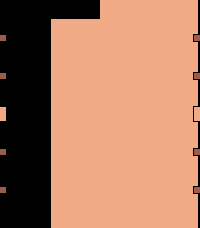
FacesA watchface that shows the day receding. The screen divides into four equal columns, each representing a 6-hour block of the day. At midnight all four columns are full of colour. As time passes, each column drains from the top — the first by 6am, the second by noon, the third by 6pm, the last by midnight. A quick glance shows roughly what part of the day you're in: full screen = early morning, half-drained = midday, mostly empty = evening. For more precision, look at the active column and read its level against the hour markers on each edge — five evenly-spaced ticks per side mark the 1, 2, 3, 4, and 5-hour positions within each 6-hour block. Fully customisable colours. Optional time overlay, inverted mode, and time-of-day colour shift available in Settings. For Pebble Time 2. *Note: Claude Code was used in the generation of this app.*
 61
61Glyph
Tools & UtilitiesShare anything, instantly. Glyph lets you store up to five QR codes on your Pebble - social media profiles, contact links, Wi-Fi credentials, payment links, or any URL you share often. When you need to share, just raise your wrist and let someone scan right off the screen. No fumbling with your phone. QR codes are generated on the watch itself, so they're always ready. Flip through your saved codes with the up and down buttons, and a label tells you exactly which one is showing. Set it up once from the Pebble app on your phone, and it just works. *Note: Claude Code was used in the generation of this app.*
 54
54M-TeePee 305
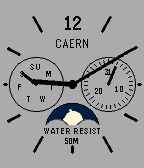
FacesA classic analog watchface by CAERN, inspired by the Casio MTP-M305L-7AV - a no-nonsense everyday analog with a full set of complications. Complications: - Moonphase indicator - tracks the actual lunar cycle, with an animated starfield as the moon travels across the sub-dial each month - Day of week (left) - Day of month (right) 8 Color Themes - choose your look in Settings: Silver, Black/Gold, Black/White, Red/White, White/Navy, Blue/Gold, Dark Gray, and Gray. **Automatic Light/Dark Mode** - set a separate theme for day and night. The watchface switches automatically at sunrise and sunset using built-in seasonal times - no setup required. Note: Claude Code was used in the generation of this watch face.