 7
7Gentle Wake Plus - Daily Smart Alarm Clo
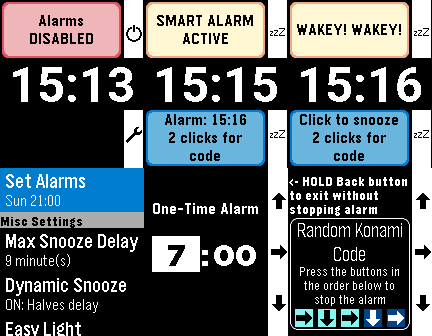
Tools & UtilitiesEvolution of the excellent original by SeaPea software This version adds: - Native Layouts for PT2 and PR2 - Alarm Sounds for PT2 and P2Duo - multiple options including some of the system options like Reveille - More vibration patterns (all watches except Aplite - OG and Steel) - Some small changes to Aplite to prevent crashes - Respects menu text size selected on watch (enabling increased text size on PT2 and PR2) All other functions work as per the original: - Alarms for each day of the week - Smart Alarm attempts to wake you if it detects you stirring shortly before the alarm time, which is the Monitor Period (doesn't interfere with background activity apps) - All settings are in-app (Down button on main screen) - Alarm vibration starts gentle and gets longer and longer to gradually wake you and this can be adjusted with the Vibration Pattern setting - Alarm will vibrate for just over a minute and will then auto-snooze to save battery - Doesn't need to be manually started for the alarms to work (set and forget) - While Alarm is vibrating, a single click on any button snoozes the alarm. 2 quick clicks are required by to turn off the alarm to reduce the chance of accidentally turning it off - Change the 'Stop Alarm' setting to 'Konami Code' to show a random sequence of buttons to turn off the alarm to help really make sure you are awake - Dynamic snooze halves the initial snooze time on each snooze until it reaches 3 minutes - for those of us with a habit of hitting snooze repeatedly ;) - Can temporarily disable all alarms (Single Up button click on main screen) - 'Easy Light' - hold your Pebble vertically to turn on the backlight while the alarm is vibrating/snoozing (no need to shake your wrist!). Can be turned off. - Skip alarms by holding Up on the main screen and choose a date to skip until (alarms restart on that date.) Disabling & enabling alarms, or going into the settings resets skips - DST Check sets the day of the week on which it checks if your location has switched to/from Daylight Savings Time
 31
31Monolith
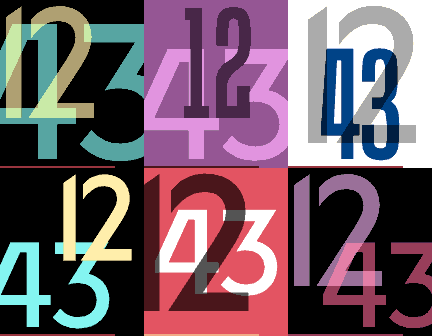
FacesSimple watchface with really large easy to read digits, and configurable layout and colours. Live preview in Settings page Features: - Show or hide battery meter (line at the bottom of the screen) - add leading zero to 12h time - remove leading zero from 24h time - option to never show Bluetooth disconnected icon or Quiet time is on icon Choice of 2 fonts, 3 sizes, 9 different screen locations and 4 transparency settings for the minutes and hours - Transparency (on colour watches only) ranges from opaque to invisible, so you can just show the minute or the hour if you want! - Option to randomise layout or keep fixed (changes happen every minute for the randomised elements) Multiple presets for colours and option to use custom colours Works on all pebbles, old and new
 235
235Tangent
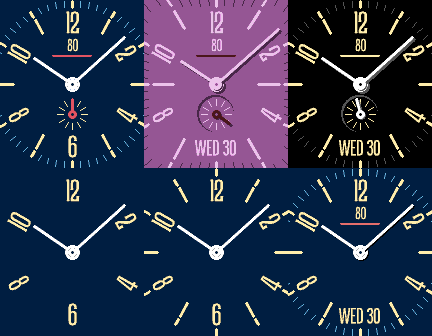
FacesInspired by the Tangente watch by Nomos Features: - Fully configurable colours, with presets or custom colours - Numbers or Roman Numerals on the dial - Configurable hand widths & lengths - Vibe & icon on BT disconnect (select never vibes, always vibes, or respects quiet time) - “Quiet time is on” icon - Shrinks down when timeline quickview is on (on compatible watches) - V2 adds more options for the sub-dial, including a second timezone (data from timeapi.io) and a sweep second hand (will reduce battery life!) - V3 adds weather (PT2 & PR2 only). Uses Open-Meteo (no API key) or OpenWeatherMap (needs a key, a free tier is available). Shows current conditions & temp, and forecast high & low temp in C or F. Shows an umbrella if the chance of rain in the next hour is >30% - V3.5 adds experimental alert for Wet Bulb Globe Temperature, a measure of heat stress. Alert is via 3 different icons. Small with 3 sunrays for a "yellow" alert level (plan outdoor exercise, use discretion), medium 4 sunrays for a "red" alert (limit exercise & exposure), and large with five sunrays for a "black" alert (not safe to exercise outdoors) - V4 adds live preview in settings. Updating will reset the watch to default, but your phone settings page should still have the previous settings in it Show or hide: - Major and Minor Tickmarks - Sub-dial: multiple options including seconds, month, or second timezone - Optional Date, in multiple formats & languages - Battery Value (in %), Battery Line (shrinks to the centre down to zero) Works on all pebbles, old and new My watchfaces are free, but if you'd like to support my work, you can via - https://buy.stripe.com/fZufZicOxd3laMV6K4eQM00 or https://paypal.me/FavouriteHumanDesign
 83
83monologue
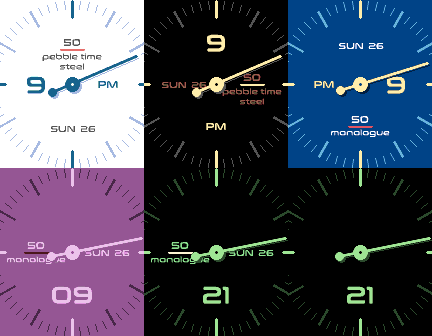
FacesWatchface inspired by the Skagen Mono watch: has a single analogue minute hand, and digital hours Features: - V2 adds ability to swap minutes and hours, and to modify size & style of the analogue hand. Now you can use it with just the hour hand as a slow watch - V2.2 adds the option to show minor ticks every minute, every 15 minutes, or every 30 minutes - Fully configurable colours, with several presets - Vibe and icon on BT disconnect (select whether vibes during quiet time) - Quiet time is on icon - Change the position of the digital hours and up to 3 other complications (top, right, bottom and left) - Hours shows 12h or 24h time depending on the watch settings - Show or hide leading zero for 12h or 24h time - Show or hide Major and Minor Tickmarks - Set custom text ("monologue" shows by default if no text is set) Complications (show or hide, and select location, in settings): - Digital hours (shows minutes when the hand is showing hours) - AM/PM marker (will only display when watch is in 12h mode) - Weekday and Date (auto-translates per watch language: English, French, Spanish, German, Portuguese, or Italian - Battery Value (in %), Battery Line (shrinks to the centre down to zero) & Logo/Custom Text My watchfaces are free, but if you'd like to support my work, you can via - https://buy.stripe.com/fZufZicOxd3laMV6K4eQM00 or https://paypal.me/FavouriteHumanDesign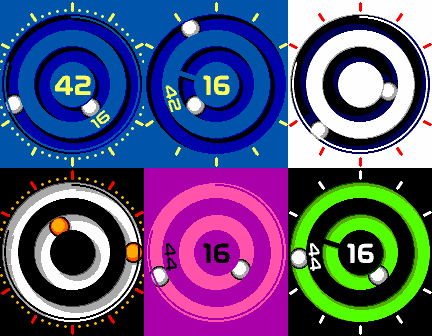 279
279Bearing
FacesAnalogue & Digital watchface styled after magnetic ball watches. The hands rolls around the ball race of the bearing. Works on all pebbles. Features & Options: - NEW in V2: Gravity Mode (all pebbles except OG and Steel) Double tap/shake to start the balls racing around the track with gravity. Double shake again to stop, or wait for the timer to end. You can set the duration of gravity mode between 5 and 60 seconds in settings, or switch it off. Will use more battery when switched on - NEW in V3: Rectangular Tracks mode (on Rectangular Watches) - NEW in V3.5: Magnet Mode. When switched on, and the balls are racing in gravity mode, they get caught at the correct time, unless you can get them to race past quickly enough - NEW in V4.0: Haptic Mode (PT2 and PR2 only). The watch vibrates as the ball bearings race in gravity mode - Animation on startup (can also be switched off in settings) - Fully configurable colours with multiple presets - Modify the direction and length of the shadow offset - Option to have either digital hours or minutes in the centre of the dial, with minutes or hours revolving on the middle ring - Add or remove leading zero for 12 & 24 hour time - Battery percentage shown as either a bar (falls anticlockwise from 12 o'clock) or an arc (a full arc is 100%). In Rectangular tracks mode, the arc becomes a sidebar - Vibrates on BT disconnect (options for always vibrate, never vibrate, or respect quiet time) - Shows BT icon on disconnection & Quiet Time icons when QT is on (centred on the ball bearings) Options to Hide: - Digital Time - AM/PM marker - Battery Bar or Arc/Sidebar - Major Ticks - Minor Ticks - Shadows I have loads more watchfaces, which you can find over on the Rebble Appstore at https://apps.rebble.io/en_US/developer/58a635d30dfc320dc60003b4 (You can also enable the Rebble Appstore from within the Mobile App: Settings Tab -> Apps -> Configure Appstore Sources -> Select Rebble App Store) My watchfaces are free, but if you'd like to support my work, you can via - https://buy.stripe.com/fZufZicOxd3laMV6K4eQM00 or https://paypal.me/FavouriteHumanDesign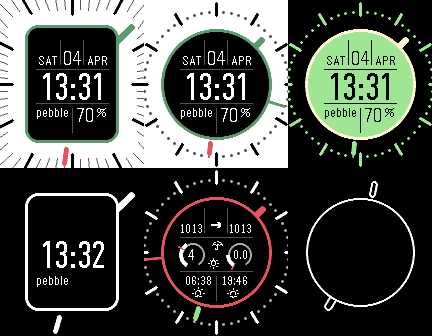 228
228Hybrid Weather
FacesHybrid watchface showing both analogue & digital time and Weather Features: - Tap (and tap again) to see weather, with loads of info from Open-Meteo (no API key required) or OpenWeatherMap (API key needed) - uses phone GPS location or manual lat/long. - Change watchface style from round to rectangular (round only on round watches) - Fully configurable colours, with several presets - Vibe and icon on Bluetooth disconnection - Quiet Time icon shows when quiet time is on - Date is shown in watch language (English, Spanish, French, German, Italian, Portuguese) - Custom text (will show "HYBRID" if not changed in settings) - Daily steps total (shows instead of custom text when selected) - Add leading zero to 12h time - Remove leading zero from 24h time - Switch on BT disconnect vibe during Quiet Time (if set to off, watch will still vibrate, just not during QT) - Minute hand floats around the rectangle/circle in the centre - Digital Time uses a DIN Condensed font Options to Show or Hide: - Digital time - Date, Battery Percentage and Custom Text - Major and Minor tickmarks - Second hand (can set to always on, always off, or show on shake for selectable time) - Foreground lines - Steps - AM/PM when in 12h time - Weather Weather info (reverts back to time screen after 30 seconds): Tap/shake once to see first weather screen (all watches): - Middle left, Current Weather Condition icon - Middle right, Forecast Weather Condition icon - Bottom (left) Current Temperature and (right) Forecast High/Low, in either °C or °F - Top (left) Current and (right) Forecast Windspeed and Direction, in knots, mph, m/s or kmh - Top Middle, Moonphase Tap/shake twice to see second weather info screen (all watches except Aplite - OG pebble and pebble Steel): - Top Left, Current barometric pressure in millibars, Hg (inches of Mercury), mmHg (millimeters of Mercury), Pascals, or standard atmospheric (atm) - Top Right, average Barometric pressure for today - Top Middle, Barotrend, rising, steady, or falling, in the next hour - Bottom Right, sunrise time - Bottom Left, sunset time - Middle Left, UVIndex data. Value is max UVI today. Dial marker is current UVI vs that max - Middle Right, Precipitation/Rain data. On PT2 and PR2, values (in mm or inches) are rain in the next hour on top, and rain today below. On other watches, the value is rain today. Dial is Chance of Rain today (0-100%), and marker is chance of rain in the next hour. I have loads more watchfaces, which you can find over on the Rebble Appstore at https://apps.rebble.io/en_US/developer/58a635d30dfc320dc60003b4 (You can also enable the Rebble Appstore from within the Mobile App: Settings Tab -> Apps -> Configure Appstore Sources -> Select Rebble App Store) My watchfaces are free, but if you'd like to support my work, you can via - https://buy.stripe.com/fZufZicOxd3laMV6K4eQM00 or https://paypal.me/FavouriteHumanDesign
 35
35phoenix rotated
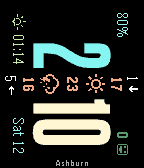
FacesPhoenix is a rotated watchface showing current weather information (temperature, conditions and wind speed) through the centre of the watchface. V4 adds Emery Pebble Time 2 support, and the ability to switch between 90° and 270° rotation in the config settings Also shows steps (except on OG & Steel). Anti-aliased time font. Inspired by Taller, chrono twist axis, 7egment and DIN Time! Features: - Auto-detection of 12h/24h based on your watch settings - Auto-translation of weekday supported for: English, Spanish, German, French, Portuguese, Italian. - Location, Sunset, Date and Battery complications Options: - Choose background and text colours - Weather: - Current conditions icon and current temperature in °C or °F, wind speed in knots, kph, mph or ms - Forecast conditions and high/low temperatures in °C or °F, wind speed in knots, kph, mph or ms - Weather powered by Open-Meteo or OpenWeatherMap OneCall API OpenWeatherMap requires an api key to work (links on the settings page for the watchface). - Location, shows your Lat/Long GPS co-ordinates - Bluetooth disconnect vibe warning and icon (no vibe in quiet time) - Optional night theme colours between sunset and sunrise Order of vertical elements, from top down is: - current wind speed - current wind direction - current temperature - current conditions icon - forecast high temperature - forecast conditions icon - forecast low temperature - average forecast wind direction - average forecast wind speed Make complications the same colour as the background to hide them My watchfaces are free, but if you'd like to support my work, you can via - https://buy.stripe.com/fZufZicOxd3laMV6K4eQM00 or https://paypal.me/FavouriteHumanDesign