Watchface inspired by the Gate of Time that appears on the game The Legend of Zelda: Skyward Sword. The amount of details is limited due to resolution restrictions.

- You can configure how often the gears rotate*.
- Hours and minutes are shown on the left and right gears respectively.
- Rupee counter indicates seconds or day of year*.
- Hearts indicate the amount of battery left.
- Navi is there to keep you company. She gets replaced by a small bolt while charging.
- Bluetooth status is indicated with the hookshot (since it hooks to your phone). It gets crossed when no BT connection is present.
- Temperature is shown on the lower right and updated when you open the watchface** as well as approximately every hour. You can toggle between Celsius and Fahrenheit within the Pebble app*.
- Weekday and Monthday are shown on top by default, you can shake your wrist to briefly look at Month and Year, although if you shake* too hard the gears might have to readjust themselves ;-)

If you set the gears' rotation to off or 1/minute AND the rupee counter to day of year, the screen will only be updated once every minute.

*Note that due to the way Pebble configuration works, you will need to have an internet connection active on your phone in order to access the watchface options.

** Weather updates are done on the minute mark, it may take a couple of minutes to load.
 169
169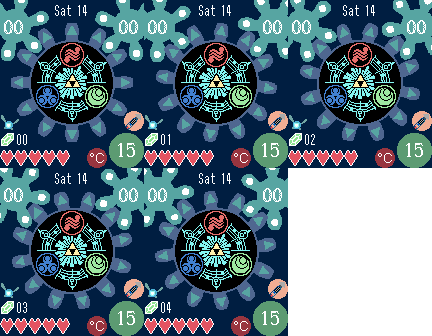 187
187