 7
7Tide Aquarium
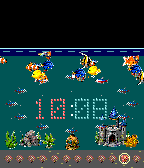
FacesWater level indicates current tides. Coral digits grow into the reef to show hours and minutes.Shells are the hour, a bright fish marks the current five-minute block, and bubbles count leftover minutes. A pearl circles the reef once per minute while the aquarium carries on around it. So ... a bunch of crap, really. Design by Luke Steuber for Ambient Time.
 5
5Rotor
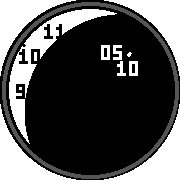
FacesA white crescent points to the hour on the outer dial. Inside it, a dark track carries the minute scale in five-minute steps. The exposed neighborhood uses large numerals, with a small moving mark showing the position between them. Design by Luke Steuber for Ambient Time.
 4
4Spectrum
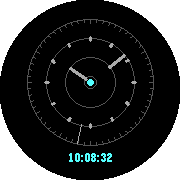
FacesThree hands live in three separate ring zones: hours nearest the center, minutes in the middle, and seconds around the edge. The minute and hour zones brighten briefly at their rollovers. The original numerical time sits beneath the dial. Design by Luke Steuber for Ambient Time.
 4
4Space Enragers
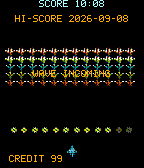
FacesArt credit at bottom! ... It's space invaders: one invader falls each second, the formation descends each minute, and twelve mines count the hours. SCORE is the local 24-hour time; HI-SCORE is the date. The next minute brings another wave. Design by Luke Steuber for Ambient Time. Space Rage assets: https://ravenmore.itch.io/space-shooter-assets-space-rage
 11
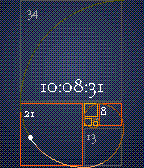
11Fibonacci Time
FacesA spiral built from nine Fibonacci squares. In the five smallest, orange counts hours, blue counts five-minute blocks, and yellow counts both. The four larger squares add toward seconds while a bright point travels along the spiral. The center time keeps the arithmetic optional. Design by Luke Steuber for Ambient Time.
 12
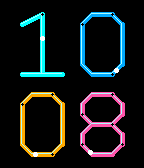
12Neon Conduit
FacesBecause nobody has ever made a neon clock. I am a genius. The numbers are the plumbing. Four bent tubes carry hours across the top and minutes underneath, with small lights traveling through their joints. When a minute turns over, the changed tube takes a new route. Design by Luke Steuber for Ambient Time.
 6
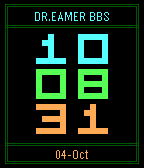
6BBS
FacesA little bulletin board for the time. Read the block numerals from top to bottom: hours, minutes, seconds. Cyan, green and amber take their turns, with a date beneath and a blinking cursor waiting for absolutely nothing. Design by Luke Steuber for Ambient Time.
 3
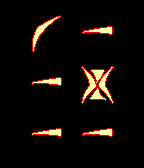
3pIqaD
FacesSix Klingon numerals glow like a ship’s viewscreen. Read the top pair as hours, the middle pair as minutes, and the bottom pair as seconds, in local 24-hour time. Design by Luke Steuber for Ambient Time. Font by Mike Neff and Michael Everson.
 4
4Balanced Ternary
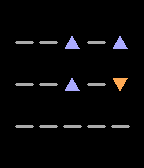
FacesTime with a little arithmetic. Read the three rows as hours, minutes, and seconds. From left to right, the columns are worth 81, 27, 9, 3, and 1. An upward triangle adds that value, a downward triangle subtracts it, and a dash means zero. Now class, if you’ll flip over the quiz - Design by Luke Steuber for Ambient Time.
 8
8Gooey
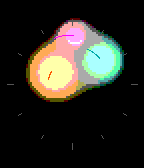
FacesExperimental! Three blobs tell the time by where they sit: amber for hours, teal for minutes, pink for seconds. They merge as they meet and pull apart again. On monochrome screens, the same changing shape carries the motion. Design by Luke Steuber for Ambient Time.
 3
3Manifold
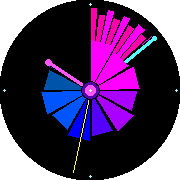
FacesTwo folding fans open around the dial. Their leading edges point to the hour and minute; the fine needle follows the seconds. The pleats gather and spread as time passes. Design by Luke Steuber for Ambient Time.
 11
11Flower Clocks
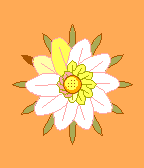
FacesChoose Daisy, Orchid, Sunflower, Lotus, Echeveria, Ginkgo Garland or Flower in the Pebble phone app’s settings. Daisy is the default. A daisy tells time through its petals. The outer marker gives the hour, the large petals count six-minute intervals, and the small petals fill in five-second stages. At the minute, they slowly wilt and begin again. Orchid can show or hide its numbers and follow your watch’s 12/24-hour preference, or use your chosen format. Sunflower’s optional weather colors use approximate location; weather is off until you enable it. Weather data: Open-Meteo. Pretty! Design by Luke Steuber for Ambient Time.
 6
6PulseTime Public Beta
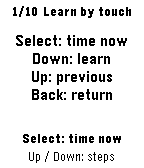
DailyA clock you can feel, with guided practice and huge high-contrast digits. A friend who is visually impaired asked me to build a way to feel the time. That request became PulseTime. Press a button to feel the current time; during lessons and time checks, one large black-and-white numeral follows each vibration group. This is a public beta. I would like to hear what works, what feels confusing, and what you would change. Send feedback and ideas to [email protected]. The store download is version 1.2.0, which tells the time. Signals 1.3.0 is a separate testing candidate for Time 2, 2 Duo, and Round 2; the features below are not yet included in the store download. Your first time check 1. Install the app, then open PulseTime from your watch's app list. The first launch opens Learn pattern. 2. Press Down for the 3:32 hours lesson. Down again reaches the minute phrase, then Down once more reaches the whole answer. Select plays the current example; press it again to stop. Replay as often as you like. 3. Keep Terse Quarter / Standard to start. Three hour pulses, a pause, and two quarter pulses mean about 3:30. The default answer covers 3:30–3:44; it does not give exact minutes. The visual clock still shows the current minute. 4. Down advances through the guide, Up goes back, and Back leaves it. Press Down on the final Ready page to finish. Hold Select from the clock to return to learning or choose Practice. Everyday controls On the app's clock, Select tells the whole time, Up tells hours, and Down tells minutes. Press the same reply button again to stop; another reply button replaces the answer. Hold Select for learning and settings. Holding Up or Down changes the haptic language. To ask from your watchface, open the watch's Settings > Quick Launch > Up and choose PulseTime. Repeat for Down if wanted. Hold a bound button from your watchface to ask the time. Both shortcuts initially tell the whole time; the app cannot assign those system shortcuts automatically. Choose Hold Select > Display > Bright / bold for large black digits on white. Dark layouts invert the colors. Exact-minute patterns and slower playback are available when you want them. Haptic hours use 1–12 without an AM/PM signal. The open clock also responds to one detected knock or flick. The optional Flick to tell time phone setting uses two taps to launch the app from another watchface; it starts off. There is no special touch spot: try two light knocks on the same part of the bezel or case, about half a second apart. Wait for the vibration to finish before retrying. Use Select inside lessons and menus. Help shape the next version Tell me your watch model, pattern and speed, the time you expected, and what you felt. Hard-to-read labels, confusing controls, missed taps, and rhythms that blur together are all useful feedback. Signals: testing the next version I am testing short, replayable vibration phrases for information beyond time. A six-hour rain forecast becomes three equal windows: quiet for dry, sparse patter for light rain, and denser patter for heavier rain. Opening and closing cues distinguish a dry forecast from an unavailable reading. A shorter summary identifies the first wet window and strongest predicted rain. An authenticated HTTPS source can supply service health or three ordered samples. The Drummer example distinguishes healthy, busy, degraded, down, and unknown. A failed connection means unknown, not a confirmed outage. Old readings remain labeled, and checking a source is an explicit action rather than a background alert. The candidate includes named lessons, visible pulse timing, stock-inspired references, and a recognition exercise. A three-step walkthrough enables weather and explains the Pebble phone app's location permission. Weather uses an approximate phone position; fixed places and custom HTTPS feeds are under Advanced. There is no Drummer token input. Feed credentials stay on the phone. Pattern comfort and recognition still need physical-watch testing. Playback currently controls timing, not per-step strength. Contact [email protected] if you would like to help test on Time 2, 2 Duo, or Round 2. Known beta limits - The app's phone settings can retain older values after a missed watch update. Saving can restore those older choices, including the haptic language. Check every option before saving, then verify the language on the watch and replay a known lesson. Reopening the phone form alone does not guarantee a refresh. - Terse Quarter's minutes-only :00 and :15 can feel alike. Use the whole-time answer if uncertain. - Watch menus do not speak their labels, and Practice does not separately announce its target time. First-use assistance may be needed; independent blind onboarding remains unverified. - The app has installed successfully on Time 2 and 2 SE. Pattern recognition still needs wearer feedback. Round layouts have emulator coverage; round hardware checks are pending. Store screenshots show emulators. Supports Time / Time Steel, Time Round, 2 / 2 SE, Time 2, 2 Duo, and Round 2. The original 2013 Pebble and Pebble Steel are not supported. The clock and lessons work offline after installation. Optional pattern tones require Time 2 or 2 Duo; the other supported models use vibration. Created by Luke Steuber. MIT licensed.
 4
4Chroma
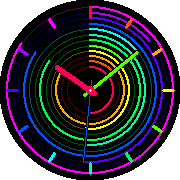
FacesTwelve rings carry the hours, minutes and seconds around a changing spectrum. The hands give you the time at a glance. I left the center clear and let the color do the rest. Design by Luke Steuber for Ambient Time.
 4
4Pixel Parallax
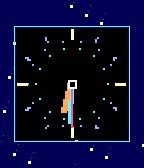
FacesChunky pixel hands on a starfield! A quick design for Ambient Time. dr.eamer.dev/clocks/
 7
7Digit Cascade
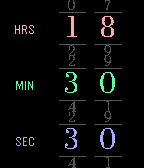
FacesThe time rolls into focus in three pairs of serif numerals. Hours sit above minutes and seconds, with smaller neighboring digits receding above and below each band. I did this because nobody has ever made this clock before, because I am a genius.
 4
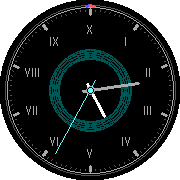
4Revolutionary Decimal
FacesA day in ten hours, each with a hundred minutes and a hundred seconds. Design by Luke Steuber for Ambient Time.
 6
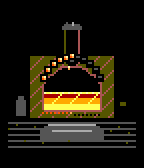
6Pixel Kiln
FacesTwelve studs around the arch mark the hour, molten metal rises through the minute, and a spark climbs the chimney each second. The coals along the hearth count four-minute steps. Why not.
 10
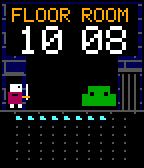
10Dungeon Loop
FacesA little adventurer meets a new creature each minute. The numbers above the chamber show the time: FLOOR is the hour from 00 to 23, and ROOM is the minute. Floor 17, Room 29 means 17:29. The glowing floor stones also count the minutes. Each encounter moves from arrival to combat, treasure, and the next door. I think this one's fun. A daylong roguelike is the next stop. Design by Luke Steuber for Ambient Time.
 10
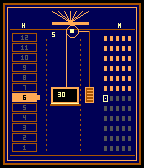
10Time Counterweight
FacesAn elevator directory with a working counterweight. The lit floor marks the hour; count the minute lamps across each row of five. The little carriage carries seconds as it travels through the shaft. That's it. How are you? Does anyone read all of these? I'm good. Could use some sleep.