 43
43Iron
Iron - Workout Companion for Pebble
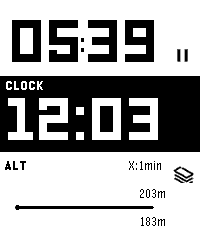
Iron is a high-performance, open-source sports tracker for your Pebble smartwatch. Designed for runners and fitness enthusiasts, it tracks your real-time metrics and seamlessly bridges the gap between your Pebble and modern Android health ecosystems.
⚠️ Important Note: This watch app will not function at all unless used in combination with the Android companion app of "Iron". Also, while designed to support all Pebble platforms, it has not been fully tested on every single model. If you encounter any issues, your feedback is greatly appreciated!
📱 Companion App (Android)
To unlock the full potential of Iron, install the companion Android app from Google Play. The companion app runs a stable background service during your workout and securely syncs your Pebble's health data directly to Google Health Connect.
 Download on Google Play:
https://play.google.com/store/apps/details?id=hag1987haaa.pebble.iron&pcampaignid=web_share
 Zero ads, zero tracking analytics.
 Requires Location permissions (including background access) to accurately track your GPS routes while your phone is in your pocket.
 Only writes data to Health Connect with your explicit permission.
✨ Key Features
By combining the Pebble app with the Android companion app, you can unlock:
 Music Control: Intuitively control your music playback directly from the workout screen. Supports swipe gestures on touchscreen models or long-press physical button mapping.
 Smart Notifications: Get vibration alerts on your wrist for distance laps (e.g., every 1km) or time intervals.
 Advanced Data Export: Supports both GPX and TCX formats. TCX includes heart rate, calories, and smoothed cadence data—perfect for uploading to Strava or Garmin Connect.
 Detailed Analytics Charts: View graphs for speed, elevation, heart rate, and steps on your phone.
 Powerful Automation: Broadcasts intents based on Pebble interactions or app state changes. Fully compatible with automation apps like Tasker.
 Health Connect Integration: Seamlessly syncs your recorded workout data directly to Android's Health Connect.
 Voice Assistant Integration: Long-press a button on your Pebble to trigger your phone's default digital assistant (the same one that launches when you hold your phone's power button). Note: Please speak your commands into your phone's or earbuds' microphone.
⚙️ Installation
1. Install this watch app.
2. Download the Iron Companion App for Android from Google Play.
3. Grant the necessary permissions (Location, Health Connect & Notifications) in the Android app. Note: Setting Location permission to "Allow all the time" is highly recommended for stable GPS tracking while your phone screen is off.
4. Start a workout on your Pebble!
🤝 Support & Credits
Iron is completely free and open-source. There are no paywalls or locked features. This app was proudly developed with the assistance of Google's AI, Gemini!
If you find this app useful for your daily runs, consider supporting the project:
 ☕ Support me on Ko-fi:
https://ko-fi.com/1987haaa

🇯🇵日本語版 (Japanese)
Iron - Pebble用ワークアウトコンパニオン
Ironは、Pebbleスマートウォッチ用の高性能でオープンソースなスポーツトラッカーです。ランナーやフィットネス愛好家のために設計されており、リアルタイムの数値を追跡しながら、Pebbleと最新のAndroidヘルスケアエコシステムをシームレスに連携させます。
⚠️ 重要な注意点: 本ウォッチアプリは、Android版『Iron』アプリとセットで使用しない限り機能しません。また、すべてのPebbleプラットフォームで動作するように開発したつもりですが、全モデルでの動作テストは完了していません。もし動かない場合はフィードバックをいただけると非常に嬉しいです!
📱 コンパニオンアプリ (Android)
Ironの真の力を引き出すため、Android用のコンパニオンアプリをインストールしてください。安定したバックグラウンドサービスとして稼働し、PebbleのヘルスケアデータをGoogle Health Connectへ安全に同期します。
 Google Playストアでダウンロード:
https://play.google.com/store/apps/details?id=hag1987haaa.pebble.iron&pcampaignid=web_share
 広告ゼロ、トラッキング解析ゼロ。
 スマートフォンをポケットに入れた状態でも正確にGPSルートを追跡するため、位置情報(バックグラウンド含む)へのアクセス権限を使用します。
 ユーザーの明示的な許可がある場合にのみHealth Connectへデータを書き込みます。
✨ 主な機能
PebbleアプリとAndroidコンパニオンアプリを組み合わせることで、以下の機能を利用できます。
 ミュージックコントロール: ワークアウト画面から直感的に音楽を操作可能。タッチスクリーンでのスワイプ操作や、物理ボタンの長押しに対応しています。
 スマート通知機能: 距離ラップ(例:1kmごと)や時間インターバルを振動でお知らせ。
 高度なデータ出力: GPX に加え TCX 出力に対応。心拍数、カロリー、平滑化されたケイデンス情報を含み、StravaやGarmin等へのアップロードに最適。
 詳細な分析チャート: 速度、高度、心拍数、歩数をスマホでグラフ化。
 強力な自動化連携: Pebbleの操作やアプリの状態変化をインテント送信。Tasker等の自動化アプリと連携可能。
 Health Connect 完全対応: ウォッチで記録したデータをAndroidのヘルスコネクトへシームレスに同期。
 ボイスアシスタント連携: Pebbleのボタン長押しで、スマホの「デフォルトのデジタルアシスタント」(電源ボタン長押しで起動する設定中のアシスタント)を呼び出せます。※アシスタントへの音声指示は、スマホ本体またはイヤホンのマイクで行ってください。
⚙️ インストール方法
1. 本ウォッチアプリをインストールします。
2. Google PlayからAndroid用Ironコンパニオンアプリをダウンロードします。
3. Androidアプリ内で必要な権限(位置情報、Health Connect、通知)を許可します。 ※画面オフ時にも安定してGPSを追跡するため、位置情報権限は「常に許可」に設定することを強く推奨します。
4. Pebbleでワークアウトを開始してください!
🤝 開発者のサポートとクレジット
Ironは完全に無料でオープンソースです。有料の壁はありません。なお、このアプリの開発にはGoogleのAI「Gemini」を活用しています!
毎日のランニングに役立ったと感じていただけた場合は、プロジェクトのサポートをご検討ください。皆様の支援が力になります。
 ☕ Ko-fiでサポートする:
https://ko-fi.com/1987haaa
 12
12Velo
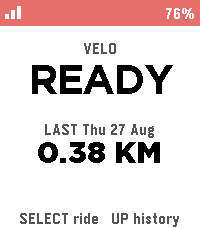
Biking/Cycling Companion for your Pebble, local to your pebble.

Download the companion app for your phone and click select to start tracking, currently tracks the following metrics:

 -Current speed
 -Distance
 -Ascent
 -Ride History

Works natively on your phone and watch with no accounts required, no cloud needed.
 0
0TrackGlance
View and control Locus Map track recordings from a Pebble Time 2 or Pebble Round 2.

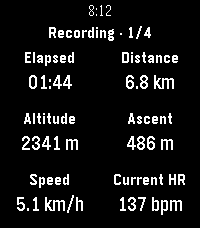
TrackGlance brings an active Locus Map track recording to your wrist. Choose the metrics shown for each Locus activity, switch between up to four pages, pause or resume recording, stop and save, and add waypoints.

Pebble Time 2 also supports dictated waypoint notes and can send watch heart-rate readings to Locus.

⚠️ Important Setup Information:

This watchapp requires both the Locus Map app and the TrackGlance Android Bridge companion app to function.

Currently, the Android Bridge is not available on the Google Play Store and must be sideloaded manually. You can download the latest Bridge

APK directly from the GitHub releases page here:
https://github.com/ChristianHerget/trackglance/releases/latest
 6
6Fit Tracker
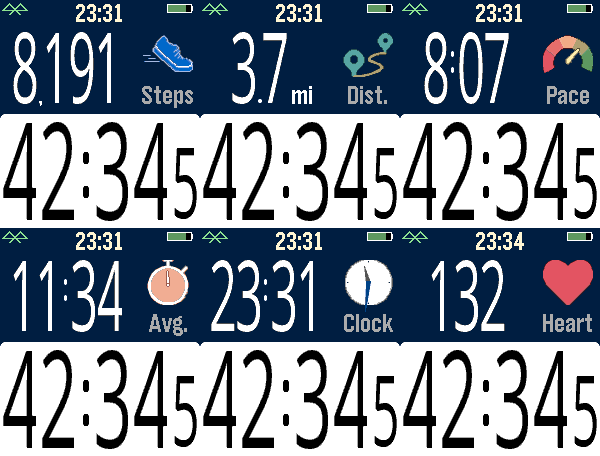
Exercise app that records elapsed time, heartrate, and distance. Exports FIT files for Strava and other online applications.

The bottom button is used for starting and stopping. The top button switches the top line mode between steps, distance, current speed, average page, current time, and (if available) heartrate.

Device-dependent features are heartrate, speaking, and touchscreen. There are custom settings for the watch to speak the interval distances or times (Pebble Time 2, Pebble Duo). The touch screen can be used to switch between the modes, similar to the up button. A touch over 0.2 seconds is recognized, and the left and right side of the screen change the mode forward or backward.

Use the middle button to activate the menu for custom feature. These include showing tenths, bluetooth, battery, metric/imperial. Interval notifications by time or distance are supported, and the notifications can be by vibration or (if available) the speaker announcing the interval.

You can see your mapped workouts at https://fit.setpebble.com. In order for your activity to be linked to your account, you will need to enter your Pebble serial number both for your account and when you adjust the app settings using the Pebble companion app.

After a workout, do a long press on the up button to either Save or Delete your workout. If saved and you have a SetPebble account, you can see your workout at https://fit.setpebble.com.

There is a Strava limit of 10 users (including me!), and I am not allowed to request an increase until we reach 10 users.
 6
6Tennis Score Keeper
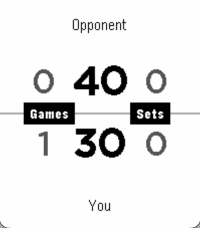
Tennis Score Keeper is a fast, player-centric tennis scoring app for Pebble. Track points, games, sets, deuce, advantage, and tiebreaks with simple one-button actions: Down for your point, Up for your opponent’s point, and Select to undo. The layout is designed for quick glances during play, with your score on the bottom, your opponent on top, and no menus or side-switching to slow you down.

The app handles standard tennis scoring automatically, including game wins, set wins, 6-6 tiebreak prompts, standard and super tiebreak modes, and continuous set tracking across a session. It’s built for keeping score mid-match with minimal friction and consistent controls.
 24
24AirCheck
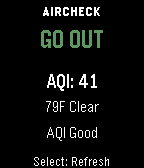
AirCheck gives you a fast, simple answer to one question:
should you go outside right now?

Using real-time air quality (AQI) and weather data, AirCheck gives you a simple, instant recommendation:

GO OUT
CAUTION
STAY IN

Features
- Real-time AQI and weather courtesy of Open-Meteo
- Temperature-aware recommendations
- Thunderstorm safety override
- Clear reason text explaining each recommendation
- Simple, easy-to-read interface
- Manual refresh on launch and button press
- Works across all Pebble watch types

No clutter. No confusing settings. Just a clear answer when you need it.
 46
46Walk Log
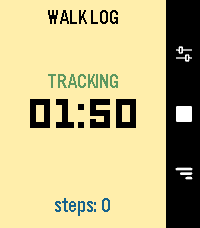
Walk Log is a Pebble application that tracks the time and steps taken during your walks. Your walk history is stored in the logs view, where you can review past activities and delete entries as needed. You can also send walks to the timeline to view them in the Pebble watch's Past Timeline view.
Set it and for get it: an inactivity option will automatically stop your walk after a set period of inactivity, thanks to a background worker.

**Quick Use**
- Open the app
- Press center right button (start symbol)
- Press again to end it (stop symbol)

**Logs**
- Press down right button
- Navigate down from latest to oldest
- Press center right button to open detail
- Long press on center right button to delete, from list or detail page

**Settings**
- Press up right button
- Navigate down to setting you want to change
- Press center right button to change it
 13
13RuckPebble
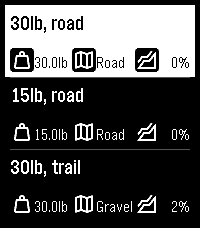
Calculates calories expended during a ruck (aka moving quickly with a heavy pack on your back) using a modified version of the Pandolf equation which calculates based on weight, terrain and gradient.

The images on the github page explain how to set up and use the app.

Feedback and ideas are welcome - please contact me using the link below …
 18
18Disc Golf Counter
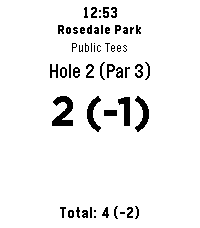
Leave your phone in the bag and focus on your throw! Disc Golf Counter is the ultimate wrist-based caddie for your Pebble, powered by real-time course data.

Unlike simple tally counters, this app uses your phone’s GPS to automatically find the nearest disc golf courses and download the actual scorecard layouts.

KEY FEATURES:

GPS Course Finder: Automatically detects nearby courses.
Smart Layouts: Select the specific layout you are playing (e.g., "Main", "Advanced", "Shorts"). Supports dynamic hole counts (9, 18, 27, etc.).
Live Scorecard: Tracks your strokes, current hole Par, and your total score relative to Par (e.g., +2, -1, E).
Persistent Storage: Your game is saved automatically. If you exit the app, your score is waiting for you when you return.
Readable Interface: Large, high-contrast numbers for easy reading in bright sunlight.
CONTROLS:

SELECT (Click): Add Stroke
SELECT (Long Press): Subtract Stroke (Undo)
UP (Click): Next Hole
DOWN (Click): Previous Hole
UP (Long Press): Refresh GPS / Find Course
DOWN (Long Press): Reset Round (Clear Score)
COMPATIBILITY: Works on all Pebble models (Original, Steel, Time, Time Steel, Round, 2).

Note: This app requires a connection to your phone to fetch course data.
 38
38Eye Protect (20-20-20)
Staring at screens all day? Give your eyes the break they desperately need with the 20-20-20 rule! This simple and essential app automatically reminds you about the recommended 20-20-20 rule.

How it works?
When you open the app it immediately toggles its mode between active and inactive (nice in combination with quick launch). When active, every 20 minutes, your Pebble watch will gently vibrate 3-times. This is your cue to look at something 20 feet away (about 6 meters). You can stop after your pebble vibrates 3 times again (20 seconds).
 60
60Health Hub
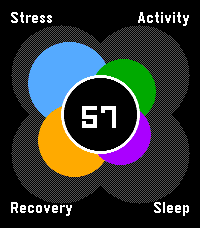
A hub to view your daily health (stress, activity, sleep and nightly recovery) all in one spot. Designed to be reminiscent of the early Pebble health windows. It uses app glance to give you a quick sense of your overall status (out of 100) throughout the day.
 4
45/3/1 Training
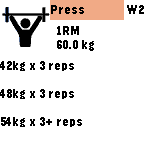
Calculates weights and sets based on Jim Wendler's 5/3/1 barbell training program so your next lifts are always available right on your wrist.
 27
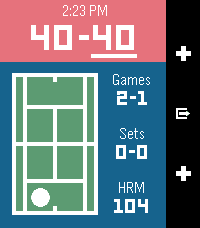
27Tennis Time: Track your game's score
With Tennis Time you'll be able to keep track of your game's score, and the side the server or receiver should be on.

Tennis Time has heart rate and calorie tracking on devices with a heart rate monitor.
 21
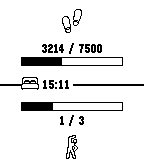
21Get active!
This app helps you to reach your health goals.

It can be configured to notify you:

- If you didn't spent enough time active within the last hour
- If you are about to not reach your daily step goal
- If you reached your daily step goal
- If you should go to bed to get enough sleep

The app shows your current health values and warnings. If a notification occurs, the app will be opened and trigger vibration.
 32
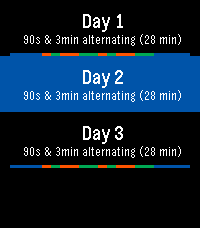
32Run - Couch to 5K
Heart Rate Monitor for Pebble2, step Counter for Pebble Round and Pebble Round 2.
No settings or data, just run 3x a week for 30min. Follow the program or jump around. run a 30min 5K by end of 9 weeks.
App vibrates and displays when to warm-up, walk, run, half way, and cool down. Tracks progress, but you can repeat weeks.