Afterprompt
DiogoPerpetual Minute-Marker
Watchface
Description
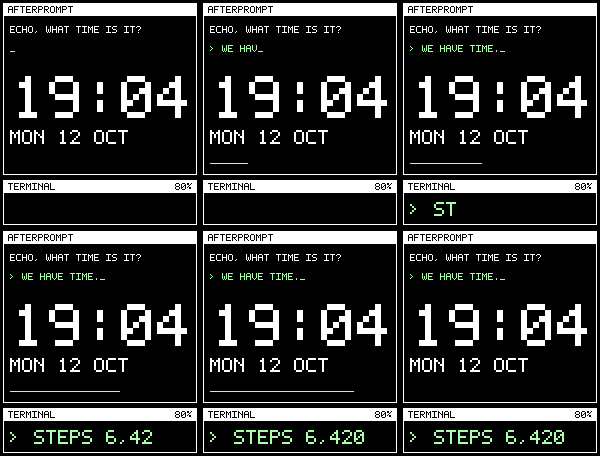
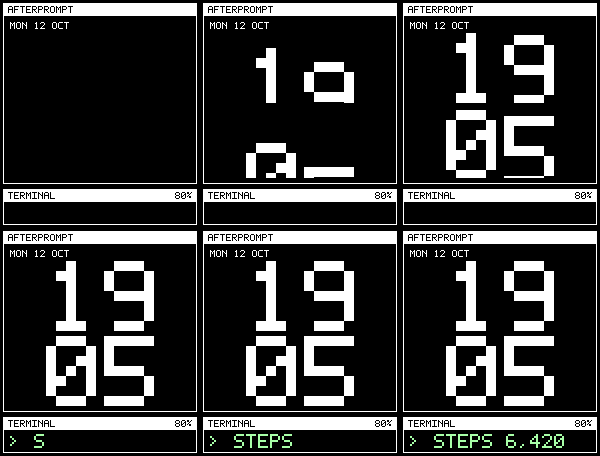
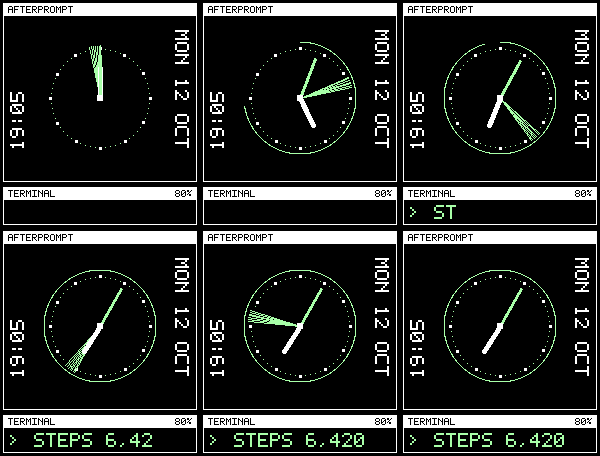
A terminal on your wrist. Afterprompt combines pixel lettering, pale green prompts, and white window frames with three ways to read the time.

Choose Dialogue, a terminal conversation with a digital clock; Clock, large stacked digits; or Dial, an analog clock with vertical time and date along the edges.

Pick one health reading, steps today, heart rate, or sleep duration today. The same reading appears in large type in every layout's terminal, next to battery level. Change the window title to AFTERPROMPT, DEADLETTER, or GHOSTTICK, the accent colour to green, amber, or cyan, and the date to MON 12 OCT, MON OCT 12, or 2026-10-12.

Brief animations play when the face opens and the minute changes, then settle. Turn them off in the watchface settings. Time follows your watch's 12-hour or 24-hour preference, with AM or PM shown in 12-hour mode, and your settings survive restarts. The watch vibrates when the phone disconnects, except during Quiet Time; turn it off in settings. When a timeline peek appears, the window shrinks to stay clear of it.

Open Afterprompt's settings in the Pebble phone app to make it yours.

Heart rate follows normal watch sampling and may be several minutes old. Sleep shows the total recorded today. Missing readings show NO DATA.
- DeveloperDiogoPerpetual Minute-Marker
- CategoryFaces
- PlatformsTime 2
- Updated2026-10-12
- Version1.1.0